

The strongest AI workflow automation examples don’t remove people from complex processes. They use AI for repetitive analysis and coordination, while employees retain judgment over consequential decisions. For enterprise teams, the real question isn’t whether a workflow can be automated. It’s whether the data, systems, and controls can support it reliably.
Generic examples rarely help decision-makers choose what to build. A promising pilot can stall when it depends on fragmented data, difficult integrations, unclear human-review points, or security and audit requirements that weren’t considered early. The use case matters, but so does the operating model around it.
This guide examines eight AI workflow automation examples across enterprise functions, from customer experience to finance and operations. For each, you’ll see the AI task, the systems and data it may require, and where human oversight belongs. You’ll also get a framework for comparing value, feasibility, and risk, plus production-readiness checks to complete before scaling a pilot.
Key Takeaways
- Distinguish rule-based automation from AI-supported steps that interpret variable or unstructured information.
- Use these AI workflow automation examples to identify candidate processes, then assess what each needs to work reliably.
- Compare workflows by potential value, volume, exception rate, data readiness, integration effort, and the consequences of errors.
- Set measures for accuracy, completion, exceptions, escalation, and business outcomes before testing a workflow.
- Validate governance, human checkpoints, and accountable ownership before deciding whether to scale internally or seek cross-platform implementation support.
What AI workflow automation looks like in an enterprise
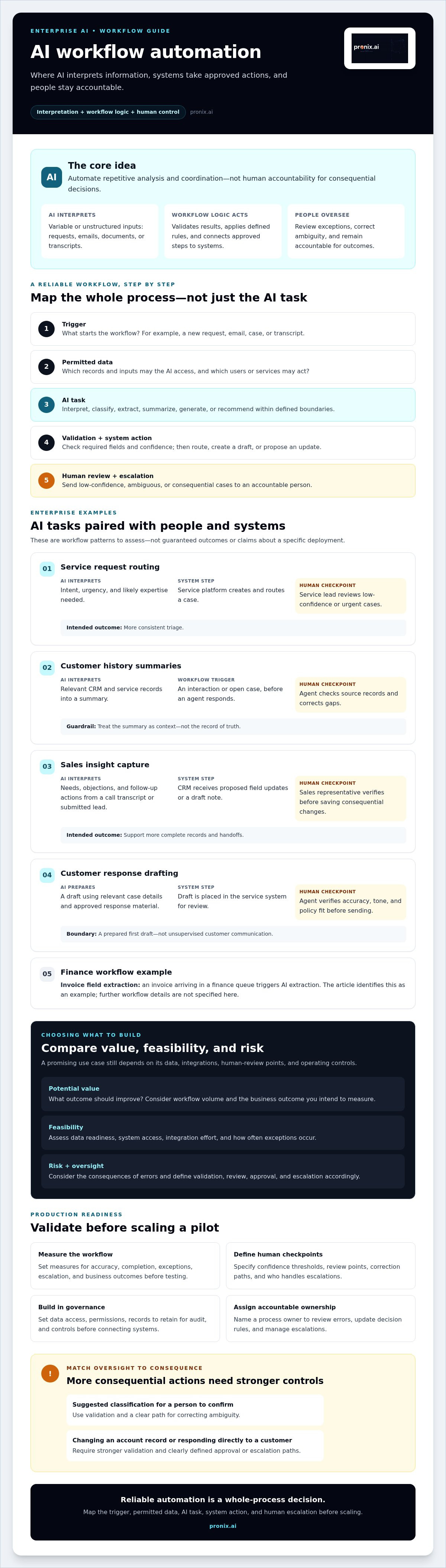
AI workflow automation is a coordinated business process that uses AI to interpret, generate, classify, or recommend actions within defined steps, systems, and human controls. AI can handle variable inputs that fixed rules struggle to process, but it doesn't take ownership of the process. People remain accountable for outcomes, exceptions, and the rules governing what happens next.
Traditional technology-enabled automation typically follows predefined conditions. For example, if a form field contains a certain value, the form goes to a specific queue. AI-supported automation can interpret less structured material, such as a free-text request, an email, or a document, and identify likely intent or relevant details. The workflow still needs explicit logic to validate the result and choose the next step.
How an AI-enabled workflow differs from a basic automation
Consider an employee service request. A basic rule can route a form based on a selected category. If the employee instead writes, “I can’t access the scheduling system before my shift,” AI could classify the request as an access issue and extract the system name. The workflow can then create a draft ticket with those details.
Classification is an AI task; ticket creation and routing are system actions. A confidence threshold can determine whether the workflow proceeds or sends the request to a person for review. Validation can check required fields, while a human can correct ambiguous classifications. Integration and workflow logic, not the AI alone, determine what happens after that checkpoint.
Where enterprise workflows need guardrails
Before connecting AI to business systems, define what data it can access, which users and services have permission to act, and what records must be retained for audit. Assign an accountable process owner who can review errors, update decision rules, and manage escalations. Build these controls into the workflow rather than adding them after a pilot.
Match oversight to the potential consequence. Suggesting a likely category for an employee to confirm is different from changing an account record or sending a response directly to a customer. Those actions need stronger validation and clearly defined approval or escalation paths. For broader implementation considerations, see this enterprise AI production guide.
Use AI workflow automation examples to identify where interpretation adds value, then map the full path: trigger, permitted data inputs, AI task, system action, and human escalation. This map helps you assess whether a workflow is ready for implementation.
8 AI workflow automation examples across enterprise functions
The following AI workflow automation examples are patterns to assess, not guaranteed outcomes or claims about a specific deployment. Each separates the AI task from the integrations and decision rules around it. AI may interpret information, while connected systems carry out approved steps. This whole-process view aligns with MIT Sloan research on AI workflows, which examines how tasks connect across work.
Customer, sales, and service workflows
- Service request routing. A new email or web request triggers the workflow. AI classifies intent, urgency, and likely expertise needed; the service platform creates and routes a case. A service lead reviews low-confidence or urgent cases. The intended outcome is more consistent triage.
- Customer history summaries. Before an agent responds, a customer interaction or open case triggers a summary of relevant CRM and service records. The agent checks the source records and corrects gaps. The goal is to make context easier to review without treating a generated summary as the record of truth.
- Sales insight capture. A call transcript or submitted lead triggers AI extraction of needs, objections, and follow-up actions. The CRM receives proposed field updates or a draft note; the sales representative verifies them before saving consequential changes. This can support more complete records and handoffs.
- Customer response drafting. A service case triggers retrieval of relevant case details and approved response material, then AI drafts a reply in the service system. An agent verifies accuracy, tone, and policy fit before sending. The intended outcome is a more prepared first draft, not unsupervised customer communication.
Back-office and knowledge workflows
- Invoice field extraction. An invoice arriving in a finance queue triggers AI extraction of supplier, date, line items, and totals. The workflow compares fields with finance records; uncertain or mismatched items go to an accounts-payable reviewer before posting. The aim is to streamline document intake while keeping approval controls.
- Contract or document intake. A submitted document triggers classification and extraction of key fields into a document-management or case system. A specialist checks uncertain clauses or missing information before the document advances. This can make review queues easier to organize without automating legal judgment.
- Internal knowledge assistance. An employee question triggers a search of approved knowledge sources and a draft response with source references. The employee verifies that the material is current and relevant before sharing it. The goal is to make information easier to find while preserving source-based review.
- Operational anomaly review. A scheduled report or system alert triggers AI to summarize changes and flag unusual patterns for an operations dashboard or ticket queue. An accountable analyst investigates the underlying records before taking action. The workflow can help direct attention, but the reviewer decides whether an anomaly requires intervention.
These patterns depend on connected systems, explicit decision rules, and named owners for exceptions. Organizations assessing integration and operational requirements can explore enterprise AI implementation and strategy from pronix.ai.
How to compare AI workflow automation examples
A workflow’s suitability depends on both business value and controllability. A process may occur frequently, yet still be a poor candidate if its data is inaccessible, exceptions are difficult to resolve, or an error could materially affect a customer. Compare the whole workflow, not just the AI task.
Use a consistent scorecard to make trade-offs visible. Treat each value hypothesis as something to test against a baseline, not a promised result.
| Workflow | AI task | Value hypothesis | Dependencies | Risk | Human oversight |
|---|---|---|---|---|---|
| Service request routing | Classify intent and urgency | Support more consistent triage | Case data, routing rules, service platform | Misrouted or urgent cases | Review low-confidence and urgent requests |
| Invoice intake | Extract fields and flag uncertainty | Reduce manual data entry | Readable documents, finance records, approval workflow | Incorrect or incomplete financial records | Approve exceptions before posting |
| Knowledge response drafting | Retrieve relevant material and draft a response | Help employees prepare responses | Current, permissioned knowledge sources | Outdated or irrelevant guidance | Verify sources and content before sharing |
Assess candidates against five practical factors: workflow volume, exception rate, data readiness, integration effort, and consequence of error. Volume can increase the value of addressing a process, but a high exception rate may make automation difficult to control. Check whether the data is accessible to intended users and whether connected systems offer stable, permissioned interfaces for the actions the workflow needs to take.
Use deterministic rules when conditions are clear and repeatable, such as routing a form based on a selected category. AI may add value when the workflow must interpret free text, documents, or patterns that don't fit fixed fields. A hybrid design often works best: AI proposes a classification, and explicit rules determine which actions are permitted.
Which use cases are strong candidates?
Prioritize recurring workflows with a clear owner, a measurable baseline, accessible data, and exceptions that staff can resolve. High-volume administrative work may be worth assessing, but frequency alone isn't enough. Confirm that integrations can support the intended steps and that review effort won't outweigh the expected operational value.
Which workflows need more caution?
Apply stronger scrutiny when sensitive data, consequential customer interactions, or regulated processes are involved. Require defined approval paths before outputs can trigger irreversible changes or high-impact actions. Data quality and access are foundational, so use this enterprise AI data strategy to examine readiness before advancing a candidate.
What to validate before moving an AI workflow toward production
A successful demonstration shows that a workflow can run under selected conditions. Production readiness requires evidence that it can handle normal variation, protect data, and recover safely when something goes wrong. Treat validation as an operating responsibility, not a final sign-off after the build.
Use a clear sequence: map the process and handoffs, baseline current performance, assess data quality and permissions, prototype the AI task, test the complete workflow, put controls in place, then monitor it after launch. Define measures before deployment so the team can judge performance against the same criteria over time.
- Accuracy: Are classifications, extracted fields, or summaries correct against reviewed examples?
- Completion: Does the workflow reach the intended system state without missing steps?
- Exceptions and escalation: How often does a case need review, and does it reach the right owner?
- Business outcome: Does the workflow improve the baseline process without shifting hidden work or risk elsewhere?
Test workflow quality, access, and exceptions
Build a test set from approved data. Include routine cases, representative variation, and edge cases. Document expected outputs as well as unacceptable ones, such as unsupported claims in a draft or an incorrect update to a record. Then test the full chain, not just the AI response: input, interpretation, system action, and human handoff.
Check role-based access, system permissions, and logging. Simulate unavailable systems, ambiguous inputs, low-confidence responses, and duplicate records. Confirm that failures stop or route safely instead of triggering an unintended action. For AI workflow automation examples that touch customer records or operational systems, reviewers should be able to trace what the workflow received, proposed, and changed.
Set ownership and monitoring before launch
Name process, technical, security, and business owners before release. They need clear responsibilities for reviewing quality, handling exceptions, approving changes, and responding when integrations or source data shift. Monitor usage, completion, errors, escalation patterns, and unintended behavior. Reassess the workflow when its data, permissions, connected systems, or business rules change.
Governance should define acceptable use, access, review, and accountability across the workflow. This enterprise AI governance framework offers additional context for the data and controls behind production readiness.
For teams assessing integration, controls, and operational ownership, pronix.ai provides enterprise AI implementation support.
From AI workflow example to an enterprise solution
The eight examples are starting points, not a shortlist. Select a workflow by weighing its potential business value against data readiness, integration effort, risk, and accountable ownership. A useful candidate has a clear process owner, a measurable objective, and a realistic way to review exceptions. If one of those conditions is missing, address the gap before expanding the pilot.
Internal teams may be ready to proceed when the workflow is bounded, its systems and data are well understood, and the team can manage testing, controls, and ongoing support. Cross-platform implementation expertise may help when a workflow spans legacy and modern applications, requires coordinated access and governance, or needs an operating model beyond the pilot. The decision is about delivery capacity and complexity, not whether AI is worth adopting.
Choose the next step based on workflow maturity
For an early idea, document the process, users, data sources, exceptions, and intended outcome. For a tested pilot, identify gaps in production integrations, permissions, human review, ownership, and monitoring. For a live workflow, review operating performance, exception patterns, system changes, and how employees will adapt as the process evolves. Each stage calls for evidence appropriate to its maturity.
Connect examples to enterprise delivery
Moving AI workflow automation examples into production takes more than selecting a model or connecting applications. It requires aligning the workflow with enterprise architecture, access controls, business rules, and ongoing operational responsibilities. pronix.ai supports enterprise AI through strategy, implementation, integration, and managed services. Its platform experience includes AWS, Microsoft, Salesforce, Kore.ai, and Genesys; the right platforms and capabilities depend on the workflow and should be validated for the specific use case.
Before engaging implementation support, prepare a concise workflow brief: current process, target outcome, data and systems involved, known exceptions, risk considerations, and accountable owner. This gives internal teams and potential partners a practical basis for assessing feasibility and the work required to move forward.
If you’re ready to assess a workflow’s path from example to production, explore enterprise AI implementation with pronix.ai.
Turn a Promising Workflow Into a Production-Ready Initiative
The most useful AI workflow automation examples start with a clear business need, not a technology choice. Shortlist processes by potential value, data readiness, integration effort, and the consequences of errors. Then define human checkpoints, success measures, and accountable ownership before expanding a pilot.
Production readiness also depends on what happens after launch. Teams need to monitor workflow quality, manage exceptions, and adapt as systems or processes change. A controlled, well-owned workflow is more valuable than a broad automation that lacks oversight.
pronix.ai supports enterprises with AI strategy, implementation, and managed services, with platform experience that includes AWS, Microsoft, Salesforce, Kore.ai, and Genesys. The right approach depends on your systems, requirements, and workflow maturity. Explore enterprise AI implementation with pronix.ai to assess a practical path forward. With a focused use case and the right controls, your next step can be both ambitious and grounded.
Frequently Asked Questions
What is AI workflow automation?
AI workflow automation connects AI tasks with business rules, systems, and human checkpoints to move work through a defined process. AI may interpret a message, classify a request, extract information, or draft a response. For example, a service request can be classified, routed to a case queue, and sent to an employee for review if the result is uncertain. The process still needs an accountable owner and defined controls.
What are examples of AI workflow automation in large enterprises?
Enterprise examples include classifying service requests, summarizing customer interaction history, extracting invoice details for approval, and finding internal knowledge to draft employee responses. Other workflows can capture sales call insights for CRM review or summarize operational reports and flag anomalies for analysts. Each pattern combines an AI task with connected business systems, decision rules, and a human checkpoint appropriate to the potential impact of an error.
How do you choose a workflow to automate with AI?
Choose a recurring workflow with a clear owner, a measurable baseline, accessible data, and exceptions staff can manage. Compare its expected business value with data readiness, integration effort, exception rates, and the consequences of errors. Use deterministic rules for stable, explicit conditions. Consider AI when the workflow needs to interpret free text, documents, or patterns. Start with a bounded task and define how people will verify uncertain outputs.
Can AI workflow automation work with existing enterprise systems?
Yes, it can work with existing enterprise systems when the required data and actions can be accessed through approved integrations, APIs, or other supported interfaces. Feasibility depends on system architecture, permissions, data quality, and how reliably the workflow can read or update records. Map each handoff before implementation. Test access controls, failure behavior, and duplicate handling, and confirm that updates are logged and routed to the right people.
Is AI workflow automation safe for sensitive business processes?
It can be designed for sensitive processes, but safety depends on the data, access controls, workflow design, and level of human oversight. Limit access to what each workflow requires, document actions, and define when a person must approve or review an output. Apply stronger controls when errors could affect customers, records, or important decisions. Assess security, privacy, auditability, and applicable organizational requirements before moving beyond testing.
What happens when an AI workflow cannot handle an exception?
A well-designed workflow should pause, flag the issue, and route it to a named reviewer rather than guessing or continuing with an unsafe action. Common escalation triggers include ambiguous input, low confidence, missing information, conflicting records, or an unavailable system. Record the reason for escalation so the process owner can review recurring failure patterns. Define who handles each exception and what happens if the workflow cannot complete its next step.
How do you measure whether an AI workflow is effective?
Measure workflow performance against a baseline established before deployment. Track output accuracy, successful completion, exception frequency, escalation outcomes, and the business result the workflow was intended to support. Also review whether human review creates extra work or catches errors before they affect a system or customer. Use representative test cases, then monitor live performance and reassess measures when data, integrations, or process rules change.