
Automation delivers value when work and data move together, not simply when a bot clicks faster. Automating back-office processes means using software and connected workflows to handle repeatable administrative tasks, transfer information between systems, and route exceptions for human review. It can coordinate work across ERP, CRM, and accounting platforms while keeping people involved where judgment is needed.
That distinction matters. Automating one task can reduce repetitive data entry, but disconnected workflows may still leave teams reconciling records and chasing approvals across systems. Effective automation addresses the process as a whole, with clear data handoffs, decision rules, and oversight.
You’ll learn what back-office automation covers, how ERP, CRM, and accounting platforms can share data, and where robotic process automation (RPA), business process automation (BPA), and AI fit. The focus is practical: which work is suited to automation, how the approaches differ, and why governance and exception handling matter when moving from isolated tasks to reliable operations.
Key Takeaways
- Identify repetitive, rule-based work with high data volumes as strong candidates for automation, while keeping exceptions and judgment-led decisions under human oversight.
- Design ERP, CRM, and accounting integrations around reliable data handoffs and end-to-end workflows, not isolated task automation.
- Match the method to the work: RPA handles structured digital actions, BPA coordinates workflows across systems, and AI supports tasks that require interpreting information.
- Build governance, auditability, and clear exception handling into the operating model so automation can scale with control.
What is back office automation?
Automating back-office processes uses software and connected workflows to handle repeatable work across finance, accounting, and operations. It moves data, approvals, and reports through defined steps, routing exceptions for human review.
Finance and Accounting Automation
Finance and accounting automation applies software to recurring tasks such as expense management, financial reporting, payroll processing, and accounts receivable. It matters because consistent workflows reduce manual rekeying and help teams reconcile transactions with less avoidable error. For example, an approved expense can flow into accounting records and the relevant reporting cycle. Revenue recognition can also connect contract and billing events to accounting entries, with ASC 606 applied where relevant. These technologies help finance teams work across complex processes without treating each record as a separate task.
Invoice Processing and Regulatory Reporting
Invoice processing automation captures invoice details, matches them with purchase orders, and routes exceptions for approval. That sequence gives finance teams a defined basis for payment decisions and regulatory reporting, rather than relying on separate manual checks. Automated reporting can consolidate transaction data, flag missing fields, and support audit trails. Approval rules and review paths still matter, especially when records do not match. The U.S. Government Publishing Office cites a Wells Fargo estimate that technological efficiencies could result in about 200,000 job cuts in the U.S. banking industry over the next decade. This highlights workforce displacement as a risk to consider alongside process efficiency.
Prioritizing Processes for Automation
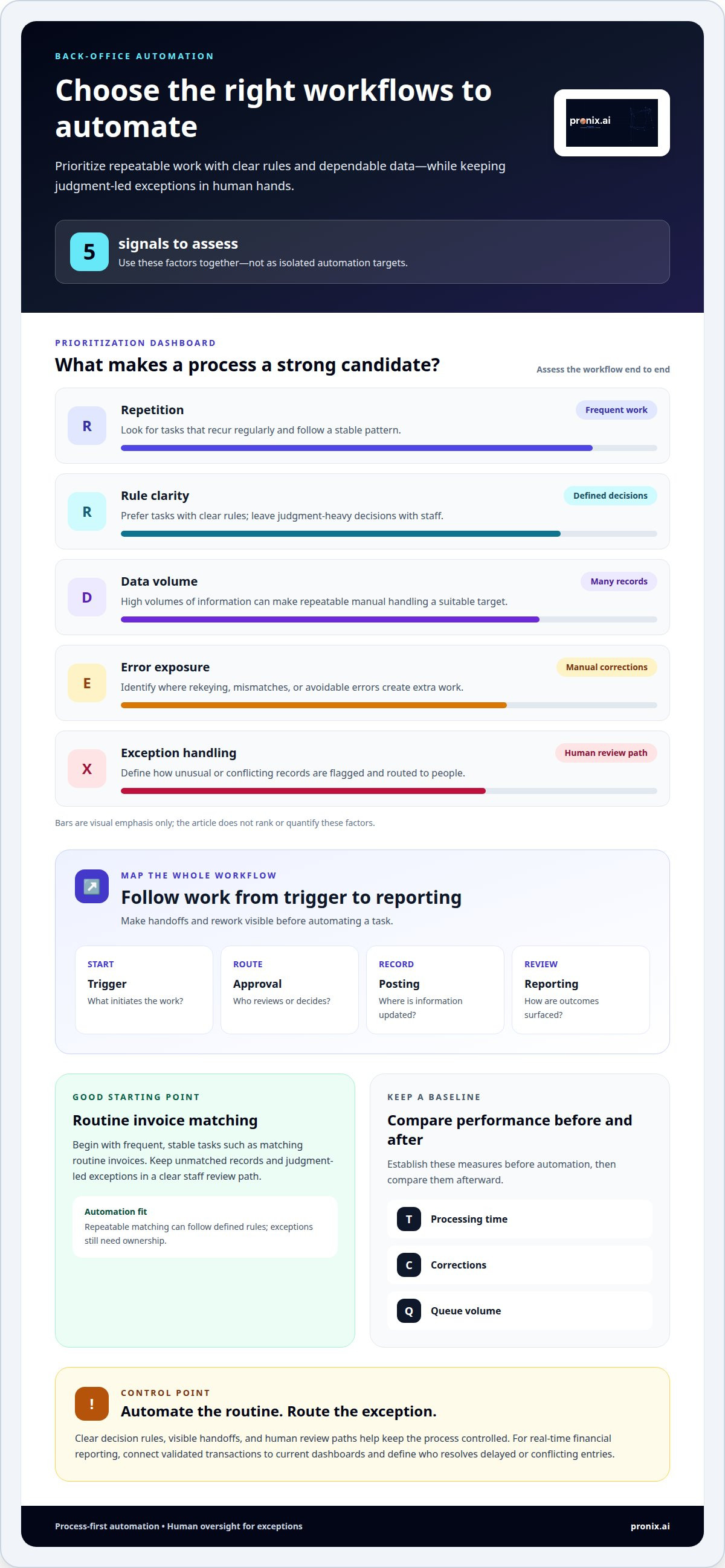
Prioritize workflows by repetition, rule clarity, data volume, error exposure, and exception handling. Map each process from its trigger through approval, posting, and reporting, then mark handoffs and rework. Start with frequent, stable tasks, such as matching routine invoices, and leave judgment-heavy exceptions with staff. Before automating, establish a baseline for processing time, corrections, and queue volume, then compare performance afterward. For real-time financial reporting, connect validated transactions to current dashboards and define who resolves delayed or conflicting entries. This evidence-led approach helps teams select processes where automation can improve control and visibility.
Integrating ERP, CRM, and accounting platforms
Integration connects ERP, CRM, and accounting platforms so transactions can move across workflows without repeated data entry. The design must account for legacy systems, shared records, employee adoption, and governance.
Cloud, On-Premises, and Workflow Integration
Cloud and on-premises integration connects systems hosted in different environments, allowing business events to trigger coordinated workflows. For example, a CRM order can pass customer and product details to an ERP, then send approved billing information to accounting. Integration may use APIs, scheduled data exchanges, or workflow tools, depending on each platform’s capabilities. Clear ownership of each record helps prevent conflicting updates. Role-based training also helps finance and operations teams understand where information enters and how exceptions move forward.
Start implementation by mapping the current process and identifying every system that creates, changes, or uses data. Define the authoritative source for customer, order, and payment records, then specify how updates, failures, and approvals move between platforms. Test routine transactions and exceptions before deployment. This sequence reduces disruption and gives employees a clear transition from manual handoffs to connected workflows.
Security, Privacy, Compliance, and Integration Risks
Integration governance defines how systems access, transfer, retain, and audit business information. In the United States, security and privacy obligations depend on the data, industry, and applicable rules. Controls should limit access, protect transfers, and preserve transaction records. Compliance also depends on traceable approvals and documented changes. These controls matter because a connection can expose data or spread errors across multiple platforms.
Common risks include inconsistent records, fragile legacy interfaces, excessive permissions, and workflows that fail without clear ownership. A practical implementation sequence is to inventory systems, classify data, map handoffs, define access and exception rules, then test and monitor each integration. Employee adoption is another operational risk: unclear responsibilities can lead staff to bypass the workflow or maintain duplicate records. AI business automation can support connected workflows when the process requires coordinated automation across systems.
Back-office automation definition and operation
Back-office automation uses software to perform repetitive tasks across internal operations, from routing requests to updating records. It supports the functions that keep a business running but don’t directly serve customers. Automating these operations can reduce manual work and give employees more time for decisions requiring context.
Front-office teams interact directly with customers; back-office teams handle the processes behind those interactions. A delayed refund, for example, may begin as an accounts issue but affect the customer experience. One survey found that 60% of customer dissatisfaction sources originated in the back office. Connecting operational workflows to service outcomes helps leaders see where internal delays affect customers.
Automation can also help teams manage workload. Employees report spending around 15 hours a week on low-value administrative work. Software can route requests, update records, and trigger approvals, reducing time spent consuming information across separate systems. Back offices that modernize through automation and RPA achieve an average 15.3% year-over-year decrease in operational costs, according to the market fact reported for this topic.
For small and midsize businesses, automation cost depends on process complexity, system integrations, data readiness, and governance needs; a quote is provided after a request. A narrow workflow with stable rules has different implementation needs than a process spanning multiple platforms and exception paths.
IT service desk operations offer a clear example. Software can create tickets, categorize requests, and route resolution workflows to the right team. Employees still handle cases that require judgment, while repeatable requests follow a defined path. This separates routine work from complex issues and makes ownership clearer.
Measure success against a baseline, tracking processing time, error corrections, unresolved requests, and service-level agreement compliance. Customer experience measures can show whether faster back-office operations improve response or resolution. Compare results over time and include exception volumes, so efficiency gains don’t hide work shifted to another team.
Robotic process automation, business process automation, and AI
RPA, BPA, and AI automate different parts of back-office work. The practical choice depends on whether a task follows fixed rules, spans departments, or requires interpreting variable information.
Robotic Process Automation
Robotic process automation (RPA) uses software bots to mimic human actions, such as entering data, processing forms, and navigating systems. It suits repetitive tasks with stable rules and predictable inputs. For example, a bot can copy approved information between screens without changing the underlying application. RPA can streamline manual processes, but exceptions still need defined handling. A changed screen or incomplete document may interrupt the task, so teams need monitoring and a route for human review.
Business Process Automation
Business process automation (BPA) coordinates an end-to-end workflow across systems, roles, and departments. Rather than automating a single screen action, BPA manages a sequence: a request arrives, rules route it, an authorized person approves it, and the next system receives the result. This approach suits processes with multiple handoffs and defined decision points. It also makes ownership visible, helping teams see where a stalled approval affects downstream work.
Artificial Intelligence
Artificial intelligence (AI) helps software interpret information that doesn’t arrive in a single fixed format. In a back-office workflow, AI can classify a document or extract key details for review, while BPA routes the result and RPA completes rule-based system actions. This combination can handle more variable inputs than fixed scripts alone. Human review remains important when information is ambiguous or a decision has material consequences.
The distinction is functional: RPA performs a defined action, BPA coordinates the process, and AI interprets information to inform an action. Start with the process requirement, then assign each technology only the role it can reliably perform. For workflows that combine interpretation and cross-system execution, plan an integrated automation approach around clear ownership, exception paths, and oversight.
Pronix.ai
pronix.ai helps organizations turn automation priorities into connected, governed workflows across business systems. Its services support process design, implementation, and ongoing operation, aligning automation choices with data readiness, system architecture, and operational controls. This is a practical next step when manual handoffs persist across departments, existing automation remains isolated, or teams need a disciplined path from pilot to production.
Its services span AI Business Automation, Data & AI Foundations, Agentic AI Implementation, and AI-Driven CX Modernization. The right starting point depends on the process, the systems involved, and the level of oversight required. Together, these capabilities connect workflow execution with reliable data and clear ownership.
To discuss how automation could support your back-office operations, contact pronix.ai.
Move from automation plans to managed execution
Treat automation as an operating capability, not a collection of disconnected projects. Assign a clear owner to each workflow, define how exceptions reach people, and review whether the process still supports business priorities as systems and requirements change. That discipline helps automating back-office processes stay aligned with operational needs.
For organizations ready to move forward, pronix.ai offers AI Business Automation alongside Agentic AI Implementation and AI-Driven CX Modernization. These services connect business goals with practical deployment and ongoing improvement. Start with a focused conversation about the workflow, systems, and outcomes that matter most to your organization.
Discuss automation with pronix.ai and take the next step toward a more connected operating model.
Frequently Asked Questions
What are common back-office processes businesses automate?
Businesses often automate employee onboarding, benefits administration, recruitment administration, inventory tracking, and routine document routing. For example, an onboarding workflow can trigger account setup, collect required forms, and notify relevant teams when information is missing. Inventory software can monitor stock levels and initiate replenishment when supplies run low. These processes are good candidates when they follow repeatable steps and have clear exception paths.
Which tools and technologies are used to automate back-office processes?
Common technologies include workflow orchestration, integration connectors or APIs, RPA, document-processing tools, and AI capabilities. The right mix depends on the task and the systems already in use. For example, AWS, Microsoft, and Salesforce platforms may be part of an organization’s technology environment, while integration tools move information between applications. Access controls, monitoring, and audit logs help teams govern and record automated activity.
What ROI and productivity gains can businesses expect from back-office automation?
ROI depends on the process baseline, implementation effort, ongoing operating costs, and the value of capacity released. Measure changes in cycle time, staff hours spent on routine work, error correction, backlog, and service quality. Then compare those results with the cost of building and maintaining the workflow. Productivity gains are most meaningful when teams can redirect released capacity to higher-value work rather than simply moving tasks elsewhere.
How does robotic process automation compare with workflow automation and AI automation?
RPA suits predictable actions within existing applications; workflow automation suits coordinated tasks involving multiple roles or systems; AI automation suits work involving variable content or interpretation. Choose based on input consistency, decision complexity, and the consequences of an incorrect result. For instance, a document review process might use AI to classify submissions, a workflow to assign reviews, and RPA to update a system after approval.
What data security, privacy, and compliance rules apply to back-office automation in the United States?
In the United States, security and privacy obligations depend on the data, industry, and applicable rules. Controls should limit access, protect data transfers, preserve transaction records, and support traceable approvals and documented changes.