

AI can make CRM faster and more predictive, but it can also amplify weak data and expose gaps in customer-interaction workflows. The challenges of integrating AI with CRM are not just technical: data quality, implementation effort, customer trust, and organizational readiness all affect whether automation improves the experience or adds friction.
AI can help teams prioritize leads, automate routine follow-ups, and respond to customers more quickly. Those benefits depend on reliable records, clear oversight, and employees who know when to use AI and when a person should take over. This article explains how AI changes CRM, where the main tradeoffs arise, and how data foundations, resourcing, governance, and workforce readiness shape a sustainable integration. The focus is practical: what to assess before deployment, what can go wrong, and how to connect AI capabilities to real customer and business needs.
Key Takeaways
- Prioritize accurate, connected customer records so AI recommendations are based on dependable information.
- Assess the ongoing resources behind implementation, including data preparation, system integration, and operational support.
- Set clear human oversight and review processes to protect customer trust and help teams work effectively with AI.
- Start with focused business objectives, then evaluate results and expand capabilities in stages.
Poor data quality and incomplete records
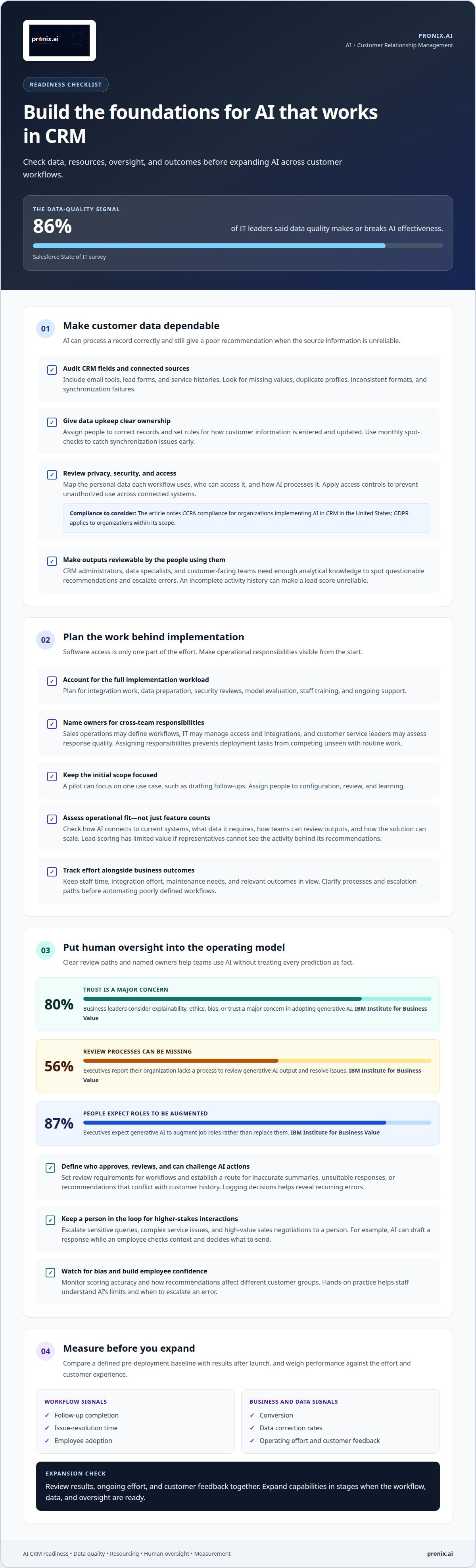
AI-powered CRM capabilities depend on records that are accurate, connected, and usable. In a Salesforce State of IT survey, 86% of IT leaders said data quality makes or breaks AI effectiveness. A duplicate contact, stale account status, or missing interaction can distort lead scoring and personalization. The model may process the record correctly but still produce a poor recommendation because its source data is unreliable.
Start with a data audit across CRM fields and connected sources, including email tools, lead forms, and service histories. Identify missing values, duplicate profiles, inconsistent formats, and synchronization failures. Then assign ownership for corrections and establish rules for how teams enter and update customer information. Monthly spot-checks can reveal synchronization issues early. Springer notes that monitoring data quality supports trust and human operators.
Include privacy and security in the same review. In the United States, organizations implementing AI in CRM must comply with the California Consumer Privacy Act (CCPA); the General Data Protection Regulation (GDPR) also applies to organizations within its scope. Map the personal data each workflow uses, who can access it, and how AI processes it. Access controls should prevent unauthorized use and protect customer information across connected systems.
Skills gaps can make even sound data controls difficult to maintain. CRM administrators, data specialists, and customer-facing teams need enough analytical knowledge to interpret outputs, spot questionable recommendations, and escalate errors. For example, a sales representative should recognize that an incomplete activity history can make a lead score unreliable. Clear review responsibilities help teams use AI without treating every prediction as fact.
How can companies measure AI feature ROI and performance? Compare a defined pre-deployment baseline with measures such as follow-up completion, issue-resolution time, conversion, data correction rates, and employee adoption. Review these alongside operating effort and customer feedback to see whether the feature is improving customer relationship management.
AI implementation costs and resource allocation
AI implementation requires more than software access. Teams need to plan for integration work, data preparation, security reviews, model evaluation, staff training, and ongoing support. Connecting a CRM to email, calendars, and lead forms, for example, can require separate mapping and testing. Each connection adds work, particularly when records use inconsistent formats or updates fail to synchronize reliably.
Internal effort also has an opportunity cost. Sales operations may define workflows, IT may manage access and integrations, and customer service leaders may assess response quality. If those responsibilities are unassigned, deployment tasks compete with routine work. A focused pilot can limit the initial scope: choose one use case, such as drafting follow-ups, and assign people to configuration, review, and learning.
Evaluate vendors for operational fit, not just feature counts. Assess how the CRM’s AI connects to current systems, what data it requires, how teams can review its outputs, and how the solution can scale. A lead-scoring feature, for example, has limited value if sales representatives cannot see the activity behind its recommendations. Cloud-based platforms and scalable solutions can help smaller organizations manage implementation costs.
Costs can rise when teams automate a poorly defined process or expand before measuring performance. A customer experience workflow may need clearer escalation paths, approval rules, or support content before automation is useful. Treat this work as part of implementation, not optional cleanup. Track staff time, integration effort, maintenance needs, and relevant business outcomes together.
Resource planning should also include ongoing learning. Assign owners to review AI outputs, manage changes, and address workflow issues after launch. A disciplined AI implementation approach can help align technical work with business priorities, while keeping scope and operational responsibilities visible.
Organizational and managerial factors
AI adoption in customer relationship management is an operating-model change, not only a platform deployment. IBM Institute for Business Value found that 80% of business leaders consider explainability, ethics, bias, or trust a major concern in adopting generative AI. Managers must define who approves AI-generated actions, which workflows require review, and how employees can challenge recommendations. Otherwise, lead scoring can shift sales priorities without clear accountability.
Review processes need named owners and practical criteria. IBM Institute for Business Value found that 56% of executives report their organization lacks a process to review generative AI output and resolve issues. A CRM team can establish a review path for inaccurate summaries, unsuitable responses, or recommendations that conflict with customer history. Logging decisions also helps managers analyze recurring errors and update workflows instead of treating each failure as isolated.
Employee expectations shape adoption. IBM Institute for Business Value found that 87% of executives expect generative AI to augment job roles rather than replace them. Managers can make that model tangible by showing how artificial intelligence drafts a response while an employee checks context and decides what to send. Hands-on practice with real workflows helps staff understand the platform’s limits and build confidence using its capabilities.
Human oversight is especially important when an interaction has higher stakes. Escalate sensitive queries, complex service issues, and high-value sales negotiations to a person. AI bias can also distort predictions, create unfair customer segments, or skew marketing actions. Monitor scoring accuracy and review how recommendations affect different customer groups.
Scaling requires management discipline, not just technical readiness. IBM Institute for Business Value found that 78% of executives say their organization has an approach for scaling generative AI into customer and employee experiences. Leaders can connect that approach to measures such as user engagement, automation efficiency, and prediction quality. The key takeaway: assign ownership, preserve human judgment, and make model performance visible in daily operations.
What steps should businesses follow to plan and implement AI CRM integration?
Start with a defined customer or operational outcome, then test each capability against real workflows. A phased rollout makes dependencies visible before automation reaches more teams.
- Set the objective. Choose one or two focus areas, such as reducing follow-up effort or improving lead prioritization. Define a baseline and success measures before deployment, so teams can assess whether the AI feature changes the intended outcome.
- Assess fit and readiness. Evaluate machine learning capabilities, real-time analytics, automation options, and scalability. Map how the CRM connects with email, calendar applications, and lead forms. Identify where information must flow and which system remains authoritative when records conflict.
- Test before scaling. Use sample data to evaluate output quality and workflow behavior. For example, test whether an automated follow-up reflects the correct account history and reaches the right review step. Resolve errors before expanding access or connecting additional processes.
- Introduce capabilities gradually. Start with a controlled feature, such as automated follow-ups. Add smart reminders or AI-generated reports after teams understand the first workflow. Train employees on how the feature works, where its outputs appear, and how to handle exceptions.
- Monitor and refine. Review predictive accuracy, automation efficiency, and user engagement after deployment. Document changes, issues, and interventions. These records help leaders compare results with the original objectives and decide whether to adjust, expand, or pause a capability.
Security and governance must remain part of each stage. Confirm that access controls, data handling, and review responsibilities align with organizational requirements before connecting systems. The Society for Mining, Metallurgy & Exploration emphasizes tracking and documenting progress to demonstrate benefits and share lessons across sites.
For a structured rollout, plan an AI CRM implementation around clear objectives, connected systems, and measurable review.
Pronix.ai
pronix.ai helps enterprises address CRM integration challenges by aligning AI strategy, data readiness, workflows, and customer experience objectives. Its services include Agentic AI Implementation, AI-Driven CX Modernization, AI Business Automation, and Data & AI Foundations. This support is relevant when teams need to move beyond isolated pilots, connect AI capabilities with existing systems, or build stronger foundations for secure, scalable production.
The right starting point depends on the operational constraint. A fragmented data environment calls for stronger data foundations; disconnected customer journeys may need CX modernization; repetitive CRM tasks can point to business automation. pronix.ai helps organizations shape a practical path from assessment through implementation and ongoing operations. Contact pronix.ai to discuss your CRM and AI priorities.
Turn CRM ambition into an operational plan
Treat the challenges of integrating AI with CRM as design decisions, not reasons to delay progress. Identify where AI could improve a customer or employee workflow, then define how the change will be governed and assessed. This creates a clearer path from experimentation to an integrated capability that fits the organization’s operating model.
pronix.ai helps enterprises advance this work through Agentic AI Implementation, AI-Driven CX Modernization, and AI Business Automation. These capabilities connect implementation choices to customer experience and business operations. If your team is weighing its priorities or preparing to move beyond a pilot, discuss AI and CRM with pronix.ai. A focused conversation can help clarify the next practical move and set your team on a more deliberate path forward.
Frequently Asked Questions
How is AI changing CRM?
AI is helping CRM systems interpret customer activity and recommend or automate next actions. For example, a CRM may use email-opening patterns to suggest when a representative should follow up, or draft a message for review. Customer-service chatbots can also handle routine questions 24x7. These capabilities shift CRM from a record of past interactions toward a system that actively supports customer engagement.
How is adopting an AI CRM different to a traditional CRM?
Traditional CRM primarily organizes customer records and interaction history, while AI-enabled CRM can analyze that information to predict outcomes or suggest actions. A traditional system may display a customer’s previous support case; an AI-enabled workflow could summarize it and suggest a response. Teams must therefore manage not only records and access, but also how employees review and use AI recommendations.
What can bias in AI algorithms in CRM lead to?
Bias can lead an AI system to treat similar customers differently when its patterns reflect incomplete or historically skewed data. A recommendation model, for example, might repeatedly prioritize one customer group for outreach while overlooking another with comparable needs. This can create uneven service and distort campaign decisions. Reviewing outcomes across customer segments can reveal patterns that an overall performance measure might miss.
What is AI-enhanced CRM?
AI-enhanced CRM is customer relationship management software with AI capabilities for tasks such as analyzing interactions, predicting likely outcomes, or generating content. It may help a service team summarize a conversation or help sales staff prioritize an opportunity. AI works within or alongside CRM processes; employees remain responsible for interpreting context and deciding how to act on its recommendations.
What is an AI-powered CRM integration?
An AI-powered CRM integration connects CRM data and workflows with AI capabilities, allowing information and outputs to move between systems. For example, AI could analyze a customer message for intent and add the resulting category to a CRM case for staff review. A useful integration preserves the context needed for that action and makes clear where the AI output fits into the team’s existing process.
What are the main challenges of integrating AI with CRM systems?
The main challenges of integrating AI with CRM systems are coordinating data, technology, governance, and employee adoption. A technically connected model may still fail if its output appears in the wrong workflow or lacks the context employees need. Trace one use case from input data through AI processing to the final human or automated action, then assign an owner to each handoff to identify weak points.