

Enterprise AI doesn’t scale by multiplying pilots; it scales by coordinating them. AI automation for global enterprises can improve productivity across regions, but disconnected systems, data, and operating practices often keep promising initiatives from delivering enterprise-wide value. The challenge isn’t simply deploying more AI. It’s building a consistent way to select, integrate, govern, and measure it.
That challenge is familiar to leaders balancing pressure for faster results with the need for security, auditability, and clear human accountability. Isolated use cases can show potential, but scaling them without shared controls can create new risks and fragmented workflows. A common operating model gives teams room to address local needs while maintaining enterprise-wide visibility and standards.
This practical 2026 guide explains how to identify workflows suited to AI automation, prioritize opportunities by business value and readiness, and establish a repeatable approach across functions and regions. It also covers platform integration, governance, human oversight, and outcome measurement, so leaders can move from pilots to managed production with control. The goal is measurable progress, not automation for its own sake.
Key Takeaways
- Build a shared operating model that aligns process owners, AI and data teams, risk leaders, technology teams, and frontline users.
- Prioritize AI automation for global enterprises by weighing business value, workflow stability, data readiness, integration effort, and risk.
- Match automation to the work: start with stable, rules-led tasks, and retain human review for exceptions that require judgment.
- Scale in controlled stages by validating workflow behavior, access, exceptions, and escalation paths before expanding deployment.
- Connect strategy, implementation, and ongoing operations to coordinate intelligent workflows, AI agents, and customer experience modernization.
Why AI Automation for Global Enterprises Needs an Operating Model
AI automation becomes an enterprise capability when it connects workflows, decisions, and operational tasks across teams, rather than solving one isolated task. It can combine AI with workflow rules and robotic process automation, an approach described in Intelligent Automation. The essential shift is organizational: define who owns each process, how systems exchange information, where people review decisions, and how performance is measured.
Enterprise-wide automation is a coordinated way to improve and govern connected processes across functions and regions. A single automated task is only one component of that system.
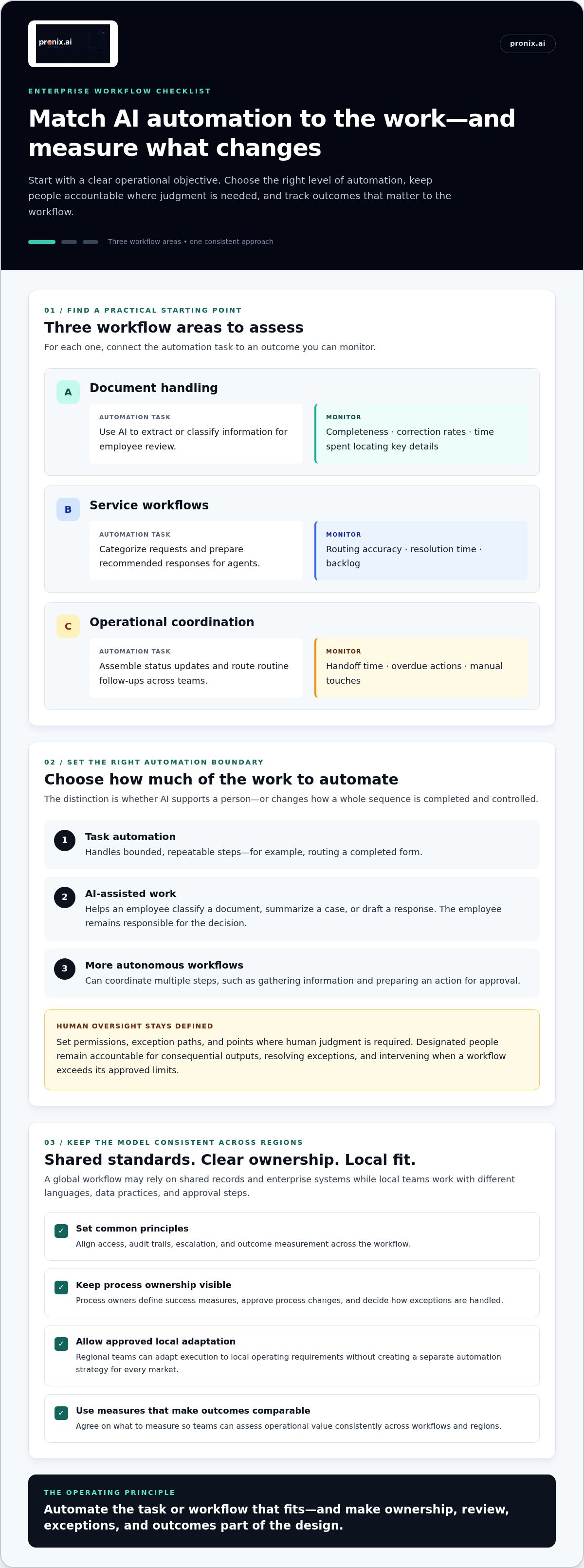
The work itself can take different forms. Task automation handles bounded, repeatable steps, such as routing a completed form. AI-assisted work helps an employee classify a document, summarize a case, or draft a response, while the employee remains responsible for the decision. More autonomous workflows can coordinate multiple steps, such as gathering information and preparing an action for approval. Autonomy is not absolute: teams define permissions, exception paths, and points where human judgment is required.
What makes AI automation different at global scale?
Shared processes rarely operate in a vacuum. A global service workflow may depend on common customer records and enterprise systems, yet involve local teams, languages, data practices, and approval steps. A workable model sets consistent principles for access, audit trails, escalation, and outcome measurement. Regional teams can then adapt execution to local operating requirements without creating a separate automation strategy in every market.
Illustrative example: A multinational company uses AI to classify incoming supplier documents and route them to procurement or finance. The shared workflow defines document categories, ownership, and exception handling. Local teams configure approved routing details for their systems and business practices. The organization can compare processing time and correction rates across regions while preserving accountable local review.
Without this coordination, pilots often acquire separate owners, integrations, and success measures. One team tracks time saved; another counts cases processed; a third measures accuracy. Leaders cannot easily compare value or reuse components, and operational teams may inherit tools without clear responsibility for maintaining the process. An operating model connects those efforts to process ownership, shared technical standards, and agreed measures before deployment spreads.
Which enterprise problems can automation address?
Start with work that has a clear operational objective, then choose the appropriate level of automation. The distinction between supporting an employee and automating a whole process matters: assistance can speed a person’s work, while end-to-end automation changes how a sequence is completed and controlled.
- Document handling: AI can extract or classify information for employee review. Track completeness, correction rates, or time spent locating key details.
- Service workflows: AI can categorize requests and prepare recommended responses for agents. Measure routing accuracy, resolution time, or backlog.
- Operational coordination: Automation can assemble status updates and route routine follow-ups across teams. Monitor handoff time, overdue actions, or manual touches.
For AI automation for global enterprises, the operating model turns these use cases into a portfolio that can be evaluated and improved consistently. It gives process owners a basis for deciding what to automate, where human review belongs, and which outcomes demonstrate operational value.
How a Global Enterprise AI Automation Operating Model Works
An operating model turns enterprise-wide principles into clear decision rights. It connects the people who own the process with the teams that manage data, technology, risk, and day-to-day work. This structure matters because a workflow crosses more than system boundaries. It also crosses functions, regions, and accountability lines. For AI automation for global enterprises, the model should make it clear who can change a workflow, approve its use, and act when it behaves unexpectedly.
Human oversight means a designated person remains accountable for reviewing consequential outputs, resolving exceptions, and intervening when a workflow falls outside its approved limits. The system can recommend or prepare an action, but approval and escalation rules define where human judgment must remain in control.
How should teams divide automation responsibilities?
Assign responsibilities before implementation, then keep them visible as the workflow evolves. Shared standards can support reuse, but they shouldn’t blur ownership: the team accountable for the business process remains responsible for its outcomes and operating changes.
- Process owners define success measures, approve process changes, and decide how exceptions are handled. They also ensure that automation still fits the work as policies and operating needs change.
- Data and AI teams assess data suitability, document how AI is used, and help establish validation and monitoring practices with the process owner.
- Technology teams manage system integrations, deployment, reliability, and access controls. They coordinate changes so automation fits the enterprise environment and can be supported over time.
- Risk and business stakeholders set review thresholds and escalation routes. They help determine which outputs need approval, what should stop a workflow, and who responds to an incident or unresolved exception.
- Frontline users provide feedback on usability and real-world exceptions. Their input can reveal where process documentation misses the way work is actually completed.
Enterprise standards should establish common expectations for documentation, access, testing, monitoring, and escalation. Process teams then retain authority over local execution within those guardrails. That balance supports reuse without forcing every region into an identical workflow.
How do platforms and enterprise systems fit together?
Architecture should follow the workflow, not the other way around. Map the sequence from trigger to outcome: where information originates, which systems must be updated, what data the AI uses, and where a person reviews or approves an action. Then identify the required connections and controls. This prevents a platform decision from becoming a disconnected pilot that cannot fit the wider process.
Global environments may include platforms such as AWS, Microsoft, Salesforce, Kore.ai, and Genesys, alongside existing enterprise systems and data sources. These are examples of platforms that may form part of an organization’s technology landscape, not a ranking or a claim that each is right for every workflow. The design should reflect current architecture, integration needs, ownership, and the operational requirements of the process.
Clear operating design also helps teams connect strategy to delivery and ongoing operations. pronix.ai’s enterprise AI strategy and implementation supports that lifecycle through strategy, implementation, and managed services, including work across intelligent workflows, AI agents, and customer experience.
How to Prioritize AI Automation Across Enterprise Workflows
A compelling demo isn’t enough to make a workflow a strong automation candidate. Leaders need to compare business value with process readiness, integration demands, and the consequences of an error. For AI automation for global enterprises, a consistent assessment helps regional and functional teams rank opportunities using the same criteria, while still accounting for local operating differences.
Which workflows are strong candidates for AI automation?
Start with a defined process, an accountable owner, and an outcome that can be observed. Review transaction volume, handoffs, data availability, and how often exceptions occur. Repetitive, rules-led steps, such as routing complete records, may suit direct automation. Work involving ambiguity or contextual judgment is better approached as employee augmentation or a workflow with explicit human review.
Before comparing candidates, document the current process and establish a baseline. Capture measures that reflect the intended objective, such as handling time, rework, queue age, or the number of manual handoffs. Without a baseline, teams can’t distinguish actual improvement from changes in demand or process conditions. For sensitive or consequential decisions, name the human decision owner and define review and escalation before considering broader automation.
How should leaders compare automation opportunities?
Use a shared scorecard, but don’t mistake the score for a universal go or no-go threshold. Rate each factor against the organization’s own criteria, record the evidence, and discuss trade-offs. A high-value workflow may still need foundational data or integration work before deployment is practical.
| Factor | What to assess | Useful evidence |
|---|---|---|
| Business value | Which operational objective should the workflow support? | Baseline measures such as processing time, rework, or backlog. |
| Workflow stability | Are steps and decision rules understood and reasonably consistent? | Process documentation, handoff patterns, and exception frequency. |
| Data readiness | Can the process access relevant, usable information? | Data sources, completeness, quality issues, and ownership. |
| Integration effort | Which systems and teams must connect for the workflow to function? | Required interfaces, dependencies, and deployment considerations. |
| Risk | What happens if an output is incorrect, delayed, or acted on without review? | Potential impact, approval points, escalation paths, and accountable reviewers. |
For each candidate, document assumptions and specify what evidence would validate the business case, including how results will be measured after implementation. Compare the expected value with delivery complexity and operational exposure, rather than choosing the highest volume alone. Frequent exceptions can make a seemingly repetitive task costly to automate without review.
Finally, manage opportunities as a portfolio. Pair near-term candidates with clear ownership and stable workflows with foundational work that improves data access, integration, or reusable controls. This balances visible operational objectives with capabilities that can support future workflows. Reassess priorities as baselines, process conditions, and evidence change.
How to Scale Enterprise AI Automation Without Losing Control
Scaling should be earned through evidence, not assumed from a successful pilot. A workflow that performs well in one team or region may encounter different data conditions, system dependencies, or exceptions elsewhere. For AI automation for global enterprises, use a repeatable progression: apply common controls at every stage, then adapt the process where local operating needs require it.
- Assess the process. Map the actual workflow, identify its owner, document current performance, and mark decision points, handoffs, and exceptions. Establish what the automation is intended to change and how the team will evaluate that change.
- Confirm readiness. Check that required data is accessible and suitable, integrations are understood, and responsibilities are assigned. Foundational data quality and ownership can affect whether a workflow is ready to scale. For more on these considerations, see the enterprise AI data strategy guide.
- Test in a controlled scope. Validate normal workflow behavior and less common cases. Check that access is limited to appropriate users and systems, outputs are reviewed where needed, and human escalation works as designed.
- Review before expansion. Compare results with the documented baseline and intended objectives. Examine exceptions, user feedback, integration behavior, and whether controls operated effectively. Record open issues and the conditions that must be met before extending the workflow.
- Expand and operate. Extend to another team or region only when ownership, support, monitoring, and escalation are clear. Continue reviewing performance after deployment, and adjust when the process or its operating context changes.
What should happen before expanding a successful workflow?
Set a defined review point before increasing volume, adding regions, or connecting further systems. The process owner should verify that measured performance aligns with the intended outcome, not just that the automation completes its steps. Frontline users can identify confusing handoffs or exceptions that are easy to miss in a limited test. Technology and risk stakeholders should review integration behavior, access, and control evidence. Document operating responsibilities and escalation procedures so the next team inherits a supported process, not just a deployed tool.
Keep enterprise standards repeatable: documentation, access controls, test evidence, monitoring expectations, and escalation ownership should remain consistent. Adaptations can then be process-specific, such as local routing rules, approved data sources, or review steps. Record each variation and its owner. This gives teams room to meet operational needs while preserving visibility across the enterprise.
How can enterprises sustain value after deployment?
Deployment starts an operating cycle. Assign an owner to monitor outcomes and review process changes, then track business measures alongside reliability, exception patterns, and human intervention. A rise in manual corrections, for example, may signal a data issue, a changed process, or a need to revise review steps. Use that evidence to refine the workflow rather than assume performance will remain stable.
To connect implementation with ongoing oversight, pronix.ai provides enterprise AI strategy, implementation, and managed services to support workflows after deployment.
How pronix.ai Supports AI Automation for Global Enterprises
Moving from isolated initiatives to coordinated execution takes more than a technology choice. It requires a connection between business priorities, process design, technical integration, and ongoing operations. pronix.ai, Pronix Inc.’s AI and customer experience division, supports enterprises across that lifecycle with strategy, implementation, and managed services. Its work spans enterprise automation, intelligent workflows, AI agents, and AI-driven customer experience modernization.
From enterprise priorities to implemented workflows
Strategy starts by translating business objectives into candidate processes and practical design decisions. Which workflow should change? What systems and data does it depend on? Where should employees review outputs or resolve exceptions? Clear answers help align business teams, data and AI specialists, and technology stakeholders around an implementation scope.
Technical implementation then connects the workflow to the enterprise environment. pronix.ai’s platform experience includes AWS, Microsoft, Salesforce, Kore.ai, and Genesys. The relevant architecture depends on existing systems and workflow requirements, with attention to integration, security, governance, scalability, and auditability. These considerations help shape production readiness; they don’t remove the need for accountable process owners and ongoing review.
Managed services can support the operational phase after deployment, helping organizations sustain oversight as workflows and business needs evolve. Define who will monitor performance, review exceptions, and manage changes so those responsibilities remain clear after launch.
What should leaders prepare for an enterprise discussion?
A focused discussion begins with the work itself, not a broad request to “use more AI.” Bring a shortlist of priority workflows and identify the people accountable for them. Include what success should look like, what the current process depends on, and where human review is needed.
- Workflow context: Describe the process, its users, handoffs, and known exceptions.
- Ownership and dependencies: Identify process owners, relevant systems, integration needs, and data constraints.
- Evidence and controls: Bring baseline measures, intended outcomes, and review or escalation requirements.
- Stakeholders: Include business operations, technology, and risk representatives so decisions reflect both delivery needs and oversight.
This preparation helps teams assess readiness and priorities without assuming every process is suitable for the same approach. It also gives strategy and implementation discussions a concrete starting point.
Move from scattered initiatives to coordinated execution
The guide’s central principle is straightforward: establish common standards, select workflows using consistent evidence, and expand only with clear ownership and operational review. That approach gives teams a way to coordinate AI automation for global enterprises while adapting execution to process needs. For agent implementation, begin by defining the tasks an agent may perform, the systems it may access, and the situations that require human review.
To assess automation readiness, align on priorities, and discuss a path from strategy to implementation and operations, discuss enterprise AI automation with pronix.ai.
Make Enterprise Automation a Capability That Evolves
The next step is to treat automation as an evolving operating capability, not a one-time deployment. As processes, data, and business priorities change, leaders can revisit what should be automated, where human judgment belongs, and what evidence should guide the next investment. That discipline helps AI automation for global enterprises adapt without losing sight of accountability.
pronix.ai connects enterprise AI strategy with implementation and managed services, drawing on platform experience that includes AWS, Microsoft, Salesforce, Kore.ai, and Genesys. Start with a focused discussion about your priorities, readiness, and the operational outcomes you want to track.
Explore your enterprise AI automation priorities with pronix.ai and identify a practical next step. With clear ownership and a measured approach, your organization can move forward with confidence.
Frequently Asked Questions
How is AI automation different from traditional business process automation?
Traditional business process automation follows predefined rules and structured inputs, while AI can help interpret less structured information, such as messages or document content. For example, a rules-based workflow might route a form based on a selected category; an AI-enabled step could suggest a category from free-text details for a person or downstream rule to use. Many enterprise processes combine both approaches, applying AI only where fixed rules alone are insufficient.
Can AI automation work with legacy enterprise systems?
Yes, it can work alongside legacy systems when teams assess how those systems exchange information and what controls are required. Integration may involve existing interfaces, middleware, scheduled data exchanges, or other approaches suited to the environment. Before connecting a workflow, identify the system of record, confirm how updates are validated, and plan for failures or delayed responses. A limited test can reveal integration constraints before broader deployment.
How should global enterprises measure AI automation success?
Measure both the business objective and the quality of the process. If the goal is to reduce document rework, track correction rates alongside processing time, and define how to distinguish AI-related corrections from other causes. Use consistent metric definitions across teams, but segment results where workflows differ by region or channel. Review the measures with process owners regularly, so an apparent efficiency gain doesn’t conceal lower accuracy or added work elsewhere.
Which teams should own enterprise AI automation?
The business function responsible for the process should own its operational outcome, supported by technology, data and AI, risk, and frontline representatives. A cross-functional governance forum can resolve decisions that span departments, such as whether a shared component is suitable for reuse. Document decision rights: who approves a process change, who manages an integration issue, and who can pause automation. Clear accountability prevents shared responsibility from becoming unassigned responsibility.
How can enterprises keep human oversight in automated workflows?
Design oversight into the workflow rather than relying on informal checks. Define which cases require approval, what information reviewers need, and how they can correct or reject a recommendation. For example, route incomplete or conflicting records to a designated reviewer instead of allowing the workflow to proceed silently. Track overrides and escalations; recurring patterns can indicate that instructions, data, or process rules need attention.
What data foundations does enterprise AI automation require?
Start with data that has a clear business purpose, accountable ownership, and defined access. Teams should understand where information originates, how current it is, and whether key fields mean the same thing across systems. Test candidate workflows with representative data, including incomplete or inconsistent records, before relying on outputs in production. Data lineage and quality checks also help teams investigate unexpected results and identify the source of a problem.
How can an enterprise scale AI automation beyond its first successful workflow?
Use the first workflow to identify reusable components, such as integration patterns, review steps, and monitoring practices, then assess whether another process genuinely shares those needs. Define expansion criteria in advance, including performance evidence, support ownership, and a way to pause or roll back changes. Scale in deliberate waves, gathering feedback from each new team before extending further. Similarity should guide reuse, not override differences in process risk or context.