

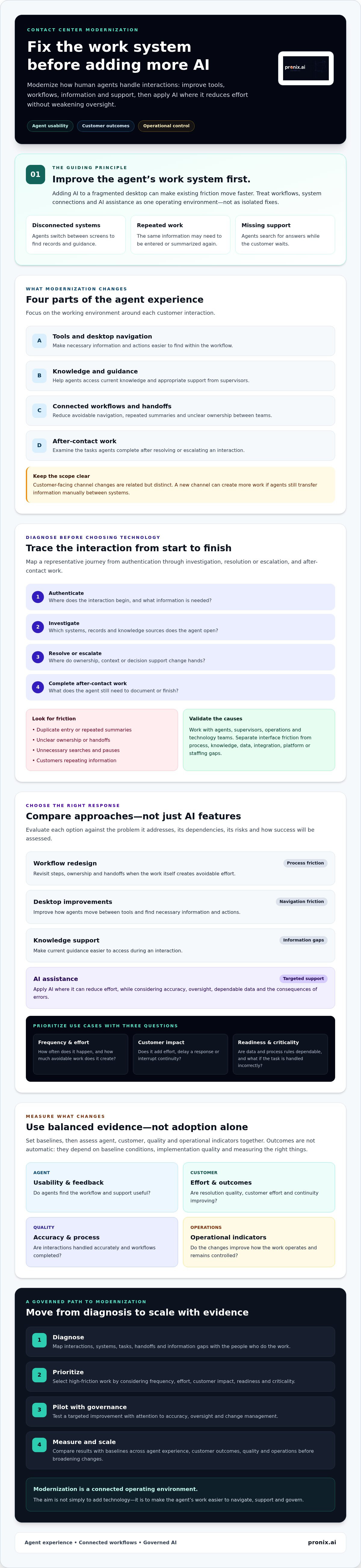
Adding AI to a fragmented agent desktop doesn’t modernize the work. It can make existing friction move faster. Effective contact center agent experience modernization starts by improving how agents handle customer interactions, then applying AI where it can reduce effort without weakening oversight.
Agents shouldn’t have to reconcile disconnected systems, enter the same information repeatedly, or search for guidance while a customer waits. Leaders also need more than adoption metrics. They need evidence that changes improve agent usability, customer outcomes, and operational control. That means treating workflows, system connections, and AI assistance as parts of one operating environment, not isolated fixes.
This guide explains how to identify high-friction workflows, evaluate AI assistance, and measure progress across agent, customer, and operational indicators. It also outlines a governed path from targeted improvements to broader modernization, including practical ways to address accuracy, oversight, and change management. The starting point is straightforward: improve the agent’s work system before adding more AI features.
Key Takeaways
- Define modernization around the tools, information, workflows, and support human agents need to serve customers effectively.
- Map contact reasons, handoffs, information gaps, and manual steps to pinpoint friction before choosing technology.
- Compare workflow redesign, desktop improvements, knowledge support, and AI assistance by their dependencies, risks, and measures of success.
- Assess contact center agent experience modernization using baselines and balanced measures across agent feedback, customer outcomes, quality, and operations.
- Use a phased roadmap to move from diagnosis and prioritization to piloting, governance, measurement, and scale.
What Contact Center Agent Experience Modernization Actually Changes
Contact center agent experience modernization means improving the tools, workflows, information, and support human agents rely on to handle customer interactions. It changes how work gets done, not simply which technologies are available.
This distinction matters. The focus here is frontline human agents, not autonomous AI agents. A contact center can add technology and still leave agents switching between disconnected screens, repeating steps, or searching for answers. Understanding the evolution of contact centers provides useful context: as service models and channels expand, the systems that support agent work also need to keep pace.
Which parts of the agent experience need modernization?
Start with the working environment around each interaction. This includes desktop navigation, access to current knowledge, handoffs between teams, after-call work, and how agents get guidance from supervisors. The aim is to make necessary information and actions easier to find within the workflow.
These are agent-facing changes. Redesigning customer-facing channels, such as adding a messaging option or changing call routing, is related but distinct. A new channel can create more work if agents still have to transfer information manually between systems.
For example, an agent handling a billing inquiry might switch from the contact center desktop to a customer record, then open a separate knowledge tool to confirm a policy. If the inquiry needs escalation, the agent may have to summarize the issue again for a supervisor. Modernization examines these steps as one connected workflow and identifies where navigation, information access, or handoffs create avoidable friction.
How agent experience connects to customer and operational outcomes
Clearer workflows can help agents find relevant information, follow consistent processes, and focus on the customer’s issue. When agents know what to do next and have appropriate support, they may be better positioned to resolve interactions accurately. This can also reduce the effort customers face when they have to repeat details or wait while an agent searches for answers.
These relationships aren’t automatic guarantees. Outcomes depend on baseline conditions, implementation quality, and whether the organization measures the right things. Leaders should assess agent feedback alongside resolution quality, customer effort, workflow completion, and operational indicators. That evidence helps distinguish a useful change from a technology addition that leaves the underlying work unchanged.
Diagnose Workflow Friction Before Choosing Contact Center AI
Start with the work, not the technology shortlist. Contact center agent experience modernization is more likely to address real operational constraints when leaders first identify where agents lose time, context, or decision support. A workflow map can reveal whether the main issue is a process, knowledge, data, platform, or staffing gap. These causes may look similar in a dashboard, but they call for different responses.
For broader enterprise context, see this AI-driven CX modernization guide. The same principle applies to agent workflows: define the problem before selecting a solution.
Map the agent journey across systems and tasks
Trace a representative interaction from customer authentication through investigation, resolution or escalation, and after-contact work. Note each system an agent opens and each point where work pauses or changes hands. Look for duplicate entry, unclear ownership, unnecessary searches, and moments when customers must repeat information they’ve already provided.
Validate the map with agents, supervisors, operations, and technology teams. Agents can identify workarounds that process documents may miss. Technology teams can help distinguish interface friction from integration or platform constraints. Together, they can confirm whether a painful step recurs and what causes it.
Prioritize use cases by value, feasibility, and risk
Assess candidate tasks using a consistent set of questions:
- Frequency and effort: How often does the task occur, and how much avoidable work does it create?
- Customer impact: Does the friction add effort, delay a response, or interrupt continuity?
- Readiness and criticality: Are the required data and process rules dependable, and what happens if the task is handled incorrectly?
Separate decision support, such as surfacing guidance for an agent to review, from actions that change customer records or trigger downstream processes. Start with a bounded use case. Before implementation, define when human review is required, how exceptions are handled, and how performance will be assessed.
Identify the data and knowledge agents need
Check who owns each knowledge source, how its content is maintained, who can access it, and whether guidance is consistent across teams. Then identify the customer context agents need during an interaction and whether it’s available in a usable form. A new AI layer can’t reliably resolve conflicting instructions or missing context. Source quality is a prerequisite, not a feature to assume.
This diagnosis gives teams a sound basis for prioritization. Organizations translating workflow findings into enterprise implementation can explore how pronix.ai supports contact center modernization through strategy, implementation, and managed services.
Compare Modernization Approaches Without Treating AI as the Whole Answer
Once the friction is clear, match the response to its cause. A process problem may need workflow redesign, while scattered information may call for better knowledge access. AI can assist agents, but it shouldn’t be the default answer to every operational gap. For contact center agent experience modernization, compare options by fit, dependencies, risk, and how the organization will evaluate them.
| Approach | Suitable problem | Key dependency | Risk to manage | Evaluation measure |
|---|---|---|---|---|
| Workflow redesign | Redundant steps or unclear handoffs | Agreed process ownership | Automating a flawed process | Step completion, rework, and handoff patterns |
| Unified desktop improvements | Agents navigate between systems to complete routine tasks | Platform fit and reliable integrations | Information gaps or added interface complexity | Navigation effort and task completion quality |
| Knowledge assistance | Agents spend time searching or reconciling guidance | Current, consistent content and appropriate access | Outdated or conflicting answers | Answer relevance and agent feedback |
| AI-enabled support | Agents need help retrieving context, summarizing, or considering next steps | Usable source data, configuration, and oversight | Incorrect suggestions or unreviewed actions | Accuracy, review rates, and workflow impact |
When workflow redesign should come before new technology
If agents follow unclear policies or repeat unnecessary steps, a new tool may preserve the friction instead of removing it. Document the current process, including routing rules, ownership, exceptions, and handoffs. Then simplify it where appropriate. Clearer workflows give later desktop changes or automation a stable process to support.
Where agent-assist AI can support human judgment
Agent-assist capabilities may help retrieve relevant knowledge, summarize interaction context, or suggest possible next steps. Treat these as recommendations for agent review, not as equivalent to autonomous actions that change customer records or trigger downstream processes. Before deployment, define how suggestions are grounded in sources, how uncertain results are handled, what escalation paths apply, and how agent feedback informs improvement.
How platforms fit the modernization decision
pronix.ai’s contact center modernization work includes platforms such as Amazon Connect, Genesys, and NICE. No platform is a universal winner. Assess fit against existing systems, workflow needs, governance, and the organization’s ability to support operations over time. Capabilities depend on the selected platform, its configuration, integrations, and the enterprise environment, so verify requirements before making a design decision.
For information on enterprise implementation support, see contact center modernization with pronix.ai.
Measure Agent Experience Modernization and Manage Change Safely
Set a baseline before changing a workflow or introducing AI support. Choose operational periods that can be compared fairly, accounting for relevant differences such as contact mix or staffing conditions. Without a reference point, teams may mistake normal variation for an effect of the change.
For contact center agent experience modernization, balance agent feedback with evidence about service quality and operations. Consider task completion effort, transfer patterns, repeat work, quality reviews, customer experience, and resolution quality. Handle time and automation volume can add context, but neither shows on its own whether agents can work more effectively or customers receive better support.
Choose measures that reveal agent effort and service quality
Define what each measure should reveal before a pilot begins. Pair efficiency indicators with quality checks and customer feedback. For example, fewer transfers are useful only if customers still reach the right support and issues are resolved appropriately. Gather structured agent feedback, then compare it with workflow and quality evidence to see where the experience improved or created new friction.
Pilot changes with clear oversight and feedback
Use a controlled sequence to test and refine changes:
- Baseline: Record current measures and document how they’re collected.
- Pilot: Set the scope, eligibility, human oversight, and escalation process before launch.
- Review: Compare like-for-like periods and examine agent, customer, quality, and operational signals.
- Adjust: Address issues, update guidance, and refine the workflow or configuration.
- Expand carefully: Scale only when results and controls support the next step, with rollback criteria still available.
Include agents and supervisors in testing, training, and feedback review. Before launch, confirm privacy, security, retention, and audit requirements with the teams responsible for them. Clear oversight helps teams identify when an AI recommendation needs review or a workflow change should be paused.
Build adoption into the operating model
Assign ownership for knowledge updates, workflow changes, model behavior, and issue resolution. Give each role practical training tied to daily tasks rather than relying on launch communications alone. Review evidence regularly and make adjustments based on actual use, not deployment activity. The operating model should clarify who can approve changes, respond to problems, and decide whether an improvement is ready to expand.
For details on connecting measurement with implementation and ongoing management, see pronix.ai’s enterprise contact center modernization services.
Build a Production-Ready Roadmap for Contact Center Agent Experience
Move from a defined workflow problem to a controlled operational capability in clear stages. A practical roadmap connects strategy, workflow design, platform integration, governance, and ongoing management. It also gives stakeholders decision points, so expansion depends on evidence and readiness rather than momentum alone.
- Diagnose: Document the workflow, friction points, and baseline measures.
- Prioritize: Select a high-friction use case with a clear owner and manageable scope.
- Design: Confirm agent, customer, technology, data, and governance requirements.
- Pilot: Test the change with defined eligibility, oversight, and escalation paths.
- Govern: Assign decision rights, controls, support ownership, and release procedures.
- Measure: Compare pilot evidence with the baseline, including service quality, agent feedback, and operating effort.
- Scale: Expand only when results, dependencies, and operational controls support it.
Define the first modernization workstream
Choose one workflow that creates recurring friction and can be assessed with available evidence. Name an accountable owner and set boundaries for the work. Before solution design, document current steps, system dependencies, data needs, and governance requirements. Agree on success criteria, oversight roles, and decision gates. These gates should make it clear when to continue, revise the approach, or stop.
Connect implementation to enterprise operations
A pilot must fit the environment where it will operate. Plan how changes relate to the contact center platform, knowledge sources, and relevant business systems. Define who monitors the workflow, owns support, approves releases, and handles incidents. Confirm responsibilities before launch, not after an issue occurs.
Pronix.ai supports enterprise contact center modernization through strategy, implementation, and managed services. Managed services can be considered when ongoing platform, AI, or operational capacity is needed. The implementation approach should reflect the organization’s systems and governance needs without assuming a fixed result or timeline.
Move from pilot evidence to a scalable decision
Review agent feedback, service measures, risk signals, and the effort required to operate the change against the baseline. Record what worked, what needs revision, and which dependencies remain unresolved. Use that assessment to decide whether to refine the pilot, expand to another workflow, or pause for additional readiness work. Scaling is a new decision, not an automatic next step.
A practical first move is to align stakeholders around one workflow and its baseline measures. For a discussion of those priorities, visit contact center modernization priorities.
Make the Next Agent Workflow Your Starting Point
Contact center agent experience modernization isn’t about adding technology for its own sake. It starts by identifying where work breaks down, matching the fix to the cause, and evaluating changes against a clear baseline. Workflow redesign, better access to knowledge, and AI assistance each have a role, but their value depends on how well they fit the agent’s work and the enterprise environment.
A measured path matters. Pilot a bounded change, involve agents and supervisors, set oversight responsibilities, and use service quality, agent feedback, and operational evidence to guide the next decision. Scale only when the approach is ready to operate with appropriate governance and support.
Pronix.ai connects strategy, implementation, and managed services across contact center environments that include Amazon Connect, Genesys, and NICE. Start a conversation with pronix.ai about your contact center modernization priorities.
Begin with one well-defined problem. Build from evidence, and make each step count toward a more usable, supportable agent experience.
Frequently Asked Questions
What does contact center agent experience modernization mean?
Contact center agent experience modernization means improving the tools, workflows, information, and support human agents use to handle customer interactions. It can include simplifying handoffs, improving access to current guidance, or reducing duplicate work across systems. The focus is the agent’s day-to-day work, not simply adding technology or deploying autonomous AI. Changes should address identified workflow needs and be evaluated using agent, customer, and operational measures.
How can AI improve the experience of contact center agents?
AI can support agents by helping surface relevant knowledge, summarize interaction context, or suggest next steps for an agent to review. These capabilities may reduce searching and repetitive effort when the underlying information is dependable and accessible. Their usefulness depends on platform configuration, integrations, and the enterprise environment. Set expectations for uncertain or incorrect suggestions, and give agents a clear way to provide feedback or escalate issues.
Which contact center agent workflows should be modernized first?
Start with recurring workflows that create avoidable effort or customer friction and can be assessed with available evidence. Map a frequent contact from authentication through resolution, escalation, and wrap-up. Look for repeated data entry, unnecessary searches, unclear ownership, and transfers that lead to repeated explanations. Then assess customer impact, data readiness, operational criticality, and feasibility. A bounded workflow with a clear owner is easier to evaluate than a broad, undefined transformation.
How do you measure contact center agent experience?
Establish a baseline before implementation, then compare like-for-like operational periods. Combine agent feedback with measures such as task effort, transfer patterns, repeat work, quality reviews, customer experience, and resolution quality. Interpret efficiency measures in context: lower handle time or greater automation volume alone doesn’t demonstrate better service or a better agent experience. Review results alongside relevant operating conditions, and use the evidence to refine the workflow or reconsider the change.
Can agent-assist AI reduce agent workload without replacing human judgment?
Yes. Agent-assist AI can support tasks such as retrieving relevant guidance or preparing a summary while leaving decisions and customer-impacting actions to human agents. Make that distinction explicit in the design. Define approved sources, how low-confidence responses are handled, when an agent must review or escalate, and how suggestions are monitored. A bounded pilot and regular agent feedback can help show whether the support reduces effort or introduces new work.
What are the risks of modernizing a contact center with AI?
Key risks include inaccurate suggestions, outdated or conflicting knowledge, missing customer context, integration issues, and workflows that add complexity instead of removing it. Poorly defined oversight can also make it unclear who reviews an AI output or responds to a problem. Before deployment, assess data readiness and access, define human review and escalation paths, and confirm privacy, security, retention, and audit requirements with the responsible teams.
How do you modernize a legacy contact center without disrupting service?
Reduce change risk with a phased approach. Document the existing workflow and dependencies, set a baseline, and choose a bounded use case for a controlled pilot. Define eligibility, oversight, escalation, release, and rollback criteria before launch. Involve agents, supervisors, operations, and technology teams in testing and review. Check pilot results and unresolved dependencies before expanding. The approach should fit the environment and its operational controls rather than assume every change can be introduced in the same way.