

Intelligent contact center solutions connect customer conversations, operational data, workflows, and human judgment so teams can act on a shared picture of each interaction. A contact center doesn’t become intelligent just because it has AI. Without connections between its tools and processes, new features can add complexity without improving service or control.
Enterprise leaders know the pressure points: conversations are split across voice, chat, email, and other channels; platform claims can be difficult to compare; and automation must meet security, governance, and service-quality requirements. The goal isn’t to automate every interaction. It’s to resolve routine needs efficiently while giving people the context and authority to handle complex ones.
This guide explains the components and operating model behind an intelligent contact center, then offers a practical framework for evaluating technology, workflows, data readiness, and measurable outcomes. It also covers how to move from disconnected tools or isolated AI pilots toward governed production capabilities. Platforms such as Amazon Connect, Genesys, and NICE can provide a foundation, but results depend on how well they fit business processes and human expertise.
Key Takeaways
- Distinguish operational intelligence from basic channel consolidation by assessing how systems coordinate context, decisions, workflows, and people.
- Trace the interaction lifecycle to identify where platform integrations and enterprise data can give agents and AI the context to act.
- Evaluate Intelligent contact center solutions against workflow fit, integration, governance, human control, and measurable outcomes, not feature lists alone.
- Move toward production in controlled phases: prioritize use cases, establish oversight and access controls, test, pilot, then scale based on evidence.
- Understand how strategy, implementation, platform integration, and managed services can support modernization across Amazon Connect, Genesys, and NICE environments.
What Makes Intelligent Contact Center Solutions Different from Basic Omnichannel Tools?
Bringing voice, chat, email, and messaging into one interface can make customer communication easier to manage. It doesn’t necessarily make the operation intelligent. The difference is whether the system carries useful context between interactions and coordinates what happens next: how a request is routed, which knowledge or business data is available, when AI can assist, and when a person needs to take control.
Intelligent contact center solutions connect channels, customer context, workflows, AI, and people so each interaction can inform a coordinated service decision. That’s an operating model, not just a feature label. A unified screen may display several channels, while an intelligent operation connects interactions to relevant processes, records, and accountable decisions. AI can classify a request or surface information, but the workflow must define how that assistance is used and how an agent can review or override it.
This distinction builds on the shift from telephone-based call centers toward broader contact operations. The overview of the Call Centre traces that evolution; enterprise intelligence goes further by coordinating information and action across the service journey. For example, if a customer moves from web chat to a phone call, the next agent should be able to see the relevant conversation history instead of asking the customer to start over.
How Is an Intelligent Contact Center Different from a Traditional Contact Center?
A traditional setup may place voice and digital requests in separate queues, with customer details scattered across channel-specific records. Connected operations make interaction context available across supported channels and link it to workflows, helping teams avoid repetitive handoffs where processes allow. A chatbot alone doesn’t modernize the contact center. Without connected data, escalation paths, agent workflows, and oversight, it can become another isolated channel instead of part of a coherent service operation.
Which Enterprise Teams Benefit from Connected Contact Center Operations?
The value extends beyond the service desk. CX leaders can assess consistency across customer journeys; operations teams can see how requests move between queues and processes; and IT teams can manage integrations with enterprise systems. Security teams need visibility into access and governance, while frontline agents need relevant context and clear next steps. For example, when a customer starts a request online and follows up by phone, the process should remain coordinated while internal teams retain visibility into how the interaction is handled.
A shared operating picture matters because service quality depends on both consistent customer experiences and workable employee processes. Leaders can define which decisions AI may support, which actions require human review, and what information teams need to monitor. Intelligence isn’t simply more automation. It’s coordination built around useful context, clear ownership, and human judgment.
How Intelligent Contact Center Solutions Connect Channels, Data, AI, and Agents
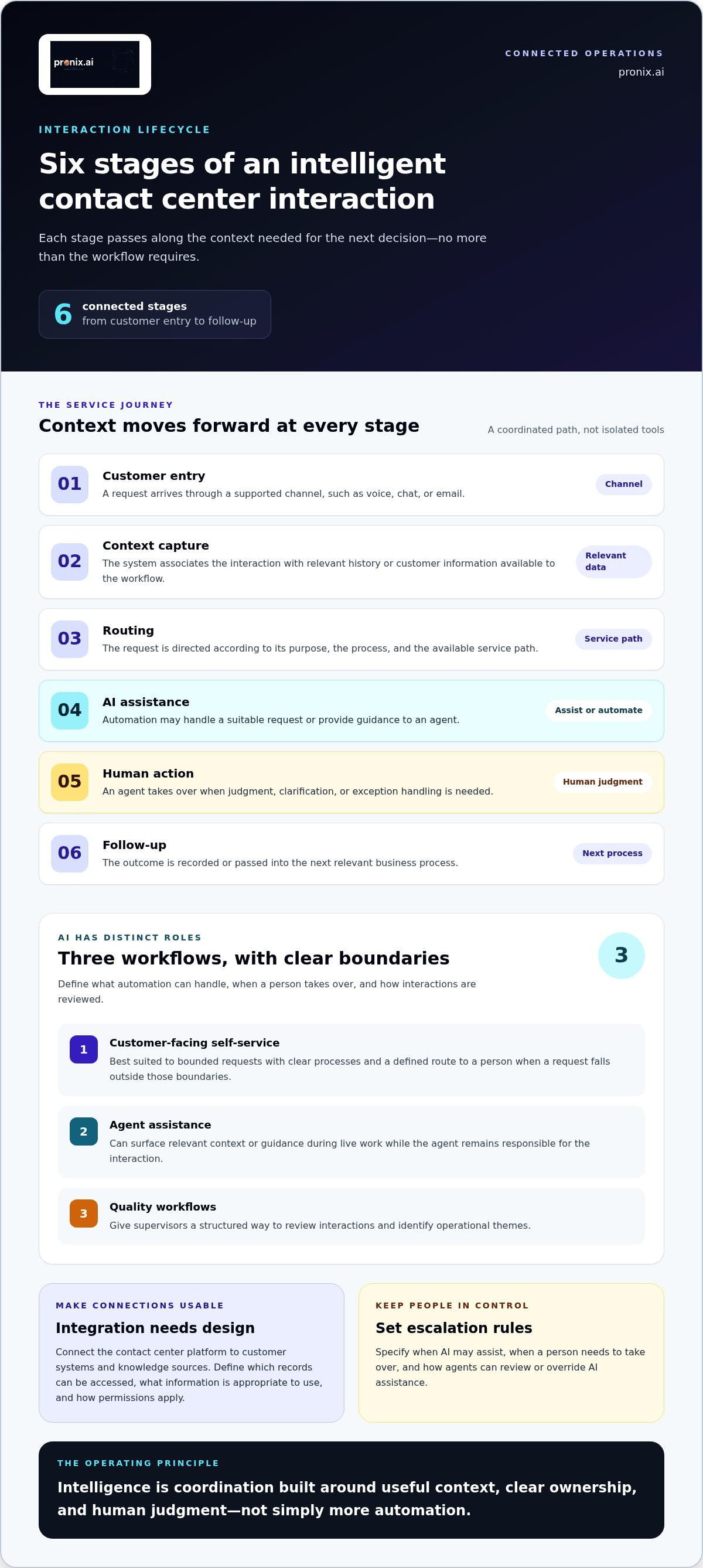
A connected interaction follows a defined path from the customer’s first message to the work that happens afterward. Each stage should pass along the context needed for the next decision, and no more than the workflow requires. That takes more than linking channels: the platform, enterprise systems, AI workflows, agents, and supervisors must operate within agreed access and escalation rules.
- Customer entry: A request arrives through a supported channel, such as voice, chat, or email.
- Context capture: The system associates the interaction with relevant history or customer information available to the workflow.
- Routing: The request is directed according to its purpose, the process, and the available service path.
- AI assistance: Automation may handle a suitable request or provide guidance to an agent.
- Human action: An agent takes over when judgment, clarification, or exception handling is needed.
- Follow-up: The outcome is recorded or passed into the next relevant business process.
This sequence depends on integration design. A contact center platform can coordinate the interaction, while connections to customer systems and knowledge sources provide relevant information. Teams need to define which records can be accessed, what information is appropriate to use, and how permissions apply. Otherwise, systems may be technically connected without giving employees reliable, usable context.
Where AI Supports Self-Service, Agent Assistance, and Quality Workflows
Customer-facing automation is best suited to bounded requests with clear processes and a defined route to a person when a request falls outside those boundaries. Agent assistance serves a different purpose: it can surface relevant context or guidance during live work while the agent remains responsible for the interaction. Quality workflows give supervisors a structured way to review interactions and identify operational themes.
Design these as distinct workflows, even when they share data. For each one, specify the information it can use, the actions it can take, when human judgment is required, and how exceptions are handled. This makes oversight part of the operating design rather than an afterthought.
Why Integrations and Customer Context Matter
Customer data can inform routing or agent decisions only when its purpose, permissions, and access are designed appropriately. An agent handling a follow-up, for example, may need relevant prior interaction details and an approved knowledge source, not unrestricted access to every enterprise record. Supervisors also need an agreed view of workflows so they can assess how work is progressing and where review is needed.
Amazon Connect, Genesys, and NICE are platform environments that can be integrated with AI-driven workflows and enterprise systems. Their capabilities and implementation choices differ, so the architecture should reflect the organization’s processes, data, and governance requirements. For a broader modernization perspective, see the AI-driven CX modernization enterprise guide.
Connected context makes AI relevant; governed workflows make it operationally useful. Organizations planning that transition can explore enterprise contact center implementation and managed services as part of a structured modernization approach.
How to Evaluate Intelligent Contact Center Solutions Beyond Feature Lists
Start with the service journeys your organization needs to support, not a vendor’s AI checklist. Intelligent contact center solutions should fit the channels customers use, the workflows employees follow, the systems that hold relevant data, and the controls your organization requires. Use this framework to compare solution design and implementation fit, not to rank vendors.
Use the criteria below as a comparison matrix. For each proposed architecture, record what it supports, what depends on integration or process changes, and what remains unresolved.
- Channel coverage: Can the solution support the channels in priority journeys and preserve relevant interaction context as customers move between them?
- Workflow fit: Does it support the actual steps, exception paths, and handoffs involved in resolving a request?
- Integration: Can it connect with the customer systems and knowledge sources required, with access designed around appropriate permissions?
- Governance: Are ownership, access, review, auditability, and change controls defined for the workflows and data involved?
- Human control: Can employees review AI assistance, take over when needed, and manage requests that fall outside automation boundaries?
- Measurement: Can the organization assess service outcomes and operational performance against a documented baseline?
Which Capabilities Should Enterprise Buyers Prioritize?
Prioritize capabilities that work together. Omnichannel context has limited value if routing logic ignores it; routing has limited value if agents can’t act on the information; and AI assistance needs clear escalation paths. Assess each AI use case by the task it performs, the consequence of an error, the information it requires, and how a person can intervene. Address security, governance, auditability, and change management alongside technical requirements, not as a later review.
Separate essential operating requirements from optional features. A workflow may first need reliable context, appropriate access, and a clear owner before adding conversational automation or other advanced AI functions. This helps direct investment toward operational gaps rather than feature counts.
How to Compare Platform Fit Without Choosing by AI Feature Count
Compare how each candidate architecture fits existing platforms, customer journeys, data access, and operating constraints. Distinguish the contact center platform from implementation services and model choices: licensing a platform, integrating workflows, and developing proprietary models are different activities. Platform-selection trade-offs, including Salesforce Agentforce and Genesys Cloud CX, are explored in this Salesforce Agentforce and Genesys CX comparison.
Ask teams to assess the same representative journeys and exceptions against the same criteria. This makes trade-offs visible: a feature may be compelling, but its value depends on integration effort, governance requirements, employee workflow, and a measurable purpose. A strong evaluation connects each capability to an operational need and a responsible path to use.
How to Implement Intelligent Contact Center Solutions with Control
Modernization should advance in deliberate stages. Before automating more interactions, establish how priority journeys work today, where employees encounter friction, and what controls each workflow requires. Intelligent contact center solutions are production-ready only when workflows, integrations, measures, and operational ownership are designed together.
- Baseline journeys: Document customer paths, handoffs, exceptions, current tools, and available performance and risk measures.
- Prioritize use cases: Select a defined need based on customer impact, operational importance, data readiness, and suitability for automation or agent assistance.
- Design integrations: Map system dependencies, information flows, permissions, and fallback paths before configuring the workflow.
- Set governance: Assign owners, access controls, human oversight, escalation conditions, and audit requirements.
- Pilot and test: Validate the workflow against representative interactions and failure scenarios, then review results with operational, technical, and governance stakeholders.
- Scale with evidence: Expand only when the controls work in practice, measures are understood, and teams are prepared to manage the workflow.
How to Move from Use-Case Selection to a Controlled Pilot
Choose a bounded workflow with a named operational owner, measurable objectives, and explicit conditions for escalation to an employee. Map the required data, integrations, decisions the workflow may make, and what happens when information is missing or a system is unavailable. Test routine requests and edge cases with frontline, technical, and governance teams before launch. A pilot should validate the operating design, not just whether the technology responds.
Set a baseline before testing so results have context. Agree on measures for service quality, operational efficiency, employee adoption, and risk. Depending on the use case, measures might include resolution outcomes, process completion, employee feedback, exceptions requiring review, or adherence to approved workflows. Decide who reviews each measure and how findings will inform changes. One favorable metric alone doesn’t prove the full workflow is ready to scale.
What to Govern Before Expanding AI Across the Contact Center
Assign accountable owners for workflow changes, data access, AI behavior, quality review, and operational incidents. Define who can approve changes, how exceptions are escalated, and what evidence must be retained for review. Monitor customer impact, employee adoption, output quality, and policy adherence against agreed thresholds, then document actions when results fall outside expectations. Broader oversight considerations are covered in this enterprise AI governance framework.
Scale only after the workflows, controls, and operational ownership are proven. This keeps expansion tied to evidence rather than feature availability. To plan a governed implementation and establish a path from pilot to production, work with pronix.ai on contact center modernization.
How pronix.ai Helps Enterprises Modernize Intelligent Contact Center Operations
Enterprise contact center modernization requires more than selecting a platform or adding an AI feature. pronix.ai supports organizations across strategy, implementation, integration, and ongoing managed services, connecting business priorities to production operations. As an implementation and operations partner, pronix.ai works with platforms such as Amazon Connect, Genesys, and NICE. The platform choice and integration approach are shaped by the organization’s existing architecture, service processes, and governance needs.
The work starts with the operating challenge. Leaders may need to improve how customer journeys move between teams, give employees better access to relevant information, or introduce AI into a defined workflow. Strategy translates those priorities into use cases, process decisions, integration requirements, and measures for evaluating progress. This keeps modernization focused on practical business value rather than technology adoption for its own sake.
From Contact Center Strategy to Production-Ready Implementation
Implementation connects people, platforms, data, and operational processes. It can involve integrating contact center platforms with enterprise systems, designing AI-driven workflows, and aligning access, oversight, and escalation with how teams work. Security, governance, scalability, and auditability belong in the architecture and delivery approach, not in a separate review after launch. For broader transformation context, explore the AI-driven CX modernization guide.
Each environment calls for decisions based on its systems and operating model. Amazon Connect, Genesys, and NICE are platform options, not interchangeable implementations; integration choices and workflow design depend on project requirements. The objective is to connect the selected environment to governed operations, with measures that help leaders understand service quality, adoption, operational efficiency, and business value over time.
How Managed Services Support Continuous Contact Center Improvement
Production isn’t the end of modernization. Enterprise AI managed services can support the ongoing operation of AI and CX capabilities as workflows, business needs, and oversight requirements evolve. This includes maintaining operational ownership, reviewing how workflows function, and keeping governance aligned with change. Clear responsibilities help teams address issues, evaluate proposed changes, and connect improvement work to agreed objectives without assuming automation should expand by default.
A practical next step for enterprise leaders is to identify one priority customer journey, its operational owner, the systems it depends on, and the outcomes that matter. That creates a focused starting point for modernization. To explore how strategy, implementation, integration, and managed services can support your initiative, discuss an enterprise contact center modernization initiative with pronix.ai.
Set a Clear Next Milestone for Contact Center Modernization
Your next move isn’t to approve a broad automation roadmap. Identify a customer journey where fragmented information or avoidable handoffs create a clear operational constraint. Define the decision you want to improve and the evidence that would justify a change. This keeps modernization anchored in business priorities while giving teams room to adapt as customer expectations and operational needs evolve.
Treat Intelligent contact center solutions as an evolving capability, not a one-time technology launch. As teams learn from live operations, they can refine workflows, strengthen controls, and decide where human expertise should remain central. A focused starting point gives business, technology, and operations leaders a shared basis for decisions.
pronix.ai works with enterprises on CX modernization through strategy, implementation, and managed services. If you’re ready to turn a priority into a practical initiative, discuss an enterprise contact center modernization initiative. Start with the customer journey that matters most and build toward a more connected operation with confidence.
Frequently Asked Questions
What are intelligent contact center solutions?
Intelligent contact center solutions combine contact channels with the data, workflows, and employee tools needed to manage customer requests. For example, a customer updating account details may begin online and then need help from an agent. A connected operation can support that handoff with relevant information and a defined process, rather than making the customer repeat every detail. The specific capabilities depend on the organization’s systems and service design.
How do intelligent contact center solutions use AI?
AI can support customer self-service, help classify or route requests, and give agents relevant information during a conversation. Its role should match the task. For instance, an automated assistant might handle a straightforward status inquiry, while a sensitive or unclear request is directed to a person. Enterprises should decide what information AI may use, how employees can review its assistance, and how exceptions are handled.
What is the difference between an intelligent contact center and a traditional contact center?
A traditional contact center may depend more heavily on employees manually searching across tools and coordinating next steps. An intelligent operation can use connected information and workflows to support decisions across a service journey. The distinction isn’t simply whether AI is present. It’s whether technology helps employees act with relevant context while preserving room for judgment, exception handling, and clear accountability.
Can intelligent contact center solutions work with existing enterprise systems?
Yes. They can be integrated with existing systems when the architecture supports the required data flows and access controls. A practical assessment identifies which system owns each record, what information the contact center needs, and when it needs to be available. For example, an agent may need an order status without broad access to unrelated customer records. Integration design should account for permissions and data quality.
How do enterprises measure the success of intelligent contact center solutions?
Measure outcomes that reflect the customer journey, not just activity volume. Useful indicators can include repeat contacts for the same issue, transfer rates between teams, successful self-service completion, and customer feedback after resolution. Compare results with a baseline and review them alongside service quality and employee experience. A lower interaction count alone may not indicate success if customers still need to contact the organization again.
Are intelligent contact center solutions suitable for regulated industries?
They can be suitable when the design reflects the organization’s risk profile, data policies, and applicable obligations. Before deployment, define who can access customer information, which decisions require human review, and how workflow changes and exceptions are recorded. A financial services team, for example, may set different review controls for a routine request than for a complex account issue. Suitability depends on implementation and governance, not the AI label.
How can an enterprise introduce AI into its contact center without disrupting service?
Start with a narrow, lower-risk workflow and test it before making it part of live service. Use representative scenarios, prepare agents for the changed process, and keep an established route to human support. Set conditions for pausing or reverting the workflow if service quality or system behavior falls outside expectations. Expand only after teams have reviewed what happened and addressed problems found during the initial rollout.