

The best AI tools for contact center agent assistance aren’t the ones with the longest feature lists. They’re the ones that deliver accurate, governed guidance in live agent workflows without adding friction. Compare how each tool supports specific interactions, not just what it promises in a demo.
Contact center leaders need to improve agent performance while keeping service consistent, systems connected, and human judgment in control. Capabilities can be hard to compare, and integrating enterprise knowledge with contact center platforms can be complex. Concerns about accuracy, security, and oversight can also slow adoption. Choosing a tool is an implementation decision as much as a procurement decision.
This guide explains how to assess agent-assistance capabilities, integration requirements, governance controls, and human oversight. You’ll learn how to build a practical shortlist, define deployment criteria, and measure readiness for production and ongoing improvement. The goal is a solution that fits your workflows and enterprise environment, with a clear path from evaluation to operation.
Key Takeaways
- Separate agent-facing assistance from customer-facing bots and autonomous resolution to match tools to the right workflows.
- Compare AI tools for contact center agent assistance by the tasks they support, the data they need, and where agents retain control.
- Address accuracy, privacy, and agent trust through clear governance and human checkpoints.
- Evaluate tools in a defined workflow, then track adoption, handling time, transfer patterns, quality, and rework.
- Plan for production with workflow ownership, approved data, ongoing monitoring, and change management.
What AI Tools for Contact Center Agent Assistance Actually Do
Agent assistance is AI that supports a human contact center agent during or after a customer interaction, while leaving the agent responsible for decisions and customer-facing actions. AI tools for contact center agent assistance can interpret conversation context, retrieve relevant information, suggest next steps, or prepare documentation. The agent can review, adapt, or ignore those recommendations.
This distinction matters. Assistance informs a human. Automation performs a defined task, such as classifying a case or drafting a summary. Autonomous resolution lets an AI system handle an interaction or complete a workflow without an agent making each decision. These approaches can coexist, but they involve different levels of human control.
Assistance can fit into voice, chat, email, and case-management workflows. On a call, it may transcribe speech and surface relevant knowledge. In chat or email, it may suggest a response for the agent to edit. In a case-management workflow, it may summarize an interaction or prompt a follow-up step. The broader mix of call center technologies includes capabilities such as speech recognition and AI. Their value depends on how well they fit the agent’s actual workflow.
Which contact center tasks can AI assist?
Common capabilities support different points in the interaction lifecycle:
- During voice interactions: Real-time transcription captures the conversation, while intent detection helps identify the customer’s need.
- Across channels: Knowledge retrieval surfaces relevant information, and suggested responses give agents a draft to review and adapt.
- After the interaction: Conversation summaries, next-step prompts, and after-call documentation can help agents record outcomes and move work forward.
A feature’s presence doesn’t guarantee it will work consistently across every channel. Capabilities depend on the contact center platform, the data the tool can access, and how the workflow is implemented. For example, a response suggestion is useful only if it reflects the interaction context and draws on information the agent is authorized to use.
Agent assistance versus customer-facing AI
Customer-facing self-service AI interacts directly with customers. It may answer questions or handle a defined task without an agent taking part in every exchange. Agent-facing assistance has a different role: it equips the human speaking or writing to the customer. The agent remains the decision-maker, even when AI prepares information or proposes an action.
Recommendations don’t have to be sent automatically. A tool can present a suggested reply for approval, provide a knowledge result for the agent to assess, or prepare a summary for review before it’s saved. Workflow design determines where AI can act and where a human checkpoint is required. That makes agent assistance a practical way to introduce AI into live operations while retaining human judgment and accountability.
Compare Agent-Assistance Capabilities Against Real Agent Workflows
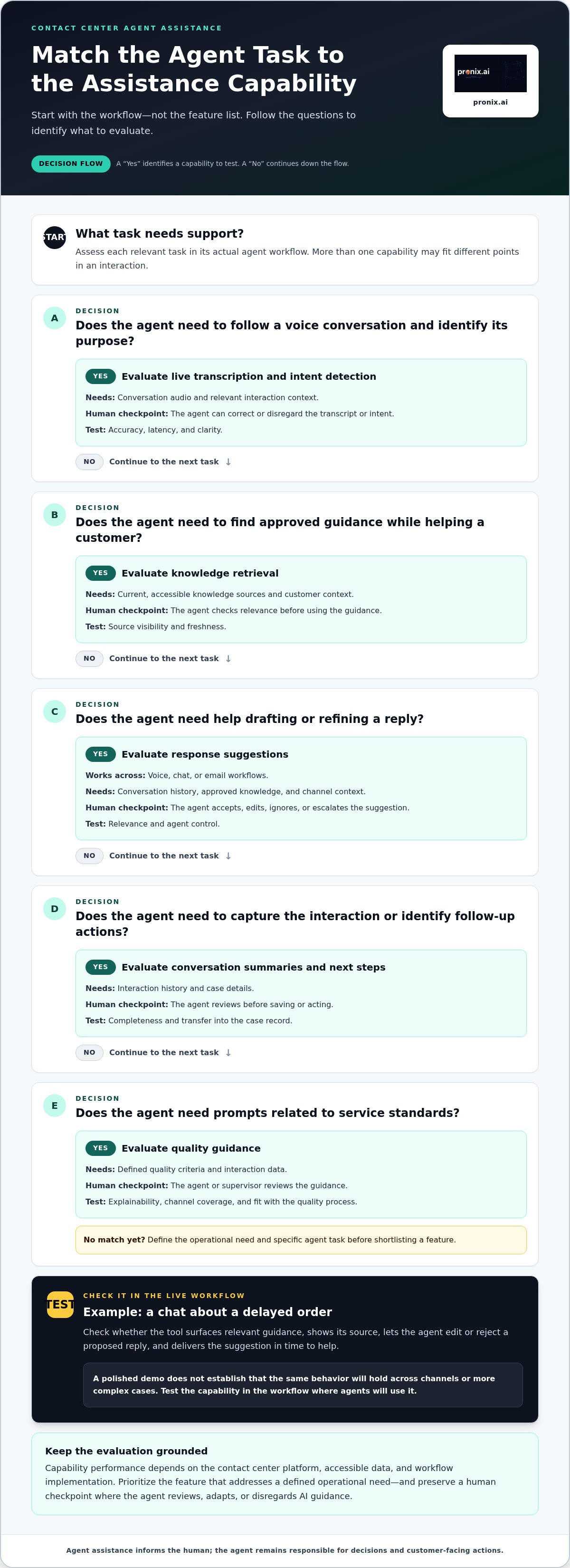
Evaluate each capability against a specific agent task, not as a standalone feature. The table outlines what the tool needs, where a human checkpoint belongs, and what to examine during testing. Channel coverage and performance depend on the platform, data access, and implementation.
| Capability | Agent task | Data needed | Human checkpoint and evaluation focus |
|---|---|---|---|
| Live transcription and intent detection | Follow a voice conversation and identify its purpose | Conversation audio and relevant interaction context | Agent corrects or disregards transcript or intent; assess accuracy, latency, and clarity. |
| Knowledge retrieval | Find approved guidance while assisting a customer | Current, accessible knowledge sources and customer context | Agent checks relevance before using guidance; assess source visibility and freshness. |
| Response suggestions | Draft or refine a reply in voice, chat, or email workflows | Conversation history, approved knowledge, and channel context | Agent accepts, edits, ignores, or escalates the suggestion; assess relevance and control. |
| Conversation summaries and next steps | Capture the interaction and identify follow-up actions | Interaction history and case details | Agent reviews before saving or acting; assess completeness and transfer into the case record. |
| Quality guidance | Receive prompts related to service standards during or after an interaction | Defined quality criteria and interaction data | Agent or supervisor reviews guidance; assess explainability, channel coverage, and fit with the quality process. |
Test guidance in the live workflow
For real-time guidance, check that recommendations draw from approved knowledge and reflect the current customer context. For example, test a chat about a delayed order. Does the tool surface relevant guidance, show its source, and let the agent edit or reject a proposed reply? Record whether the suggestion arrives in time to help. A polished demo doesn’t prove the same behavior will hold across channels or more complex cases.
Prioritize features that address a defined operational need. If agents spend time searching for approved answers, retrieval may be essential. If the main gap is incomplete case records, summaries and documentation may matter more. Quality prompts can help where they support a clear review process, but they may be optional for an initial workflow.
Check summaries and workflow handoffs
A useful summary should preserve customer intent, commitments made, and unresolved issues, not just shorten the conversation. Test whether agents can correct it and whether approved details flow into the relevant case fields without creating extra rework. Broader decisions about platform integration and operating-model change are covered in this AI-driven CX modernization guide.
Across AI tools for contact center agent assistance, assess relevance, explainability, latency, channel coverage, and agent control in the workflow where each feature will be used. For a broader view of implementation planning, explore enterprise AI implementation.
Address the Biggest Risk: Accuracy, Privacy, and Agent Trust
An incorrect recommendation can mislead an agent, and exposing sensitive customer data can undermine trust. These risks call for design and governance controls before deployment. Agent-assistance risk depends on the data a tool can access, the permissions it receives, the controls applied to its outputs, and the oversight built into the workflow.
Set clear boundaries. Ground recommendations in approved, maintained sources. Limit access to the information needed for a defined use case. Keep an agent review step where a suggestion could affect a customer commitment or case decision. Make recommendations traceable so teams can investigate what was shown and how it was handled.
Evaluate answer quality and human control
Test with representative interaction scenarios and approved knowledge, including cases where the right answer is unclear or unavailable. Don’t score only whether a response sounds plausible. Check whether it reflects the source, the customer’s situation, and the agent’s task. Agents should be able to inspect supporting information, correct generated content, and report problematic suggestions through a defined feedback path.
Define fallback behavior before live use. If the tool can’t find relevant guidance or confidence is low, it should avoid presenting an unsupported answer as fact. Depending on the workflow, it can show no recommendation, point the agent to an approved resource, or prompt escalation to a supervisor or specialist. Human control should be clear at each step, including who can approve, override, or escalate.
Govern data access across workflows
Map the information the tool can access to the agent’s role, connected systems, and approved use case. A workflow that retrieves general product guidance may need different permissions from one that summarizes a customer record. Review these boundaries with security, privacy, contact center, and data stakeholders before expanding access.
Governance also requires reviewability. Define what interaction or recommendation activity is logged, who can review those records, how long they’re retained, and how concerns are escalated. Align those decisions with enterprise policies and the workflow’s sensitivity. Clear ownership helps teams respond when knowledge changes, an output is challenged, or the process needs adjustment.
For broader production governance considerations, see this enterprise AI agent production guide. Applying these controls turns AI tools for contact center agent assistance into a governed workflow that agents can use with informed judgment, rather than a black box they’re expected to trust.
Choose a Tool with a Measurable Evaluation and Integration Plan
Evaluate agent assistance as an operational change, not a feature demonstration. A structured pilot can show whether a capability fits the workflow, connects reliably to enterprise systems, and earns agent use. Set measures before testing so the decision rests on comparable evidence rather than broad performance claims.
Set pilot goals and measures before testing
Start with one narrow, repeatable workflow, such as retrieving approved guidance during a specific type of customer inquiry. Define who will use the tool, what task it should support, and what a useful outcome looks like for agents and customers. Record the current process and performance before enabling assistance.
- Define the workflow. Specify the interaction type, channel, agent task, and boundaries of the tool’s role.
- Establish a baseline. Capture current handling time, transfer patterns, quality results, rework, and other measures relevant to that workflow.
- Test under realistic conditions. Use representative interactions and approved data, and document when suggestions are accepted, edited, ignored, or escalated.
- Review results. Compare the pilot with the baseline, review agent feedback, and look for effects on quality and customer handling, not just speed.
- Decide what follows. Continue, adjust, expand, or stop based on the evidence and operational readiness.
Review adoption alongside outcomes. Low use may mean guidance arrives too late, doesn’t fit the task, or adds work. Segment findings by workflow and agent experience where useful, and account for changes in interaction mix or operating conditions. Vendor-published results can inform questions, but treat them as directional unless the context, baseline, population, and measurement method are comparable to yours. Don’t assume the same result will transfer to your contact center.
Assess integration and operational fit
Map every connection the workflow requires. Depending on the environment, that may include a contact center platform such as Amazon Connect, Genesys, or NICE, plus CRM and case systems, enterprise knowledge sources, identity services, and data used to personalize recommendations. Check how information moves between systems, whether access follows existing permissions, and what happens when a connection or source is unavailable.
Integration fit also affects the agent experience. Test whether assistance appears in the right workflow, uses current context, and responds quickly enough to be useful. Identify the teams responsible for knowledge quality, access changes, support, and ongoing review before expanding beyond the pilot.
For broader implementation considerations, read the secure enterprise AI deployment guide. To turn evaluation findings into an implementation plan, plan an enterprise AI implementation around your contact center workflows and integration needs.
Move from Agent-Assistance Selection to Governed Production
A successful pilot validates a workflow. Production readiness also requires accountable owners, approved data, ongoing monitoring, and a plan for change. Without these foundations, assistance can become outdated, inconsistent, or difficult to manage as the contact center evolves.
What a production-ready agent-assistance operating model includes
Assign clear ownership before expanding. Knowledge owners maintain the accuracy of approved sources. Workflow owners decide how recommendations appear and when human review is required. Operations teams monitor adoption and quality, while incident response roles handle problematic outputs or workflow failures.
Give agents a practical feedback loop. They need a clear way to flag irrelevant or incorrect recommendations, and teams need a process to review reports, identify patterns, and update knowledge or workflow rules. Schedule operational reviews to assess adoption, quality, risks, and changing business requirements. Use those reviews to decide whether a validated workflow is ready to expand to another channel, interaction type, or team.
Scale in controlled steps. Define acceptance criteria for each expansion, preserve human accountability for customer-impacting decisions, and monitor whether performance remains consistent as data sources and workflows change. If quality declines or a control stops working as intended, owners should be able to investigate and adjust the deployment.
How pronix.ai supports enterprise contact center implementation
Moving from platform capability to reliable operations takes strategy, technical implementation, and ongoing management. pronix.ai helps enterprises design and operate intelligent workflows that fit their contact center environment, with integration experience across platforms including Amazon Connect, Genesys, NICE, AWS, Microsoft, Salesforce, and Kore.ai. The implementation focus is secure, scalable production with enterprise governance, security, and auditability.
This work connects the selected capability to the systems agents use, the knowledge they rely on, and the controls the organization needs. It also helps establish ownership and operational processes so teams can monitor the workflow and adapt it as requirements change. AI tools for contact center agent assistance deliver durable value when platform integration, governance, and human accountability are built into the operating model, not added after launch.
To align strategy, integration, governance, and ongoing operations with your contact center goals, discuss an enterprise AI implementation with pronix.ai.
Turn Agent Assistance into a Production-Ready Capability
The right AI tools for contact center agent assistance fit real agent workflows, connect to enterprise knowledge and systems, and keep human judgment in the loop. Compare capabilities by the tasks they support, then evaluate them against a baseline using measures such as adoption, quality, handling time, transfers, and rework.
Selection is only the starting point. Production depends on approved data, clear workflow ownership, defined oversight, and ongoing monitoring. A controlled evaluation helps leaders see what works in their environment and where integration or governance needs attention before expansion.
pronix.ai brings strategy, technical implementation, and managed services to enterprise AI initiatives, working across platforms including AWS, Microsoft, Salesforce, Kore.ai, and Genesys. Security, governance, auditability, and scalable production outcomes guide the approach. Discuss an enterprise AI implementation aligned with your contact center goals.
With a measured plan and the right operating foundations, you can move from tool evaluation to agent assistance designed to support teams reliably as your needs evolve.
Frequently Asked Questions
What are AI tools for contact center agent assistance?
AI tools for contact center agent assistance support human agents during or after customer interactions. They can transcribe conversations, retrieve approved knowledge, suggest replies, or prepare summaries for an agent to review. The agent remains responsible for decisions and customer-facing actions. This differs from customer-facing automation, which communicates directly with customers, and autonomous resolution, where a system completes a task without an agent directing each step.
How do AI tools assist contact center agents during live calls?
During live calls, AI can convert speech into text, identify the customer’s likely intent, and retrieve relevant guidance from approved knowledge sources. It may also propose a response or surface a next step based on the conversation. The agent reviews the information and decides whether to use it. Useful assistance should fit the call workflow, reflect current context, and avoid interrupting or distracting the agent.
Can AI agent-assistance tools work with an existing contact center platform?
Yes, they can work with an existing platform, but the integration approach depends on the contact center systems, available data, and workflow requirements. Assess how the tool will connect to voice or digital channels, customer records, case management, identity services, and knowledge sources. Also consider permissions, information flow, and what happens if a connection fails. The goal is to fit assistance into agents’ existing work rather than create disconnected steps.
How do you measure the effectiveness of AI agent assistance?
Measure effectiveness by comparing a defined workflow with its baseline before assistance is enabled. Track agent adoption, handling time, transfer patterns, quality results, and rework, selecting indicators that reflect the task’s goals. Review agent feedback and examine results by workflow, since one overall average can hide important differences. Consider changes in interaction mix and operating conditions when interpreting results, and avoid treating vendor-reported outcomes as directly comparable without matching context.
Are AI-generated agent suggestions accurate enough for customer interactions?
Accuracy depends on the quality of approved knowledge, customer context, and workflow controls, so suggestions should be tested before relying on them in customer interactions. Use realistic scenarios, check whether recommendations reflect their sources, and let agents inspect, correct, or reject outputs. Define fallback behavior for uncertain or unavailable answers, such as showing no suggestion or prompting escalation. Ongoing review helps teams identify recurring errors and improve the workflow responsibly.
How do contact centers protect customer data when using AI assistance?
Contact centers protect customer data by limiting AI access to approved information and matching permissions to roles and use cases. Map which systems and data sources a workflow needs, then review those boundaries with relevant enterprise stakeholders. Define what activity is logged, who can review it, how records are handled, and how concerns are escalated. Governance should also assign responsibility for monitoring access and updating controls as workflows or business requirements change.
What is the difference between agent assist and an AI customer service chatbot?
Agent assist supports a human employee, while an AI customer service chatbot interacts directly with customers. An agent-assistance tool might retrieve guidance or draft a reply that the agent reviews before responding. A chatbot may answer a question or perform a defined self-service task without an agent handling each step. The distinction is the user and decision-maker: agents retain control in assisted workflows, while customer-facing automation handles parts of the interaction itself.
How can an enterprise move AI agent assistance from pilot to production?
Move from pilot to production by validating a focused workflow, comparing results with a baseline, and confirming that integrations and governance controls work as intended. Identify owners for approved knowledge, workflow changes, monitoring, and incident response. Gather agent feedback, review quality and operational risks, then expand in controlled stages when the workflow is ready. Maintain human accountability for customer-impacting decisions and continue tracking adoption and outcomes after deployment.