

Better workflows improve more than speed. Large enterprise workflow optimization means examining how work moves across teams and systems, then removing bottlenecks, unnecessary approvals, and repetitive manual tasks. The aim is to make work more reliable and easier to complete while preserving the controls complex organizations need.
Workflow optimization and process optimization are related, but they focus on different things. Workflow optimization looks at how tasks, decisions, and handoffs move through daily work; process optimization takes a broader view of how a process performs and where it can improve. This article explains the distinction, shows how AI integration can connect business systems and reshape workflows, and explores the effects on productivity, employee satisfaction, and customer experience. It also covers where optimization can create value, common enterprise challenges, and how disciplined implementation can make improvements more consistent.
Key Takeaways
- Map how work moves between teams to expose bottlenecks, unnecessary approvals, and repetitive tasks that could be automated.
- Distinguish workflow improvements, which target task flow and handoffs, from broader process changes that address how an operation performs.
- Assess AI integration by how well it connects systems and reduces siloed information, while keeping oversight and governance in view.
- Track measures such as cycle time, error rates, and first-time resolution to understand whether changes improve work for employees and customers.
1. What is Workflow Optimization?
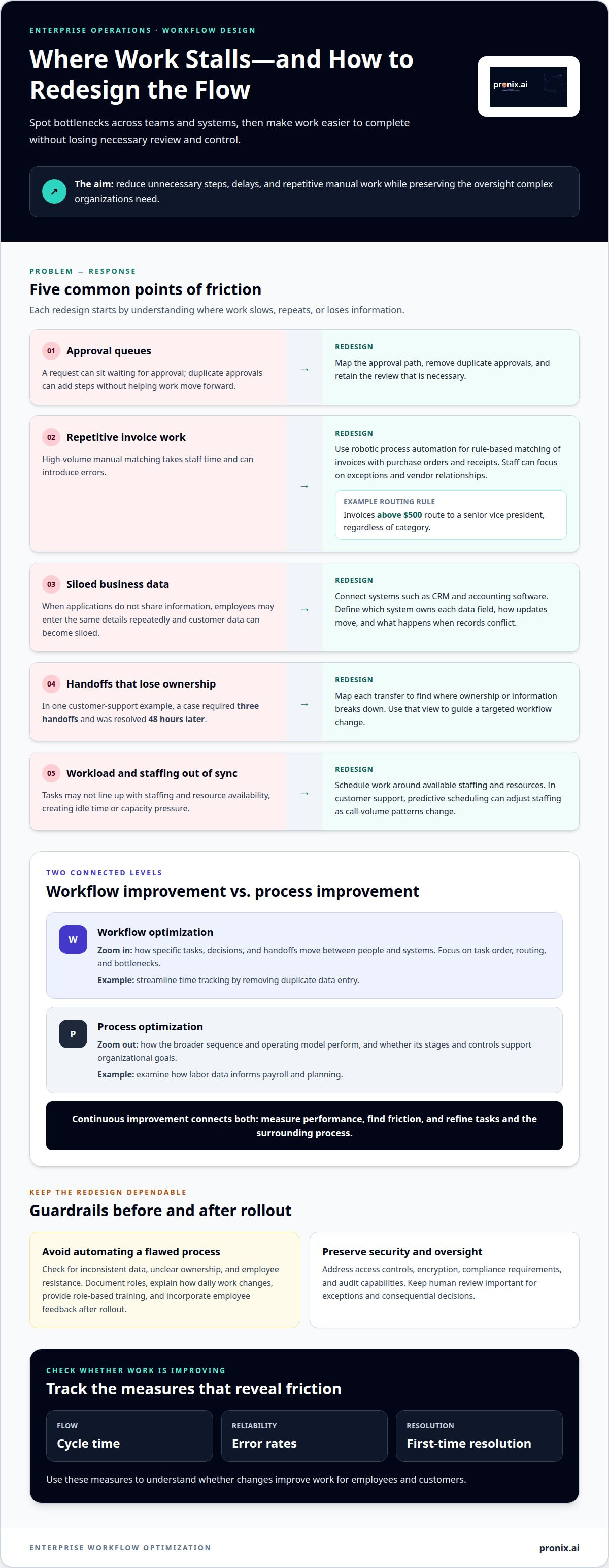
Workflow optimization aligns daily work with organizational goals by mapping steps, identifying constraints, and removing bottlenecks. A bottleneck is a point where work slows, such as a purchase request waiting in an approval queue. In a large enterprise, optimization might remove duplicate approvals or automate routine tasks while retaining necessary review.
Workflow automation applies rules or software to move work forward with less manual effort. Robotic process automation can handle repetitive, rule-based tasks, such as matching invoices with purchase orders and receipts, so accounts payable staff can focus on exceptions and vendor relationships. RPA can execute these tasks 24/7 and reduce manual errors in high-volume operations. A workflow designer might also route invoices above $500 to a senior vice president, regardless of category.
Scheduling is another practical application. Scheduled workflow automation can time tasks around staffing and resource availability, helping departments coordinate work across shifts or service periods. In customer support, for example, predictive scheduling can adjust staffing as call-volume patterns change. The goal is not automation for its own sake, but less idle time and a better match between workload and available capacity.
Workflow software can automate routine tasks, analyze workflow data, send notifications, and map steps visually. These capabilities help teams identify where work stalls, which handoffs cause delays, and where errors recur. Implementation should also address security and privacy through access controls, encryption, compliance requirements, and audit capabilities. These controls determine who can view or change information and how workflow activity is recorded.
Needs differ by industry and organization size because workflows reflect different risk levels, systems, workloads, and approval structures. A manufacturer may prioritize production handoffs, while a service organization may focus on case routing; a larger organization also needs coordination across more departments and connected systems. Software and implementation costs depend on workflow scope, integrations, data requirements, governance, and ongoing support; pricing is provided after a quote request.
2. Workflow optimization compared with process optimization
A process describes the broader sequence for achieving an outcome; a workflow defines how specific tasks move between people, systems, and decisions. For example, an invoice process may cover receipt through payment, while its workflow specifies who enters data, approves exceptions, and records completion. Workflow optimization targets task order, handoffs, and bottlenecks. Process optimization assesses the wider operating model, including whether its stages and controls support strategic goals.
The distinction matters at enterprise scale. A team might streamline time tracking by removing duplicate data entry, while process management examines how labor data informs payroll and planning. Similarly, workflow automation can route an invoice for review, while process improvement addresses why invoices arrive with incomplete information. Continuous improvement connects both levels: teams measure performance, identify friction, and refine tasks and the surrounding process.
Enterprise process orchestration coordinates connected workflows across departments. It helps preserve consistent rules as work crosses systems, while allowing different teams to manage their responsibilities. In a customer support example, a case required three handoffs and was resolved 48 hours later. Mapping those transfers can reveal where ownership or information breaks down, then guide a targeted workflow change.
To assess a platform or provider, prioritize integration with existing systems, workflow visibility, exception handling, access controls, audit capabilities, and room to scale. Compare pricing against the required implementation scope, integrations, governance, and ongoing support; costs depend on those factors, and service pricing follows a quote request.
Common risks include automating a flawed process, inconsistent data, unclear ownership, and employee resistance. Providers can reduce disruption by documenting roles, explaining how changes affect daily work, delivering role-based training, and incorporating employee feedback after rollout. For organizations connecting automation with wider AI initiatives, enterprise workflow automation expertise can help align implementation with operational requirements.
3. AI-powered integration between business systems
AI-powered integration connects business applications so information can move across departments without repeated manual entry. For example, syncing a CRM with accounting software can reduce transcription errors and customer-data silos. To make the integration dependable, define which system owns each data field, how updates move, and what happens when records conflict.
Enterprise teams can combine process mining, robotic process automation, and AI to uncover inefficiencies and streamline work. Process mining analyzes event data to show how tasks actually move through connected systems. Teams can use those findings to locate delays, apply RPA to repeatable, rules-based actions, and use AI for information classification or decision support. Human review remains important for exceptions and consequential decisions.
Integrations also need to account for remote employees and outsourced teams. A claims workflow, for instance, may pass from an internal intake team to a remote reviewer and an external processing partner. Define access by role, standardize the information required at each handoff, and maintain a visible record of status changes. This helps reduce missing information without assuming every participant uses the same application.
Cross-team integrations connect applications used by finance, operations, customer service, and suppliers. Shared definitions help teams interpret the same customer, order, or quality record consistently. In manufacturing, an aerospace example combined CNC machine sensor data with supplier quality-control reports in a quality data product, cutting rework by 35%. The value came from connecting operational signals to supplier information, not from adding another isolated dashboard.
Reporting completes the integration loop. A consolidated view can reveal growing queues, recurring exceptions, and handoff delays across business applications. Align reports with operational measures, assign an owner to each issue, and use findings to guide workflow changes. For example, a service manager can trace a case from intake through resolution and target the handoff causing avoidable waits. The cycle is practical: connect data, identify friction, make a controlled change, and measure the result.
4. Productivity, employee satisfaction, and customer satisfaction
An organization should assess workflow gains through both operational performance and the experience of doing the work. Automation can raise productivity, but its impact depends on whether it removes friction or simply moves effort elsewhere. Organizations that effectively implement automation technologies saw productivity improvements of 20%-25%. That result makes workflow design a business outcome, not just a technology deployment.
Administrative burden is a useful starting point. Companies implementing structured workflows reduced time wasted on administrative tasks by nearly 30%. For one data-operations example, staff spent 60% of the week finding data and 20% cleaning it before workflow changes. Those figures show how time spent locating and preparing information can displace analysis and decision-making.
Employee satisfaction improves when clear task ownership and reliable information replace repeated entry and avoidable rework. A process that wastes 20 minutes per employee per day can cost a 500-person organization thousands of hours every month. Implementing a more direct workflow can return time to judgment-heavy work, while role-based training and employee feedback help teams adapt to changed responsibilities.
Customer experience depends on the same operational discipline. A support workflow should make case ownership visible, give staff useful customer context, and route exceptions to the right team. Track measures such as cycle time, lead time, error rate, task completion rate, and first-time resolution to assess whether changes improve service, not just internal throughput. Customer feedback can help explain why a metric changed.
Continuous improvement keeps early gains from fading. A provider can establish baseline measures, monitor performance after implementation, and review employee feedback, customer comments, and incident reports. Regular reports then connect operational changes to outcomes, helping leaders adjust workflows when service quality or staff experience declines. To align automation with measurable business outcomes, explore enterprise workflow optimization support.
Pronix.ai: Enterprise AI Managed Services
pronix.ai helps enterprises move AI-enabled workflows from implementation into ongoing operations through Enterprise AI Managed Services. This can be a useful next step when workflows span departments, rely on connected systems, or need continued oversight after deployment.
For repetitive operational work, AI Business Automation can support workflow improvement. Agentic AI Implementation is suited to workflows that use AI agents, while AI-Driven CX Modernization focuses on customer experience operations. The right starting point depends on the workflow’s objectives, systems, and governance needs. Defining the scope helps align implementation with operational priorities and provides a basis for monitoring performance over time.
If your organization is planning or managing enterprise AI workflows, contact pronix.ai to discuss the work.
Build a durable operating model
The next step is to make improvement part of how the organization operates, rather than treating it as a one-time technology project. A durable large enterprise workflow optimization effort needs clear ownership, defined measures, and a review cycle that can respond as business priorities change. Start by selecting a workflow with a clear operational need, aligning the teams responsible for it, and agreeing how performance will be assessed.
Targeted AI capabilities may also help. pronix.ai offers Agentic AI Implementation, AI-Driven CX Modernization, and AI Business Automation for different enterprise needs. The right path depends on the intended outcome, the workflow environment, and the governance needed for responsible operation. Aligning these choices before implementation keeps technology decisions connected to business priorities.
For a practical discussion about your workflows and next steps, contact pronix.ai to discuss your workflows. A focused conversation can help turn an operational priority into a clear direction for action.
Frequently Asked Questions
What is Workflow Optimization?
Workflow optimization improves how work is carried out so teams can achieve a defined business outcome with less friction. For example, in employee onboarding, an organization might clarify who provisions system access and when managers approve role-specific requests. The key measure is whether the revised workflow reduces avoidable delays without weakening controls or leaving employees unsure about what to do next.
What feedback loops can be implemented to improve the workflow continuously?
Use a feedback loop to capture issues, assign an owner, make a targeted adjustment, and review what changed. For example, if incident reports repeatedly identify incomplete service requests, the workflow owner can refine intake requirements and assess later submissions for the same gap. Employee observations, customer comments, and operational records reveal different kinds of friction, so consider them together when prioritizing changes.
What is an enterprise workflow?
An enterprise workflow coordinates work across multiple roles, systems, or departments to achieve an organizational outcome. Vendor onboarding is one example: procurement collects supplier information, finance handles payment details, and a business owner reviews the request. A clear workflow defines responsibilities, decision points, required information, and exception paths so requests can progress without depending on informal knowledge held by one team.
What is workflow automation?
Workflow automation uses software to perform or route defined actions based on events and rules. For example, when a service request arrives, software can assign it to a queue based on its category and notify the responsible team. Automation works best when inputs and decision criteria are clear. Cases requiring interpretation, sensitive judgment, or handling of unusual exceptions should retain an appropriate human review path.
What is workflow orchestration?
Workflow orchestration coordinates related automated and human tasks across systems, including their sequence, dependencies, and responses to exceptions. In a product return, for example, an orchestration layer could coordinate a case record, eligibility review, warehouse notification, and customer update. If a step fails, the design should make the issue visible and route it for resolution instead of allowing later tasks to proceed with incomplete information.
What key performance indicators (KPIs) should be monitored to assess workflow efficiency?
Choose KPIs that reflect the workflow’s intended outcome, then interpret them together. Cycle time measures elapsed work time, while error rate highlights quality issues; task completion rate shows whether assigned work reaches completion. In customer support, first-time resolution can indicate whether an issue is handled without repeat contact. Pair operational measures with customer or employee feedback to spot trade-offs a single metric may miss.