
AI for accounts payable automation goes beyond moving invoices through a queue faster. It brings together invoice data capture, validation, coding, purchase-order matching, and approval routing, while people handle exceptions and decisions that require judgment. Reliable automation depends not only on the AI model but also on invoice data quality and consistent finance workflows.
Automation can reduce repetitive work, but implementation also raises practical questions about cost, system integration, data readiness, and employee trust. This article explains how AI supports invoice approvals and matching, what information it needs, which factors affect project costs, and how to address workforce concerns while retaining human oversight. The focus is on decisions that help finance leaders assess readiness and plan a controlled path from automation goals to operational use.
Key Takeaways
- Map approval handoffs and exception paths to see where automation can reduce manual delays while keeping people involved in decisions that need judgment.
- Assess how invoice data, coding rules and purchase-order records fit together before automating validation and matching.
- Account for system integration, process variation and data readiness when estimating the effort involved in adoption.
- Plan for employee concerns by making oversight clear and focusing automation on repetitive work first.
How does AP Automation fix the invoice approval process?
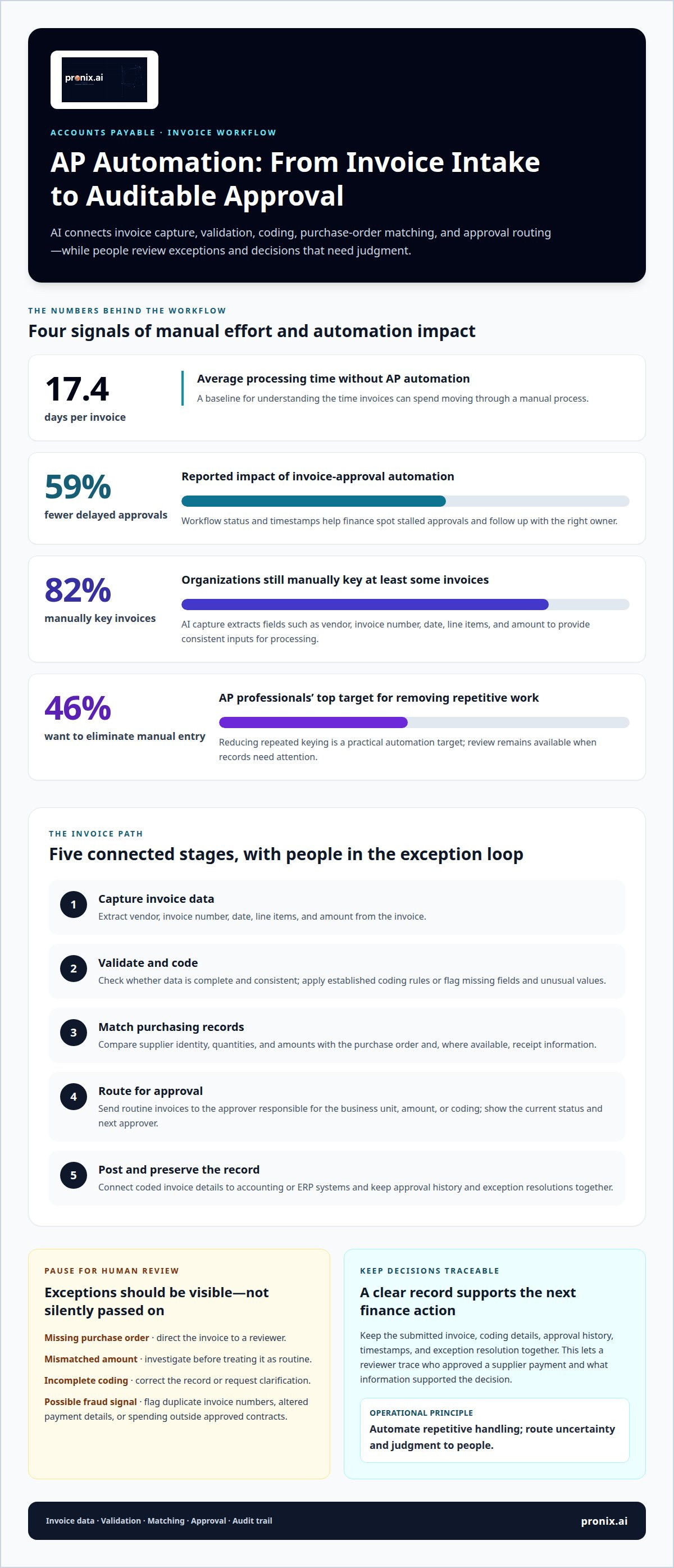
AI for accounts payable automation links invoice data to approval workflows, routing routine invoices and surfacing exceptions for review. Organizations without AP automation take an average of 17.4 days to process one invoice.
Automated Approval Routing
Automated routing sends each invoice to the approver responsible for its business unit, amount, or coding. An AI for accounts payable automation workflow can apply these rules to assign ownership and move routine invoices forward. For example, a facilities invoice can go to its cost-center approver, then to finance. This reduces manual forwarding and keeps approval steps consistent across teams.
Exception Handling and Resolution
Exception handling identifies invoices that need a person’s decision and directs them to the right reviewer. A missing purchase order, mismatched amount, or incomplete coding can pause one invoice without stopping other workflows. The reviewer can correct the record or request clarification from the supplier. Recording the resolution gives finance a clear basis for the next action.
Approval Delays and Workflow Visibility
Workflow visibility shows an invoice’s current status, its next approver, and any pending action. Automation technology for invoice approvals can reduce delayed payment approvals by 59%. With status and timestamps available, finance teams can spot stalled approvals and follow up with the right owner. That helps distinguish a routing delay from an invoice-data issue requiring investigation.
Payment and Auditability
Approval records link each decision to the payment process, making it easier to verify that required reviews occurred before an invoice advances. Keep the submitted invoice, coding details, approval history, timestamps, and exception resolution together. A reviewer can then trace who approved a supplier payment and what information supported the decision, creating a clearer record for finance operations.
Invoice validation, coding, and purchase-order matching
Invoice processing brings together data capture, validation, coding, and comparison with purchasing records. Automating these checks reduces manual handling while routing uncertain records to finance teams for review.
AI Invoice Capture and Data Extraction
AI invoice capture reads digital invoices and extracts fields such as vendor, invoice number, date, line items, and amount. It matters because those fields give downstream processing consistent inputs instead of relying on repeated manual entry. A study found that 82% of organizations still manually key at least some invoices into accounting systems.
Centralized invoice records bring documents, extracted data, and review notes together. A finance reviewer, for example, can see the submitted invoice alongside its processing status instead of searching through separate email threads.
Invoice Validation and Coding
Validation checks whether extracted invoice data is complete and consistent, while coding assigns expenses to the appropriate general-ledger accounts. Automation software can apply established coding rules and flag missing fields or unusual values for review. This gives finance teams a clear route from capture to approval instead of silently passing uncertain data forward.
Centralized documentation preserves the original invoice, coding changes, and reviewer decisions in one record. Since 46% of AP professionals would most like to eliminate manual data entry, reducing repetitive keying is a practical target, while review remains available for exceptions.
Purchase-Order Matching
Purchase-order matching compares invoice details with the related purchase order and, where available, receipt information. The process can check supplier identity, quantities, and amounts, then route mismatches for investigation rather than treating them as routine. This helps operations distinguish a valid variance from a duplicate or incorrectly billed item.
Fraud controls can also flag duplicate invoice numbers, altered payment details, or spending outside approved contracts. Clear exception records support investigation; integrated invoice processing can connect these checks to established workflows.
What is Accounts Payable Automation?
Accounts payable automation connects invoice capture and workflow logic with accounting records, moving invoices toward review and posting. Compare tools by their capture, coding, approvals, exception handling, and ERP connections, including how invoice data reaches finance systems. For U.S. tax and recordkeeping, retain source invoices, transaction details, accounting entries, and approval records in consistent, accessible records. Route uncertain tax classifications to finance for review.
Accounting and ERP Integrations
Accounting and ERP integrations connect the AP process to systems containing supplier, purchasing, and finance records. This allows invoice capture and approvals to use consistent data rather than isolated files. For example, a workflow can send coded invoice details to an ERP for posting and return payment status to the AP workspace.
Integration design depends on how many ERPs and financial systems an organization uses and how well they connect. Map where supplier records, purchase orders, and accounting entries originate. This reveals which data relationships need synchronization and where a handoff might duplicate information or interrupt processing.
AI AP Solution Implementation
Implementation configures invoice capture, processing rules, and system connections around an organization’s AP process. For reliable automation, the workflow must reflect real approval paths. A focused pilot can begin with one business unit or invoice category, then test extraction, coding, routing, and ERP posting against actual records.
During integration, teams define which system owns each data field and how exceptions return for review. For example, an ERP might remain the authoritative record for supplier details, while automation software handles capture and invoice routing. Testing these exchanges helps uncover incomplete data and mismatched fields before the workflow expands.
Integration and Compliance
Integration and compliance involve configuring system access, records, and workflow controls to support finance oversight. Automated activity still needs a traceable link between source documents and accounting entries. A documented workflow can keep the invoice, coding changes, approval history, and posting result together for review.
U.S. tax treatment can depend on the transaction, so invoice automation should not make unsupported tax judgments based on extracted text alone. A tax classification question, for example, can go to a qualified finance reviewer, with the decision recorded alongside the invoice. This keeps automated processing aligned with human review and established recordkeeping practices.
AI adoption costs, data quality, and employee concerns
Adoption costs depend on more than AI software. Finance-system integration, data cleanup, workflow changes, and ongoing support all affect the project effort. A focused pilot on selected vendors or invoice types can limit the initial scope and help the AP team assess data quality and matching results before expanding use.
Data quality directly affects what automation can do reliably. Roughly 39% of invoices contain at least one error, while manual accounts payable data entry has an error rate of one to four percent. In practice, inconsistent supplier names or incomplete invoice fields can weaken capture and matching. A finance team should define which errors require human action, then track how often they occur during the pilot.
Employee concerns need equal attention. A survey found that 94% of AP staff are enthusiastic about tools that automate repetitive work, while 64% of payables professionals are concerned about a lack of human involvement. These findings point to a practical approach: explain which work is automated, identify who handles exceptions, and keep review responsibilities visible. For example, an employee can validate a flagged invoice rather than rekey every document.
Process readiness also affects implementation effort. Standardized invoice workflows and digital documents are easier to assess than paper-heavy processes that vary across regions. Starting with vendors whose records are consistent helps establish a baseline before addressing weaker data sources. Define success in operational terms, such as fewer manual corrections or clearer exception queues, before expanding the workflow.
For a structured assessment of implementation effort, data readiness, and employee oversight, plan an AI business automation initiative around the AP process.
Pronix.ai: AI Business Automation
pronix.ai helps enterprises turn accounts payable automation plans into integrated business workflows through AI Business Automation. This work is relevant when invoice processing spans multiple systems, data quality is uneven, or teams need a controlled path from a focused pilot to broader operations.
For an AP initiative, pronix.ai can connect process design, data readiness, and implementation decisions. Data & AI Foundations supports underlying data needs, while Agentic AI Implementation can put suitable workflows into operation. Start with a defined business outcome, such as reducing manual handling or improving exception visibility, then assess systems, records, and human review requirements.
Contact pronix.ai to discuss how AI Business Automation could support your accounts payable goals.
Turn your AP priorities into a governed next step
Focus the next decision on operational fit, not automation for its own sake. Define the outcomes finance needs, the controls employees must retain, and the evidence leaders will use to assess progress. This gives an AI for accounts payable automation initiative a clear basis for moving from a contained workflow to broader adoption.
pronix.ai supports enterprise AI initiatives through AI Business Automation, Agentic AI Implementation, and AI-Driven CX Modernization. For accounts payable, the next step is to align the workflow, system integration, and human oversight with your operating priorities.
Discuss AP automation with pronix.ai to explore a practical path forward. A well-scoped decision can help your team advance with greater clarity and control.
Frequently Asked Questions
How much does AP automation software cost?
There is no single standard price for AP automation software. The cost of an implementation engagement depends on scope and is provided after a quote request. Key factors include invoice volume, ERP connections, workflow complexity, data cleanup, and ongoing support needs. Assess software licensing separately from implementation and integration costs, since they cover different parts of adoption.
Can AP Automation prevent duplicate payments?
AP automation can flag potential duplicate invoices before payment, but it cannot guarantee that every duplicate will be stopped. Matching controls can compare invoice numbers, supplier records, amounts, and dates, then send close matches for review. A supplier resubmission with a changed invoice reference, for example, may need a human decision before payment proceeds. Clear exception handling helps prevent false matches from blocking valid invoices.
Does AP Automation deter invoice fraud?
AP automation can strengthen fraud controls by flagging unusual invoice details for investigation, but it cannot eliminate fraud. A changed bank account or an unfamiliar supplier record, for example, can trigger a review before payment. Finance teams should keep vendor-detail changes under controlled review and retain evidence of the decision. Treat automated alerts as signals to investigate, not proof that fraud occurred.
How does AP Automation improve document management?
AP automation can organize invoice files and related records around searchable details, such as supplier, invoice identifier, or transaction date. This helps staff retrieve documents without searching individual inboxes or shared folders. A useful record links the invoice with supporting purchase information and review history, giving finance a clearer reference when resolving a supplier query or preparing internal reporting.
How does AP Automation intake vendor invoices?
AP automation can receive invoice files through configured intake channels and capture their contents for processing. Depending on the organization’s setup, intake may include digital files or scanned paper invoices. The system can identify key fields and flag unreadable or incomplete documents for review. Defining accepted formats and assigning responsibility for exceptions helps prevent invoices from getting lost before they enter the AP workflow.
Will AP Automation fix invoice-related communication problems?
AP automation can make invoice-related communication easier to coordinate, but it cannot resolve unclear ownership or incomplete supplier information on its own. A shared record of invoice status, pending action, and relevant notes can reduce back-and-forth between finance staff and suppliers. Teams can identify whether a query needs an internal coding decision or a corrected vendor document, then direct the follow-up appropriately.