

What if the best way to lower contact center costs isn’t to automate more interactions, but to resolve more customer issues with less effort? Contact center cost reduction AI can help, but only when it removes friction across the workflow instead of shifting work to agents or customers. Rising labor costs and service demand make the opportunity urgent. Legacy systems, unclear savings attribution, and poor handoffs make the business case harder than a successful demo suggests.
Those concerns are justified. Automation can reduce cost-to-serve, but deflection alone doesn’t prove value. If customers have to repeat themselves or agents spend more time correcting errors, apparent savings may come with higher operating costs and a worse experience.
This guide explains how to identify high-value automation opportunities, calculate net value using cost per resolved case, and build a measurable business case. It also covers workflow redesign, platform integration, and how to scale with governance, human escalation, and customer experience safeguards. The goal is practical: lower costs while resolving issues effectively and keeping service dependable.
Key Takeaways
- Focus automation on repetitive, high-volume work where demand, complexity, and risk make the opportunity clear.
- Compare baseline costs with post-deployment results, including implementation, integration, and ongoing operating costs.
- Contact center cost reduction AI is most sustainable when routine tasks are automated with clear service guardrails and fallback paths.
- Move from workflow discovery to a bounded pilot, then use evidence and accountable ownership to guide scale decisions.
- Connect CX modernization, enterprise platforms, governance, and operational measurement to keep automation aligned with customer and employee experience.
Why contact center cost reduction with AI starts with cost-to-serve
Cost reduction starts with a clear view of the work behind each resolved customer issue. Cost-to-serve includes the operational effort and expense required to resolve customer demand across channels and teams. It can include agent time, routing, system use, repeat contacts, and the follow-up needed to close a case. A useful definition is simple: Cost-to-serve is the effort and expense an organization incurs to resolve customer demand.
This shifts the goal from reducing headcount to removing avoidable work. AI may help agents find information faster, reduce unnecessary transfers, or automate a routine step. Its value depends on whether the customer’s issue is resolved with less total effort, not simply whether one interaction becomes shorter. Artificial intelligence in customer experience includes uses that automate tasks and support customer interactions, but each workflow still needs to be assessed in its operational context.
Which contact center costs should leaders examine first?
Map the work from customer demand to resolution. Start with labor, repeat contacts, transfers, after-contact work, and avoidable demand, such as questions caused by unclear processes or information. Separate directly measurable operating costs from broader productivity effects, such as time returned to agents for complex cases. Establish a pre-implementation baseline using internal data, and record how each measure is defined and sourced. For example, if a transfer is counted differently across teams, standardize that definition before comparing results.
Why cost reduction cannot be measured in isolation
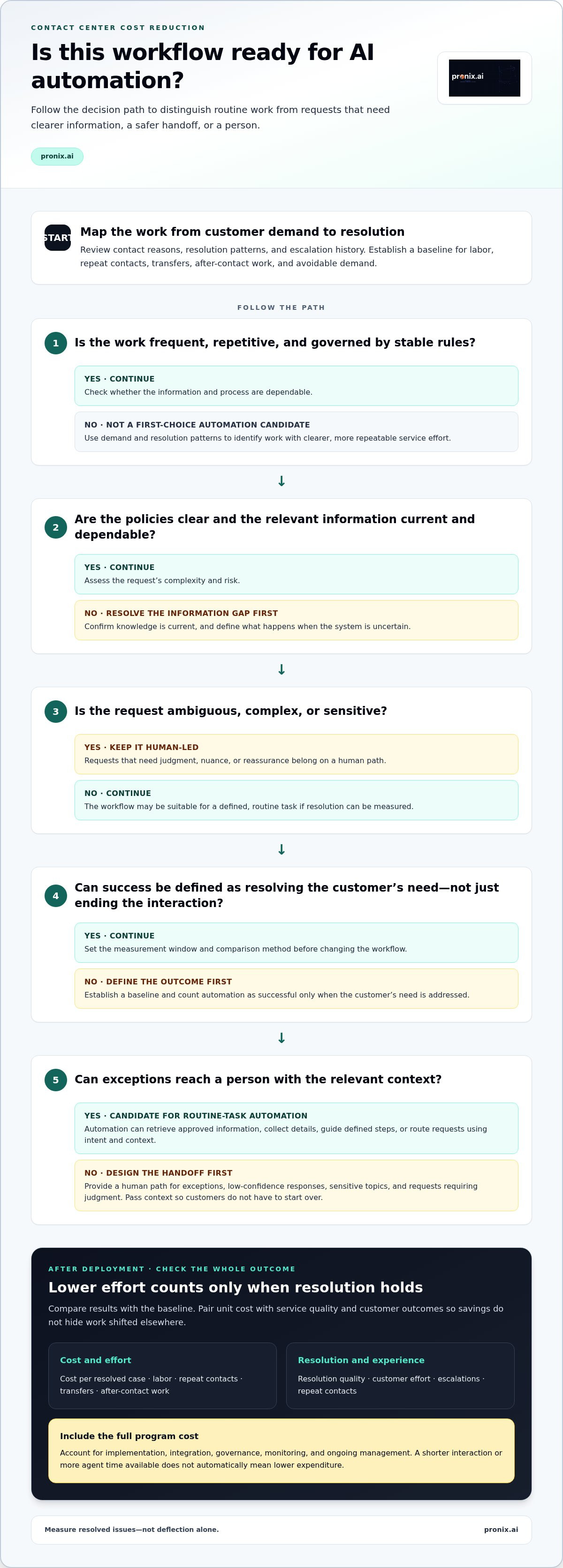
Pair cost measures with resolution quality, customer effort, and escalation indicators. A lower handling cost can conceal unresolved issues if customers call back, switch channels, or need a person after an unsuccessful automated interaction. Track these outcomes alongside unit cost so a change in one measure doesn’t obscure deterioration in another. Set service guardrails before deployment, then compare performance with the baseline.
Also distinguish unit-cost improvement from total program savings. A lower cost per resolved case is useful, but it doesn’t account on its own for implementation, integration, governance, monitoring, or ongoing management. Nor does a change in agent time automatically reduce expenditure. Report productivity gains separately unless the organization can show how they affect operating costs or capacity.
For a credible Contact center cost reduction AI business case, define the measurement window and comparison method before changing the workflow. Use consistent operational data and note volume or process changes that could affect results. Count an automated interaction as successful only when the customer’s need is addressed, not merely when the interaction ends. This discourages superficial deflection.
The decision standard should be balanced: reduce unnecessary service effort while maintaining resolution quality and customer trust. If unit costs improve but repeat contacts or escalations rise, investigate the workflow before expanding it. This gives leaders a practical basis for deciding whether AI is improving cost-to-serve or moving effort elsewhere.
Where AI can reduce contact center operating costs
Prioritize workflows by demand, complexity, and risk, not by how impressive a demo looks. Start with interaction types that occur frequently, follow stable rules, and draw on reliable information. A routine request to check an order status, for example, may be a better automation candidate than a complaint involving several departments, unclear facts, or a sensitive decision. Review contact reasons, resolution patterns, and escalation history to find where service effort accumulates.
The opportunity isn’t limited to customer-facing automation. AI can also assist agents by reducing the effort involved in locating guidance, documenting interactions, and completing consistent next steps. IBM’s overview of AI in Customer Service: A Strategic Advantage describes how AI can support real-time analysis and more informed customer service decisions.
Automate routine interactions without creating friction
Assess candidate intents for repeatability, clear policies, dependable data, and a measurable definition of resolution. Keep ambiguous, complex, or sensitive requests on a human-led path, and make escalation a deliberate part of the workflow. Evaluate containment alongside repeat contacts, escalations, and resolution outcomes. A conversation ending without an agent isn’t proof that the customer’s need was met.
Automation can support routine inquiries by retrieving approved information, collecting details, and guiding customers through defined steps. It can also route requests using intent and context, helping direct customers to the right queue or workflow. Before automating, confirm that the relevant knowledge is current and that the system can recognize requests outside its intended scope. Set fallback conditions so uncertainty leads to an appropriate next step rather than a guessed answer.
Human handoffs are an operational control, not a failure of automation. Design them for exceptions, low-confidence responses, sensitive topics, and requests that require judgment. Pass relevant context to the agent so the customer doesn’t need to start over. This creates a clear division of work: automation handles defined tasks, while people take responsibility when nuance or reassurance matters.
Reduce agent effort across the service workflow
Agent-assist capabilities can surface relevant knowledge during an interaction, summarize the conversation, and suggest a next step based on an approved workflow. These tools should support agent judgment, not obscure the source of guidance or force an unsuitable action. Controlled automation can also prepare case notes, populate fields, or trigger routine follow-up steps, subject to review and defined permissions.
Targeted automation reduces service effort when it removes repeatable work while keeping resolution and escalation controls intact. To find where that effort sits, examine the workflow end to end: what agents search for, what they enter more than once, where approvals cause delays, and which follow-up tasks consume time after a conversation. This turns Contact center cost reduction AI into a practical workflow question rather than a blanket mandate to automate.
For enterprises connecting AI to existing contact center workflows, enterprise contact center AI implementation can align automation, platform integration, and operational controls with the work being targeted.
How to evaluate AI cost reduction without hidden trade-offs
A credible business case compares the current workflow with the proposed one, then accounts for the full cost of operating the change. Don’t count reduced agent handling time as realized savings by default. Separate realized savings, such as an expense actually removed; capacity released, where teams can handle more demand with available resources; and costs avoided, such as future expense that may no longer be required. These outcomes have different financial implications and should be reported separately.
Use a consistent measurement period and name the operational owner responsible for validating results. That owner should be able to explain how each metric is calculated, which systems provide the evidence, and what operational changes could affect the comparison. Clear ownership makes Contact center cost reduction AI decisions more auditable and prevents optimistic assumptions from becoming unexamined forecasts.
Which measures belong in an AI contact center business case?
Track cost per resolved interaction alongside transfers, repeat contacts, and agent effort. Pair efficiency measures with resolution quality, escalations, and customer experience indicators so the business case reflects both operating performance and service outcomes. Before the pilot, define each measure’s source, calculation, review cadence, and accountable owner. Use a consistent definition of “resolved”: the customer’s need was addressed, not simply that the conversation ended.
Measure
Baseline
Expected change
Source and guardrail
Cost per resolved interaction
Current cost using an agreed method
Change after workflow deployment
Finance and contact center records; confirm resolution quality holds
Transfers and repeat contacts
Current transfer and repeat-contact patterns
Fewer unnecessary handoffs or callbacks
Interaction and case records; monitor escalations and unresolved issues
Agent effort
Current handling and after-contact work
Effort released or redirected
Workforce and workflow data; review service and employee impact
How to expose costs and risks before scaling
Include implementation, platform integration, data readiness, change management, governance, monitoring, exception handling, and ongoing operations in the analysis. Human oversight has a cost, but removing it can increase operational and customer risk. Document assumptions, dependencies, and who owns each control. For wider transformation considerations, the AI-driven CX modernization guide connects workflow and platform change to production readiness.
Distinguish projected value from observed results. A forecast may assume that released agent capacity can be redeployed, but that is not the same as reducing expenditure. Validate what changed during the agreed measurement period, including the costs added to support the workflow. Review the results with operations and finance before expanding scope. If service guardrails weaken or key costs remain unmeasured, refine the use case and business case before scaling.
Build a controlled roadmap for contact center cost reduction with AI
Move from opportunity to scale through defined decision gates, not an open-ended rollout. A controlled roadmap gives operations, technology, risk, and finance teams shared evidence for deciding what to automate, how to supervise it, and whether it’s ready to expand. Each use case needs a clear outcome, an accountable owner, and a fallback path before automation enters production.
Move from use-case selection to a controlled pilot
Begin by mapping the current workflow, including systems, data inputs, decision points, handoffs, and failure modes. Document where customers or agents encounter delays, where exceptions arise, and which actions require human judgment. Then set the pilot boundary: eligible interaction types, excluded cases, success measures, and the operational baseline. Configure automation only after these conditions are agreed.
- Discover the workflow. Confirm how work moves across channels, teams, and platforms. Identify dependencies and potential failure points, including missing data or unclear process ownership.
- Set controls and ownership. Define data access, permitted actions, escalation triggers, and who reviews system behavior. Preserve records that support auditability, and specify how a person takes over when the system is uncertain or the request falls outside scope.
- Run a bounded pilot. Monitor outcomes against the baseline. Use human review to identify incorrect responses, missed exceptions, or changes in service quality. Give the pilot owner authority to pause automation when a control or customer outcome falls outside agreed limits.
Before launch, document the criteria for three possible decisions. Go when operational results meet the target and service guardrails hold. Revise when the workflow shows promise but specific errors, exceptions, or integration issues need correction. Stop when customer or control risks persist, or the evidence doesn’t support the intended outcome. Set the criteria in advance rather than adjusting them to justify a preferred result.
Scale only when operating evidence supports it
Expansion should follow a review of service outcomes, agent and operational effort, exceptions, and total program costs. Confirm that the pilot’s results are repeatable in the next proposed workflow or operating group. Scaling isn’t simply increasing volume: it can change data exposure, exception patterns, and the work required to monitor performance. Reassess controls as scope grows.
Assign owners for ongoing monitoring, maintenance, issue escalation, and change management. They should know how to detect performance shifts, investigate incidents, update approved knowledge or workflow rules, and communicate changes to affected teams. Production planning also requires alignment among platforms, processes, data, and governance. The enterprise AI implementation guide offers additional production-readiness context.
A disciplined Contact center cost reduction AI roadmap turns a promising use case into a managed operating capability. Pronix supports enterprises from workflow assessment through governed implementation, connecting automation with platform integration and operational controls.
Scale contact center AI cost reduction with Pronix
Scaling AI requires more than a successful pilot. The workflow, enterprise platforms, data, controls, and operating teams must work together in production. pronix.ai helps enterprises connect these pieces through strategy, implementation, CX modernization, and managed services, grounding delivery in contact center priorities and the business-case assumptions established during planning.
Connect business outcomes to enterprise delivery
Strategy turns a cost or service priority into a scoped implementation plan. That means identifying the workflow to change, defining how success will be measured, and mapping the systems and teams involved. A goal such as reducing avoidable effort in a defined inquiry type needs a corresponding delivery scope, operational owner, and service guardrails. This keeps implementation tied to a business outcome rather than technology deployment alone.
Contact center workflows rarely operate in isolation. AI may need to connect with a contact center platform, enterprise data, knowledge sources, and existing business systems. pronix.ai works across platforms including Amazon Connect, Genesys, and NICE, alongside AWS, Microsoft, and Salesforce environments. Integration planning considers how information and work move between systems, while governance and auditability help teams maintain oversight as automation is introduced.
Ongoing operations are part of the delivery model, not an afterthought. Enterprise AI managed services support the ownership, monitoring, and operational practices needed to sustain AI after implementation.
Move from a cost hypothesis to a production plan
Before moving beyond a pilot, translate the business case into decisions teams can execute. Document the assumptions behind expected value, the measures used to validate outcomes, and the conditions that require intervention. Assign ownership for monitoring, exception review, maintenance, and workflow changes. Include human escalation paths and define how teams will respond when system behavior or customer outcomes move outside agreed limits.
pronix.ai connects workflow redesign, platform integration, and ongoing management to operational measurement. That means examining whether the deployed capability addresses the intended work, whether service safeguards remain effective, and whether the organization can maintain controls as usage expands. The production plan should reflect enterprise realities, including existing systems, data dependencies, governance requirements, and the people responsible for day-to-day operations.
Contact center cost reduction AI should be evaluated against the outcomes the organization set, not automation volume alone. A clear business case helps leaders distinguish validated results from assumptions and determine what to refine before expanding. pronix.ai supports enterprise teams from strategy through implementation and managed operations, with attention to cost objectives and customer experience.
Discuss your contact center AI priorities with pronix.ai, including the workflows you’re targeting, the outcomes you need to measure, and the controls required to scale responsibly.
Turn your next contact center priority into a production plan
Choose a customer journey where better service and lower operational effort can be pursued together. Define the outcome that matters, identify the constraints that must remain in place, and assign a clear owner. That focus turns Contact center cost reduction AI from a broad ambition into a disciplined enterprise decision.
Pronix connects that priority to strategy, implementation, and managed services. Its enterprise CX modernization work spans major contact center platforms, with a focus on secure, governed production outcomes. The aim is not automation for its own sake, but a capability your teams can operate, measure, and refine as customer needs and workflows evolve.
Bring your target workflow, current business-case assumptions, and service priorities into the conversation. Discuss your contact center AI priorities with Pronix and identify a practical path from cost hypothesis to measurable action.
Frequently Asked Questions
How much can AI reduce contact center costs?
There’s no dependable savings figure that applies to every contact center. Results depend on interaction mix, automation performance, existing processes, and the resources needed to operate the solution. To estimate the opportunity, model costs and expected outcomes for a specific workflow, then compare them with measured results after launch. Keep reduced expenditure separate from capacity freed for other work. Contact center cost reduction AI should be evaluated on verified results, not a headline projection.
Can AI reduce contact center costs without reducing service quality?
Yes, if the solution is designed around successful customer outcomes and tested against service measures, not just interaction volume. For example, a virtual assistant might handle a straightforward account-information request while sending a disputed charge to a trained representative. Review customer feedback and complaint patterns alongside resolution data, and make sure customers can reach a person when automation isn’t appropriate. Adjust or pause a workflow if service indicators deteriorate.
Which contact center tasks should an organization automate first?
Start with a task that follows clear rules and has dependable source information, such as checking an order status or explaining a published process. Confirm that the answer can be validated and exceptions are easy to recognize. Avoid starting with cases involving negotiation, emotional distress, or judgment calls. A narrow, well-defined workflow makes it easier to assess whether the technology performs as intended before expanding its responsibilities.
How long does it take to see a return from contact center AI?
There’s no standard payback timeline. It depends on implementation scope, system dependencies, data quality, adoption, and how quickly the organization can measure outcomes. A pilot may reveal operational signals before finance can validate realized savings. Set review dates around meaningful interaction volume and allow time for quality checks, agent feedback, and adjustments. Treat early results as evidence for refining the business case, not as a guaranteed forecast for enterprise-wide deployment.
What costs should an AI contact center business case include?
Include the full lifecycle, not only the technology used during customer interactions. Account for workflow design, integration, data preparation, security review, training, change management, quality assurance, and ongoing monitoring. Identify expenses tied to exceptions, human review, maintenance, and updates as processes change. Assign each cost to a responsible team and clarify whether it is one-time or recurring. This gives finance a more complete view of the investment and its operating requirements.
Is AI safe to use with sensitive customer interactions?
It can be used only when the workflow has controls appropriate to the data and potential consequences. Limit access to necessary information, define which actions automation can take, and retain a clear path to human review. Test sensitive scenarios before deployment, including incorrect or incomplete inputs, and make escalation behavior observable. If a use case can’t meet the organization’s security, privacy, and oversight requirements, keep that interaction human-led until controls are adequate.
Will contact center AI replace customer service agents?
AI can automate defined tasks, but that doesn’t mean every agent role disappears. People remain important for complex decisions, sensitive conversations, exceptions, and situations where customers need empathy or judgment. Organizations should plan how responsibilities may shift, train employees to use new workflows, and involve agents in identifying failure points. A thoughtful deployment can reduce repetitive work while directing human expertise toward interactions that benefit most from it.