

Document automation succeeds or fails at the handoff, not the scan. Intelligent document processing for enterprises combines OCR with document classification, contextual data extraction, verification, and routing to turn varied files into information business workflows can use. Human review handles uncertain or high-stakes fields, and approved corrections can help improve future processing.
Digitizing a document is only the first step. Enterprise teams also need to understand its contents, check whether the data makes sense in context, and determine where that information goes next. Without these steps, automation can simply move errors faster.
This article explains how IDP processes and verifies information, where human review fits, and how organizations apply it across financial services, healthcare, retail, education, insurance, and the public sector. You’ll see how the same core capabilities support workflows ranging from forms and claims to records management, and what makes IDP useful beyond basic document capture.
Key Takeaways
- Map document classification, extraction, validation, and workflow integration to see where automation can reduce manual handoffs.
- Use contextual checks to assess whether extracted information fits the document and the business process it supports.
- Keep human review in the workflow for uncertain or high-stakes cases, and use corrections to improve how the process handles future documents.
- Explore how financial services, healthcare, retail, education, insurance, and public-sector teams can apply these capabilities to distinct document workflows.
What are the features of Intelligent Document Processing Solutions?
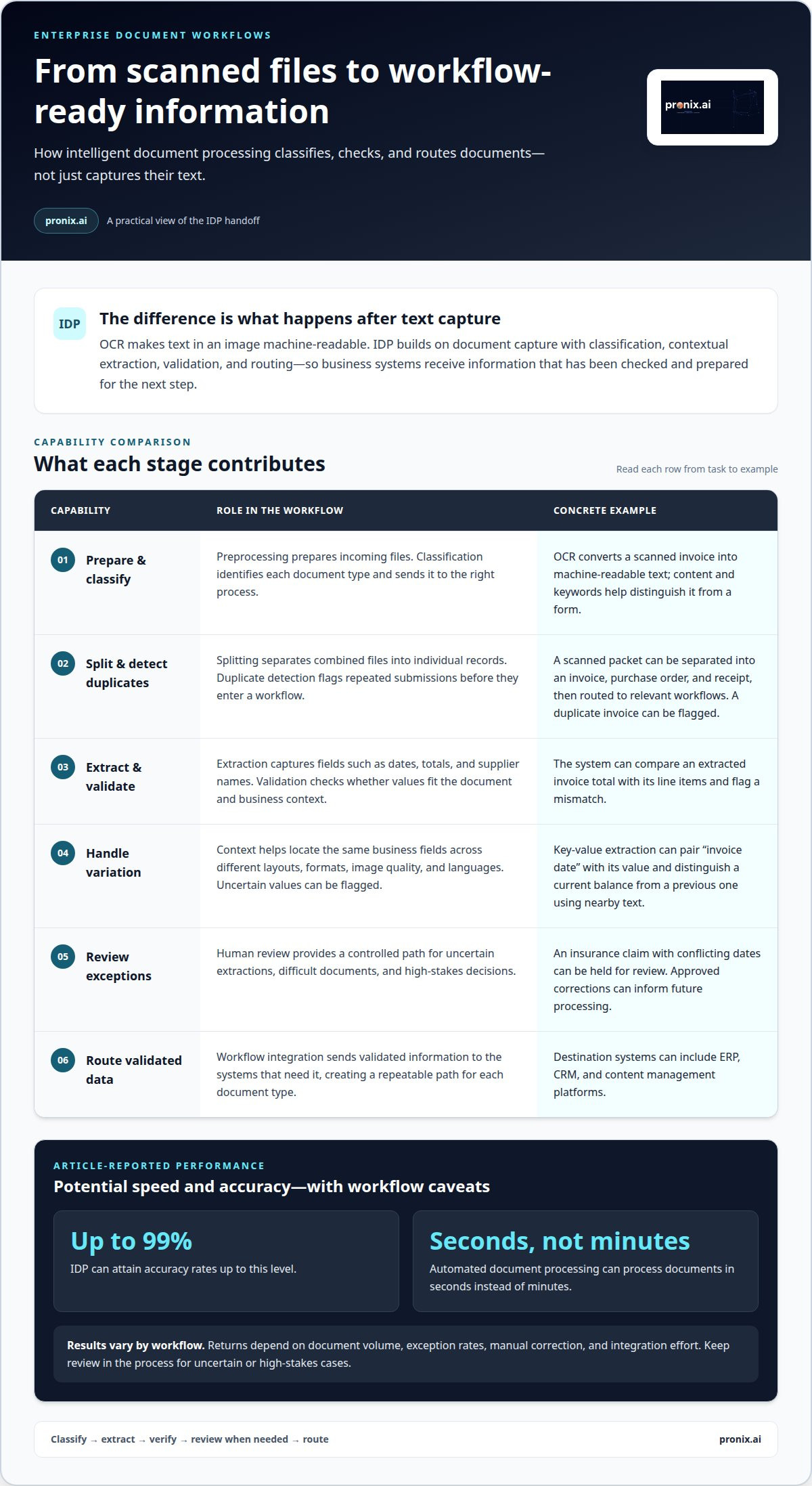
Intelligent document processing for enterprises combines classification, data extraction, validation, and workflow integration. Together, these capabilities turn files such as invoices into information business systems can use.
Document Classification and Preprocessing
Preprocessing prepares incoming files, while classification identifies each document type and sends it to the right process. This is useful when manual sorting slows work across varied formats and layouts. For example, OCR converts text in a scanned invoice into machine-readable text, and classification uses the document’s content and keywords to distinguish it from a form. The result is more consistent processing of structured documents and scans.
Document Splitting and Duplicate Detection
Splitting separates combined files into individual records, while duplicate detection flags repeated submissions. Consider a scanned packet containing an invoice, purchase order, and receipt. Classification can identify each document and route it to the relevant workflow. Detecting a duplicate invoice before processing helps prevent the same submission from entering a workflow twice. These steps prepare mixed batches for downstream processing without requiring someone to handle every page manually.
Data Extraction and Validation
Extraction captures fields such as invoice dates, totals, and supplier names. Validation checks whether those values fit the document and business context. For example, a system can compare an extracted total with the invoice’s line items and flag a mismatch. Traditional OCR converts text in an image, while robotic process automation repeats recorded user steps. IDP adds document classification and data validation to turn document content into structured information.
Workflow Integration and Consistent Processing
Integration routes validated data into systems such as ERP, CRM, or content management platforms. When evaluating a solution, assess its support for your document formats, classification, validation, administration, and required integrations. Implementation typically involves assessing workflows, choosing suitable automation candidates, configuring extraction, testing outputs, and connecting destination systems. A mature approach to intelligent document processing for enterprises aligns these steps with defined data needs, giving each document type a repeatable path into business systems.
Contextual data extraction and document verification
IDP checks the meaning of extracted fields in context, whether it’s an invoice total or a receipt date.
In the United States, security and privacy controls depend on the data being handled, organizational obligations, and deployment design. Include access permissions, data protection, retention, auditability, and storage location in system governance.
IDP can attain accuracy rates of up to 99%, and automated document processing can process documents in seconds instead of minutes. Returns depend on factors such as document volume, exception rates, manual correction, and integration effort, so operational results vary by workflow.
Extraction Across Document Variability
Extraction across document variability means capturing the same business fields from files with different layouts, formats, and image quality. This matters because suppliers may place invoice details in different locations, even when each document includes a date, amount, and vendor name.
IDP uses document context to locate and validate fields rather than relying only on fixed coordinates. A shifted total or poor-quality scan can affect capture accuracy, so the workflow can flag uncertain values before they reach downstream processes. This helps teams identify where automation can reduce manual handling while retaining checks for exceptions.
Key-Value and Multilingual Data Extraction
Key-value extraction pairs a label, such as “invoice date,” with its corresponding value, even when the layout changes. The system can capture a field from a structured document or identify it through its relationship to nearby text. That context helps distinguish a current balance from a previous one.
Multilingual extraction handles text in multiple languages, allowing a shared workflow to process documents that don’t use the same language. Verification checks whether captured values fit the document and intended process. AI agents can support this flow by passing extracted information to downstream systems, while uncertain fields remain available for review. For teams designing document workflows for automation, these checks help connect extraction quality to business outcomes.
Human-in-the-loop review and continuous learning
Human review gives organizations a controlled way to handle uncertain extractions and high-stakes decisions. Approved corrections can also inform future processing and help workflows improve through machine learning.
Risks include biased training examples, inconsistent labels, and unusual unstructured documents. Human review can catch questionable outputs, but it requires clear criteria and remains important for edge cases.
Reviewing Difficult Documents
Human review routes difficult documents to a person when extraction is uncertain or a decision carries high stakes. This is useful when a damaged scan, unusual layout, or handwritten note makes an automated result difficult to assess.
For example, an insurance claim with conflicting dates can be held for review rather than passed downstream as verified. A reviewer can correct the value, record why it changed, and return the document to its workflow. This controlled exception path helps organizations avoid treating every machine output as final.
Verification Workflows and Human Review
A verification workflow combines automated checks with human review, correction, and override. Each exception needs a clear owner and disposition, rather than an informal correction outside the process.
A workflow can send low-confidence fields to a reviewer, show the source document beside extracted values, and record the reviewer’s decision. On an insurance form, for example, a person might resolve an unclear policy identifier while leaving routine fields untouched. Review rules should distinguish uncertain extraction from a genuine business exception so approval decisions remain traceable.
Continuous Learning Through Human Review
Continuous learning uses approved corrections to refine how machine learning handles recurring document patterns. This is useful when organizations process changing forms or encounter layouts not represented in earlier examples.
For instance, reviewers may repeatedly correct a field that an invoice layout places near a similar label. Those corrections can inform model updates or extraction rules, subject to the workflow’s configuration and governance. Agentic processes can then use improved outputs in later steps, while retaining escalation paths for uncertain cases. Enterprise IDP deployments often reduce manual data entry by 80-90%, while retaining human review for edge cases, low-confidence extractions, or high-stakes decisions.
Industry applications in financial services, healthcare, retail, education, insurance, and the public sector
IDP applies the same core capabilities to different records, decisions, and business processes. Its value depends on matching document recognition and extracted data to a specific workflow, rather than applying one model everywhere.
In financial services, IDP can capture information from expense forms, business receipts, and account paperwork. Banks may offer over 20 different account servicing forms for download from their websites, creating varied inputs for processing. A bank can classify each form, extract its fields, and route the results to the relevant service workflow. This ability helps teams handle structured documents and scanned submissions through a consistent process.
Healthcare organizations can extract information from patient records and organize medical documents. Healthcare insurers can use IDP to verify claims and reduce manual paperwork. For example, a workflow can sort incoming records by type, capture relevant details, and send extracted data for review or processing. Patient documentation and insurer claims serve different applications, even when both arrive as digital files or scans.
Retail teams can use IDP for supplier forms, purchase records, and customer-submitted documents. Education organizations can process enrollment forms, transcripts, and supporting records. These examples show why models need to recognize each document’s purpose and capture the fields its workflow uses. Handwriting or changing layouts may require additional review, so workflows should distinguish routine files from exceptions instead of treating every page alike.
Public-sector teams can use document processing for applications, submitted forms, and records that need routing across services. Across all six industries, a practical starting point is one document-heavy workflow with clear inputs, required fields, and a defined destination. That makes it easier to assess recognition quality and how extracted data supports the next decision. To operationalize document workflows across business functions, explore enterprise AI managed services.
Pronix.ai: Enterprise AI Managed Services
pronix.ai helps enterprises connect AI initiatives to operational needs through Enterprise AI Managed Services. When document workflows span teams, systems, and review requirements, these services can support their management in an enterprise environment. AI Business Automation can also address processes where document handling is part of broader operational workflows.
Turn to this next step when you’re ready to move from identifying IDP use cases to considering how AI fits into enterprise operations. The appropriate approach depends on the workflow, integration needs, and level of human oversight involved. Contact pronix.ai to discuss your enterprise AI needs.
Turn an IDP use case into an operating capability
A strategy for intelligent document processing for enterprises should start with a workflow that has a clear owner, defined outcomes, and a path into existing systems. The key decision is not simply which documents to automate, but how to implement, govern, and extend the capability as operational needs change.
Before expanding a use case, define how success will be assessed, who handles exceptions, and how extracted information moves into business processes. These decisions connect technology choices to operational accountability and help teams determine whether document processing should stand alone or support a broader transformation effort.
pronix.ai supports broader AI initiatives through Agentic AI Implementation, AI-Driven CX Modernization, and AI Business Automation. These services are relevant when document processing connects to customer interactions or wider business processes, rather than operating as a standalone capture task. Aligning the use case with the operating model helps teams plan a clear path from initial deployment to ongoing enterprise use.
Discuss your IDP priorities with pronix.ai, and take the next step with a clear view of the workflow you want to improve.
Frequently Asked Questions
How do you keep IDP workflows from failing silently?
Use operational monitoring to track each document from intake through completion. Reconcile received files against processed records, alert owners when queues stall, and log rejected or incomplete outputs. For example, if a batch enters a workflow but produces no downstream records, an exception alert can trigger an investigation. Assign responsibility for reviewing alerts, fixing workflow issues, and documenting recurring failure patterns.
How does IDP work with agentic process automation (APA)?
IDP turns document content into structured inputs, while agentic process automation can use those inputs to coordinate later steps. For example, an agent may receive an extracted service request, determine its workflow destination, and prepare a next action. Keep approval gates for consequential actions and define escalation paths for ambiguous records. This separates document interpretation from process decisions while connecting both in a governed workflow.
What are the top IDP platforms in 2026?
There is no universal “top” platform for every enterprise. The right shortlist depends on document types, workflow complexity, and existing architecture. Compare how each option handles varied layouts, extraction review, configuration, deployment, and integration with your systems. Test candidates against representative documents, including difficult exceptions, then assess whether administrators can maintain workflows without building a separate solution for each use case.
What changed in the IDP market for 2026?
For enterprise buyers, a useful 2026 evaluation lens is how IDP connects document understanding to broader automation. Consider whether extracted information can support a workflow beyond capture, while keeping oversight, exception handling, and governance clear. This is an evaluation priority, not a claim that every vendor or organization has changed in the same way. Assess capabilities against your actual processes rather than a market-wide label.
What functional areas within enterprises benefit most from IDP?
Teams with recurring document intake and data handoffs are strong candidates for IDP. Finance can examine invoice and expense workflows; human resources can process resume information; legal teams can organize contract terms; and customer operations can route submitted forms. Prioritize work where documents cause delays or repeated manual handling. A strong starting point is a bounded process with clear owners, usable source documents, and a defined destination for the results.
What separates a good IDP rollout from an expensive one?
A disciplined rollout starts with a specific workflow, measurable operational goals, and an agreed exception process. Rollouts can become costly when they expand before teams understand document variation, integration requirements, or ongoing ownership. Define a successful output, test representative records, and establish who maintains models and rules. Expand only when the first workflow performs reliably in its real operating environment and its handoffs are clear.