

A model’s safeguards can’t secure data that moves through an unapproved tool, a prompt, a vendor, and a production workflow. The real test of AI data security best practices is whether your organization can see and control that journey from end to end. Teams are right to prioritize privacy, access controls, and vendor review, but policies alone won’t show where data is retained, who can retrieve it, or how an AI system uses it.
This practical 2026 checklist turns those concerns into a prioritized, auditable operating plan. You’ll learn how to map AI use and data flows, classify sensitive information, set prompt and access controls, compare vendor and architecture safeguards, and monitor systems after deployment. It also clarifies ownership, evidence, and incident response so security can support responsible adoption. From initial assessment through production operations, the focus is clear: protect data throughout the AI lifecycle, verify safeguards rather than relying on claims, and give teams practical rules for moving forward with confidence.
Key Takeaways
- Map how AI data is collected, accessed, processed, stored, and deleted to identify exposure points across the full lifecycle.
- Apply AI data security best practices with least-privilege access, data minimization, and safeguards for prompts, models, and outputs.
- Compare AI vendors and deployment architectures using consistent evidence for retention, training use, access boundaries, encryption, logging, and deletion.
- Make security controls auditable by assigning each a named owner, required evidence, review cadence, and escalation path.
- Establish ongoing oversight so teams can review permissions, exceptions, vendor changes, and incidents as AI use evolves.
AI data security best practices start with mapping your enterprise AI data
AI data security is the practice of protecting information as it is collected, accessed, processed, stored, and deleted across AI systems. It focuses on the data and its movement. Model safety addresses whether a system behaves as intended and avoids harmful outcomes; governance assigns decision rights and oversight. These disciplines connect, but they solve different problems. A broad overview of AI safety can help frame the wider field, while a data inventory makes security risks visible in your own environment.
Start by mapping both sanctioned and unsanctioned AI use. Include standalone tools and models, AI features embedded in enterprise software, integrations, datasets, and the business owners responsible for each use case. Don’t assume a tool is out of scope just because it is part of an approved platform. A connected assistant, for example, may access enterprise documents or send generated outputs to another system.
Visibility comes before control. Without an inventory, teams can’t reliably decide where to apply access restrictions, retention limits, or additional review. Not every AI use presents the same risk: a tool processing public material has a different exposure profile from a workflow handling confidential customer records. Map first, then prioritize safeguards based on the data, purpose, access, and potential business impact.
Which data flows should an AI inventory capture?
Trace the full path: what users enter in prompts, which connected sources the system retrieves, what the model processes, where outputs are saved, and which downstream tools receive them. At each step, record the data owner, system boundary, retention settings, and destination. Include third-party AI features within existing software, not just tools acquired specifically for AI. This reveals where information crosses organizational or vendor boundaries and who can investigate if a flow changes.
How should teams classify data for AI use?
Use existing enterprise classifications, such as public, internal, confidential, regulated, and restricted. Then document whether each category is approved, limited, or prohibited for every use case. A category may be permitted in one controlled workflow but unsuitable for another. Specify any conditions, such as removing identifiers or limiting access to designated users.
Assess sensitivity alongside business impact and contractual commitments. Ask legal and privacy teams to validate applicable obligations before approving a use case; don’t assume a general label answers every handling question. Record the decision, its owner, and the conditions that would trigger review. This gives teams a practical basis for applying AI data security best practices consistently as tools, integrations, and use cases enter the environment.
Protect AI data with controls for access, prompts, models, and outputs
Once data flows are visible, apply controls at every point where information can be read, transformed, or retained. Use least-privilege access for datasets, models, AI tools, and service accounts. Give each identity only the permissions its task requires, and review those permissions when roles or workflows change. Avoid shared credentials, which make activity harder to attribute.
Reduce what enters prompts. Remove unnecessary personal or confidential details, and mask or tokenize sensitive fields where the use case allows. Set explicit requirements for encryption, logging, retention, and deletion across connected systems. A prompt policy alone can’t secure information retrieved from connected repositories, copied into application logs, cached by an integration, or passed to a downstream workflow. Controls need to follow the data beyond the text a user submits.
Use the NIST AI Risk Management Framework as a reference for structuring risk management, then translate relevant practices into controls your teams can test and document.
How can organizations reduce sensitive data exposure?
Restrict retrieval to authorized sources and enforce user permissions at query time, rather than assuming the AI tool should inherit broad access. Apply approved data-loss prevention and secrets-management controls where appropriate. Then check where sensitive inputs may persist, including logs, caches, generated outputs, and support or troubleshooting workflows. Define retention and deletion expectations for each system, and verify them in practice rather than relying only on configuration labels.
How should AI access and output controls be tested?
Test with representative roles and realistic scenarios. Confirm that users can retrieve only information they’re authorized to access, including through connected sources. Review outputs for confidential information or unintended disclosure, especially before enabling automated actions that affect customers, records, or business operations. Keep test results, remediation owners, and retest dates as audit evidence. Re-test after material changes to models, integrations, permissions, or data sources.
Make control requirements specific enough to verify: who can access each asset, what data can be submitted, where activity is logged, and how long records are retained. Assign owners to exceptions and define when they must be escalated. Build these AI data security best practices into production workflows from the outset. Organizations planning secure implementation or ongoing operations can explore enterprise AI implementation support.
Compare AI architectures and vendors by how they handle your data
Architecture affects where data is processed and who operates the controls, but no deployment model is automatically safest. Approved SaaS AI, cloud-hosted services, and self-managed deployments each require a review of actual data flows, configuration, responsibilities, and contract terms. Ask the same questions about each option, then compare documented evidence with your organization’s data classifications and use case.
The CISA AI data security best practices guidance offers a useful reference for assessing data protection across AI systems. For architecture planning, see this enterprise AI data strategy guide.
Which vendor questions reveal how AI data is handled?
Ask what information the service collects, where it is processed, and how long it remains in prompts, logs, or other records. Confirm whether inputs or outputs may train shared or vendor-operated models, and under what terms. Clarify subprocessors, deletion pathways, incident notification commitments, and available audit rights. Apply these questions to AI features embedded in existing software as well as standalone services.
What evidence should enterprise buyers request?
Request current assurance documentation and verify that its scope covers the specific service being evaluated. Ask for data-flow diagrams, access-control descriptions, and retention and deletion settings. A vendor statement is a claim; a signed contract is a commitment; independent assurance provides a separate form of assessment. None replaces checking the deployed configuration.
| Control | Compare across deployment options | Evidence to verify |
|---|---|---|
| Data retention | Where prompts, outputs, and logs persist, and for how long | Documented settings and contract terms |
| Model training | Whether inputs or outputs are used to train shared or vendor-operated models | Service-specific terms and configuration |
| Access boundaries | How user, administrator, and service access is restricted | Architecture documentation and control demonstration |
| Encryption | Which data states and connections are covered | Technical documentation for the service in scope |
| Logging | What activity is recorded and who can access records | Logging configuration and retention details |
| Deletion | How data is removed from active systems and related records | Documented process and contractual commitment |
Record gaps and assign an owner to resolve them before approval. These AI data security best practices make vendor comparisons repeatable: assess evidence, contract language, and configuration together rather than treating marketing statements as proof.
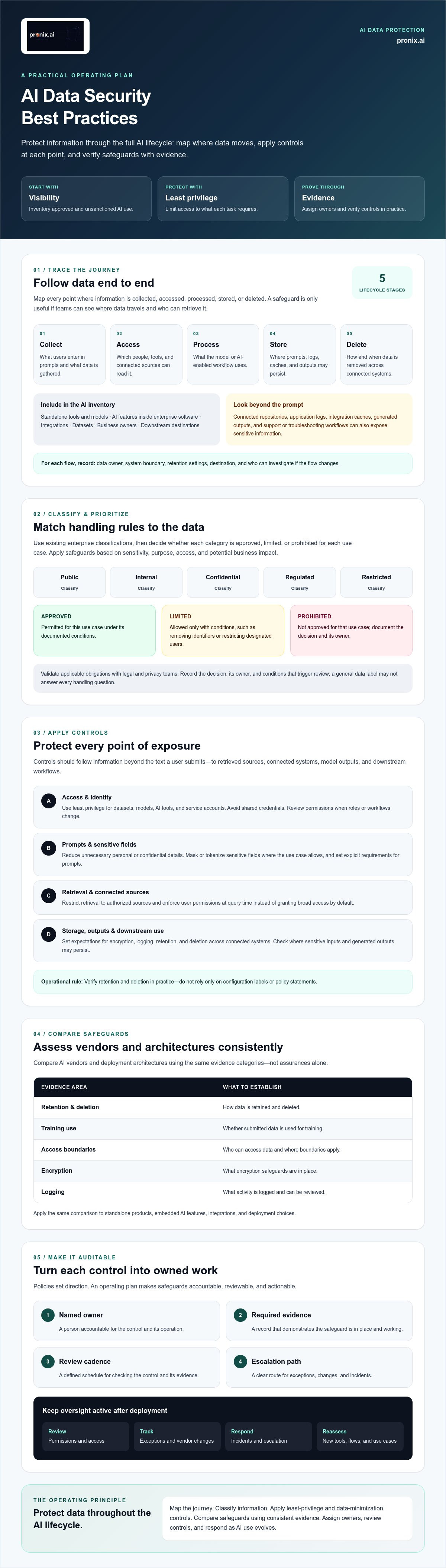
Turn AI data security best practices into an owned implementation checklist
A checklist is useful only when every control has an accountable owner and a way to prove it works. Use a consistent sequence for each AI use case, then set approval requirements according to data sensitivity and potential business impact. A workflow using public information may need a lighter review than one handling restricted data or triggering consequential actions.
- 1. Inventory use cases. Record the purpose, tools, integrations, data sources, and business owner.
- 2. Classify data. Document permitted, limited, and prohibited data categories for that use case.
- 3. Assign control owners. Name the people accountable for access, privacy, vendor review, and operational decisions.
- 4. Configure controls. Set access, retention, logging, and escalation requirements, then retain configuration evidence.
- 5. Test safeguards. Record test scenarios, results, remediation owners, and retest dates.
- 6. Approve and monitor. Capture the approver, any conditions or exceptions, and the next review point.
For each control, specify the evidence to retain, review cadence, and escalation route. For example, an access review should identify its owner, show the permissions reviewed, record any changes, and state where unresolved issues go. Link agent-specific deployment controls to the secure enterprise AI deployment checklist.
How can teams make security controls measurable?
Track approved-use coverage, unresolved exceptions, completed access reviews, and remediation status. Establish a baseline before rollout, then have accountable risk owners set thresholds that reflect the data and business impact involved. There’s no universal target that fits every enterprise. Document the rationale for each threshold and revisit it when the use case, data, or system changes.
How should incident response cover AI data exposure?
Define who triages, contains, preserves evidence, notifies stakeholders, and leads recovery for exposed prompts, compromised credentials, unexpected retention, or harmful outputs. Include vendors and connected systems in tabletop exercises when they’re part of the workflow. After an exercise or incident, record lessons learned, assign remediation owners, and update controls. For help operationalizing these practices through Agentic AI Implementation, connect security requirements to deployment and ongoing operations.
Operationalize AI data security with governance and ongoing oversight
Security controls need an operating model to remain effective after deployment. Bring security, data, privacy, legal, business, and technology owners into a governance process with clear decision rights. Business owners explain the purpose and impact of each use case; technical teams manage systems and access; privacy and legal teams assess relevant obligations; security teams coordinate risk controls and response. Name an accountable decision-maker so exceptions don’t stall between functions.
Use recognized frameworks such as the NIST AI Risk Management Framework and ISO/IEC 27001 as reference points, not substitutes for implementation. Map relevant controls to your existing security and AI governance processes, and verify current framework versions and mappings before relying on them. The objective is consistent evidence of how risks are assessed, controls are applied, and decisions are reviewed.
How often should AI data security controls be reviewed?
Set review intervals according to system risk, data sensitivity, and potential business impact. Reassess promptly when a model, vendor, data source, or business purpose changes, and use incident findings to trigger targeted reviews. Maintain an audit trail of decisions, exceptions, accountable owners, and remediation. This creates a record of why a control was set and whether it still fits the use case.
Include AI assets, permissions, vendor changes, unresolved exceptions, and incidents in the oversight process. Define who reviews each item and how findings are escalated. A scheduled review is useful, but it shouldn’t delay action when a material change or incident calls for an immediate reassessment.
When should an enterprise bring in implementation support?
Consider additional support if ownership is fragmented, teams can’t consistently evidence controls, or security requirements aren’t integrated into production workflows and monitoring. First identify the specific gap: strategy, implementation capacity, data foundations, or ongoing operations. Then determine whether internal teams have the skills and processes to close it while keeping accountability clear.
pronix.ai supports enterprise AI strategy, implementation, and managed services, helping organizations build toward secure, scalable production and ongoing oversight. These AI data security best practices work best when governance is part of delivery and operations, not a separate approval exercise. To discuss your organization’s needs, Discuss enterprise AI security with pronix.ai.
Make AI security part of how you move to production
Effective AI data security best practices start with knowing where information flows, then matching safeguards to the sensitivity and impact of each use case. Apply controls across prompts, connected data, models, and outputs. Compare vendor claims with contractual commitments and technical evidence before approving a service.
Security also needs clear ownership after launch. Assign accountable reviewers, document exceptions, test controls, and revisit them when systems, vendors, or business needs change. That discipline helps organizations strengthen protection while enabling responsible AI adoption.
pronix.ai supports enterprises with AI strategy, implementation, and managed services, including work with platforms such as AWS, Microsoft, Salesforce, Kore.ai, and Genesys. If your team needs support connecting strategy to secure production workflows, discuss a secure path from AI strategy to production with pronix.ai. With the right ownership and operating model, your organization can advance AI initiatives with greater confidence.
Frequently Asked Questions
What are AI data security best practices?
AI data security best practices protect information throughout its AI lifecycle, from collection and access to processing, storage, and deletion. Start by inventorying AI tools, models, integrations, datasets, and owners. Classify data and define which categories each use case may handle. Then apply least-privilege access, minimize sensitive prompt content, verify vendor safeguards, test outputs, and assign owners to controls, evidence, reviews, and incident response.
Can AI tools use my company data to train their models?
They may, depending on the specific service, configuration, and contract terms. Don’t assume that an enterprise account or a vendor’s general privacy statement excludes your inputs or outputs from training. Check the terms for the exact service and feature, confirm how settings are configured, and ask whether data may be used to improve shared or vendor-operated models. Record the answer and any contractual commitment before submitting sensitive information.
How do you protect sensitive data in AI prompts?
Submit only the information needed for the task. Remove identifying details or mask and tokenize sensitive fields where the use case allows, and prohibit restricted data unless the workflow has been explicitly assessed and approved for it. Use approved tools, restrict access, and check how prompts, logs, caches, and outputs are retained. Prompt hygiene helps, but it won’t control sensitive data retrieved from connected sources or passed to other systems.
What should an enterprise ask an AI vendor about data security?
Ask what data the service collects, where it’s processed, how long it’s retained, and whether prompts or outputs can be used for model training. Clarify access boundaries, encryption, logging, deletion methods, subprocessors, incident notification, and audit rights. Request service-specific architecture and assurance documentation. Compare vendor statements with contract terms and deployed settings, and verify that any independent assurance covers the service and controls your organization will actually use.
Is cloud-hosted AI less secure than self-hosted AI?
Not inherently. Security depends on the architecture, configuration, access controls, data flows, operational responsibilities, and evidence for the specific service. A self-managed deployment may provide more direct control, but it also requires the organization to operate and maintain its safeguards. Cloud-hosted and SaaS options have different shared responsibilities. Compare retention, training use, access boundaries, encryption, logging, and deletion rather than treating hosting location as a security verdict.
What happens if sensitive data is exposed through an AI system?
Follow the organization’s incident response process. Triage the exposure, contain affected access or data flows, preserve relevant evidence, and identify connected systems, vendors, and potentially affected information. Assign responsibility for stakeholder notification and recovery according to internal procedures and applicable obligations. Review prompts, logs, outputs, credentials, and retention settings to understand the exposure. Document findings, remediation owners, and control changes, then test the fixes before closing the incident.
How often should an organization review AI data security controls?
Set review intervals according to system risk, data sensitivity, and potential business impact, and reassess controls after material changes. A new model, vendor, data source, integration, or business purpose can alter the risk and should trigger review. Incidents and test findings may also call for an earlier reassessment. Keep an audit trail of decisions, exceptions, owners, evidence, and remediation so teams can show how controls remain appropriate over time.