

An estimated 60% to 87% of AI projects never reach production. The signs of a failing AI project include key data completeness gaps exceeding 15% during readiness checks, a pilot stalled beyond six months without clear graduation criteria, and risks or business outcomes that remain undefined. These signals point to problems in the project’s foundations, not just its model.
An AI project can look active while drifting away from measurable value. Teams may keep refining a model or extending a pilot without resolving data quality, operational readiness, employee capability, or fit with a real business need. Spotting these gaps early helps leaders decide whether to correct course, pause, or stop.
This guide shows you how to assess AI project health in practical steps. You’ll examine data and infrastructure, skills and organizational readiness, technical and operational risks, and the business case. Then you can use the evidence to decide what the project should do next.
Key Takeaways
- Check whether critical data is complete and reliable, and whether the infrastructure can support deployment and ongoing management.
- Assess technical, ethical, and operational risks before expanding a pilot, including whether the use case fits AI’s capabilities.
- Evaluate whether employees have the skills, training, and workflows needed to adopt and support the system.
- Connect the project to a defined business problem and measurable outcomes so leaders can judge its value and make a clear next-step decision.
- Audit the project’s requirements, timeline, success criteria, and production pathway to identify gaps and decide whether to recommit, pivot, pause, or stop.
Data infrastructure, talent, and skills
Check data completeness, consistency, freshness, and relevance in the fields the model relies on. Missing or conflicting values in important fields can undermine development and results, even when the dataset appears large.
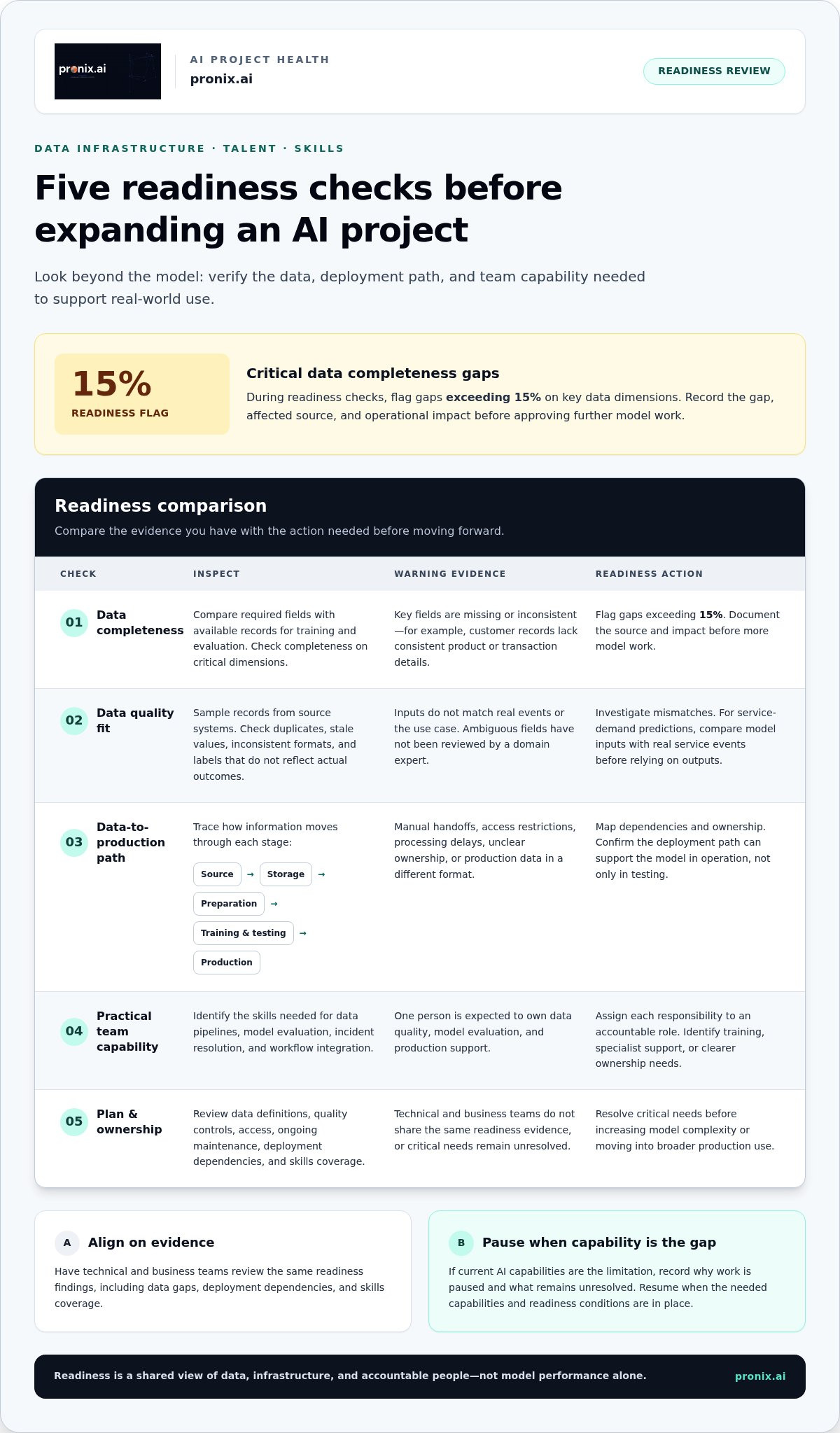
- Measure completeness on critical data dimensions. Compare required fields against the records available for training and evaluation. During readiness checks, flag data completeness gaps exceeding 15% on key dimensions. For example, if customer records lack consistent product or transaction details, the model may not have enough usable context. Record each gap, its affected data source, and its operational impact before approving further model work.
- Test whether data quality fits the use case. Sample records from the systems that will supply the model. Look for duplicates, stale values, inconsistent formats, and labels that don’t reflect actual outcomes. Ask a domain expert to review ambiguous fields. Poor-quality data can hinder model development and project outcomes. If a model predicts service demand, compare its inputs with real service events and investigate mismatches before relying on its outputs.
- Trace the path from source data to deployment. Map how data moves from operational systems through storage, preparation, training, and testing into production. Identify manual handoffs, access restrictions, processing delays, and gaps in ownership. Weak data-management and deployment infrastructure can undermine execution. For example, a model that performs well in testing may fail in operation if production data arrives in a different format.
- Assess the team’s practical AI capabilities. List the skills needed to maintain data pipelines, evaluate model performance, resolve incidents, and integrate outputs into workflows. Assign each responsibility to an accountable role. If one analyst must manage data quality, model evaluation, and production support, the project has a capability bottleneck. Identify where teams need training, specialist support, or clearer ownership before expanding the system.
- Build readiness into the project plan. Invest in the infrastructure needed to manage data and deploy AI models. Assign ownership for data definitions, quality controls, access, and ongoing maintenance. Have technical and business teams review the same readiness evidence, including data gaps, deployment dependencies, and skills coverage. Resolve critical needs before increasing model complexity or moving into broader production use.
Keep decisions tied to the project’s actual requirements. Collaboration with public agencies and private organizations can help address data-collection challenges when existing sources cannot fill the gaps. Make clear which issues this approach could resolve and which still need assessment by the project team.
When readiness problems reflect limitations in current AI capabilities, pausing may be more effective than abandoning a project that could benefit from emerging capabilities. Record the reason for the pause and the unresolved gap in project decisions. Applying AI beyond its current capabilities can lead to poor outcomes, so confirm that the problem fits what the system can do before proceeding. Resume work when the necessary capabilities and readiness conditions are in place.
Inadequate technical, ethical, and operational risk assessment
- Map failure modes before expanding the system. List what could go wrong at each stage: input, model output, human review, and downstream action. For a customer-support model, test whether incomplete requests trigger incorrect answers or inappropriate account changes. Assign an owner to each failure mode and document its business impact. In April 2026, an estimated 70% of enterprise AI deployment failures were described as structural rather than technical. That makes ownership, workflows, and controls essential parts of risk review.
- Set performance limits that reflect the decision’s consequences. Machine-learning models are probabilistic and will rarely, if ever, be 100% accurate. Define acceptable error types, escalation rules, and human review before relying on outputs. A forecasting model might tolerate a small variance, while an automated decision affecting customers may need tighter review. Track false positives and false negatives separately. If the team reports only one accuracy score, it may be overlooking failures that matter operationally.
- Test ethical risks in real workflows. Examine whether outputs differ across relevant user groups, whether sensitive information enters prompts, and whether people can challenge consequential decisions. Use representative test cases, including edge cases, rather than relying on a successful demonstration. For example, compare how a hiring-support system handles equivalent applications with different demographic cues. Record test results, remediation owners, and unresolved risks before approving production use.
- Classify systems against applicable rules. Organizations operating in the European Union must classify AI systems under the EU AI Act risk framework. Identify where the system is used, who is affected, and what decisions it supports. Then record the classification rationale and connect it to governance controls. A system used to assist internal document search has a different operational context from one influencing access to essential services. Keep the analysis tied to actual use, not the technology label.
- Prepare for incidents and changing conditions. Define who can pause the system, investigate an unexpected output, and restore the previous workflow. Monitor model behavior after deployment, since changes in inputs or business processes can alter results. A practical test is to simulate a service disruption and trace the escalation path from detection to human decision. If responsibilities are unclear, strengthen operational governance before scaling. A structured AI implementation approach can help connect deployment controls with business workflows.
If a pause decision has no clear owner, the response plan is incomplete. Feasibility assessments with technical experts can help keep expectations realistic. Include the assessment in the risk review, alongside failure modes, performance limits, ethical tests, and incident procedures. If expectations exceed what the project can feasibly support, revise the scope or controls before relying on the system. This connects planned use to operational readiness, not assumed capability.
Organizational, cultural, and employee readiness
- Check that the project has an accountable business owner. Name the leader who can resolve conflicts, approve workflow changes, and make adoption decisions. Identify the operational managers responsible for using the system’s outputs. For example, a forecasting tool needs an owner who can act when recommendations conflict with established planning practices. Without an owner, the project may remain technically active while employees continue using existing processes.
- Map the work that will change before development begins. Document the current workflow, the proposed AI-supported workflow, and the people affected at each handoff. A customer-service assistant, for example, may change how agents find information and escalate unresolved cases. Ask frontline employees to review the workflow and identify practical barriers. Their input can reveal missing steps, unclear responsibilities, or exceptions the project team overlooked.
- Assess readiness through direct employee input. Ask intended users what they understand about the system, where they expect to rely on it, and when they would override its output. Compare answers across teams and roles. If agents cannot explain when to escalate an AI-generated response, define that rule before deployment. MIT NANDA linked 95% of failed generative AI pilots in 2025 to organizational gaps rather than model quality. Treat adoption and operating conditions as project risks, not post-launch details.
- Build the pre-initiation checklist around evidence. Before authorizing work, confirm that the project has a named sponsor, an accountable process owner, and employees available for design and testing. Document the workflow problem, affected roles, training needs, and change-management responsibilities. Identify who will handle exceptions and maintain the process after launch. If a contact center pilot changes agent workflows, include supervisors and agents in scenario reviews. A checklist without named owners and supporting evidence is not a readiness assessment.
- Close capability gaps before scaling the pilot. Match required tasks to existing roles, then provide continuing education and training where employees need practical AI implementation skills. Use the project’s actual workflows, such as reviewing outputs, correcting errors, and escalating uncertain cases. Track whether users can complete these tasks independently. If the team relies on one specialist to explain every output, document the knowledge gap and establish a repeatable support process before expanding access.
Unclear ROI and business misalignment
AI project costs and budgets can overrun when scope expands without corresponding changes to the timeline or budget. Additional data work, integrations, testing, and workflow changes can add effort the original business case missed.
Realistic timelines depend on data access, system integration, risk controls, and user adoption. Set a decision date before the pilot begins, then measure progress against a baseline, a specific business target, and a practical path to production.
- Name the business problem before selecting a model. Start with a measurable operational issue, such as slow case handling or customer churn. Stakeholders should be able to explain the project’s purpose in one sentence or within 30 seconds. If they describe a tool but not the problem, pause and clarify the intended outcome. AI projects should address a specific business problem, not simply adopt a trending technology.
- Set a baseline and a decision-ready target. Record current performance before implementation, then define what meaningful improvement looks like. A business case might target reducing customer churn by 15%, or cut processing time from three days to three hours. These examples are targets, not universal benchmarks. Choose a measure tied to the problem, and assign an owner who can validate results.
- Connect model performance to business value. Accuracy alone doesn’t establish return on investment. A predictive model might need to reach 85% accuracy to support a positive return, but the threshold depends on decision costs and operational use. Track both model performance and the outcome it is meant to change. If improved accuracy doesn’t influence the business measure, revisit the use case.
- Test whether effort matches the value at stake. Compare development complexity with the scale of the problem. Building a more sophisticated model for an edge case affecting 0.3% of transactions may divert effort from higher-impact needs. Also review requirements when documentation expands by more than 30% without corresponding timeline or budget adjustments. Reassess scope, dependencies, and expected value before adding work.
- Set a decision point and act on evidence. A healthy pilot defines success criteria before starting, follows a specific timeline, and has a concrete production pathway. More than 80% of AI projects failed to reach production or deliver measurable return on investment in 2024. MIT Sloan Management Review states that 10% of organizations achieve significant financial benefits with AI. Recommit, pivot, or terminate based on results, rather than allowing an experiment to continue without a clear business case.
Steps to audit an AI project’s health
- Distinguish a temporary setback from a persistent failure pattern. Compare current results with the pilot’s original success criteria, timeline, and production pathway. A temporary integration delay has an owner, a recovery plan, and a decision date. A project is in deeper trouble when blockers keep recurring, targets keep shifting, or teams can’t explain what evidence would justify continuing. A pilot stalled beyond six months without clear graduation criteria is a warning sign, not a decision rule on its own.
- Set a decision point, then choose a course. Pause when a specific dependency, safety issue, or data constraint prevents a fair test. Pivot when the business need remains valid but the use case or approach doesn’t fit. Cancel when the evidence shows no workable path to meaningful outcomes. Don’t leave the project in limbo. Record the decision, supporting evidence, accountable owner, and conditions for any future restart.
- Review scope, requirements, and delivery evidence. Compare current documentation with the approved baseline, then map changes to timeline and budget decisions. Review requirements when documentation expands by more than 30% without corresponding timeline or budget adjustments. Check whether each added requirement supports the original business need. Also test whether the current model is unnecessarily complex: a SQL query or basic statistical model may handle a task that doesn’t require a large language model or deep neural network.
- Rescue the project by targeting its biggest blocker. Identify whether the main constraint is data, model performance, integration, employee adoption, or unclear ownership. Assign an owner and corrective action. For example, if inconsistent inputs undermine evaluation, standardize the input process before retraining. Retest against the original success criteria, not relaxed targets. The rescue plan should state what evidence will demonstrate progress and when leaders will review it.
- Make the audit lead to a concrete next move. Confirm that success criteria were set before the pilot, the timeline includes a decision point, and production has a practical pathway. Compare actual outcomes with the business baseline and document unresolved risks. If any of these elements are missing, establish them before approving further expansion. End the review with one recorded decision: recommit, pivot, pause, or terminate. This gives sponsors and delivery teams a shared basis for action.
Pronix.ai: Agentic AI Implementation
pronix.ai helps enterprises move AI initiatives toward secure, scalable production through Agentic AI Implementation. Turn to this service when an approved use case has a clear business purpose but needs implementation aligned with operational workflows, governance, and deployment requirements. For projects held back by weak data foundations, Data & AI Foundations can address underlying readiness needs. AI Business Automation supports initiatives focused on improving business workflows, while AI-Driven CX Modernization fits customer experience and contact center priorities.
The right next step depends on the audit findings. Define the unresolved blocker, intended outcome, and production requirements before shaping an implementation plan. This keeps the engagement focused on the project’s actual needs rather than adding technology without a clear business fit.
Contact pronix.ai to discuss your AI project’s next step.
Turn the audit into a decisive next move
Recognizing the signs of a failing AI project matters only when the findings change what happens next. Turn the audit into an actionable decision: identify the outcome the business needs, assign an owner, and define the evidence that would justify the next phase. The decision may be to strengthen the project, reshape its use case, or stop work and redirect effort. The value lies in making the choice explicit, not extending activity without a clear purpose.
For projects that need a path from strategy to operational use, pronix.ai offers Agentic AI Implementation, AI-Driven CX Modernization, and AI Business Automation. Choose support that fits the business challenge and intended outcome. A focused discussion can clarify the practical next step and how it connects to your operating priorities.
Discuss your AI project with pronix.ai, and move forward with a clearer decision.
Frequently Asked Questions
What are the most common signs an AI project is failing?
The signs of a failing AI project often include repeated manual corrections, growing exception queues, and outputs employees routinely ignore. Check whether recommendations change real decisions or simply add review work. For example, planners may consistently override a forecasting tool that doesn’t fit their operating process. Compare usage and correction patterns over time. One poor result needs investigation, but recurring workarounds point to a deeper issue.
Why do AI projects fail to deliver measurable business value?
A common sign of a failing AI project is technical activity disconnected from an observable business outcome. A model may generate useful predictions, but its value remains unclear if teams don’t act on them or existing processes stay unchanged. Compare the target workflow with actual practice. For example, faster document classification matters only if it eases a bottleneck such as delayed case routing. Track whether that operational change occurs.
What warning signs show an AI project lacks executive support or user adoption?
Watch for repeatedly deferred decisions, absent business owners at reviews, and teams without authority to change workflows. Adoption problems may show up as low usage, workarounds, or feedback that never reaches project leaders. For example, employees may export recommendations into spreadsheets because the tool doesn’t fit their daily process. Review usage records alongside interviews, and compare manager and frontline feedback to find gaps between sponsorship and actual use.
What risks arise from poor AI accuracy, bias, privacy, or compliance?
Poor accuracy can lead to flawed recommendations and costly downstream decisions. Bias can produce uneven outcomes across groups, while sensitive information in prompts or outputs can expose private data. Inadequate testing records can also make risks harder to investigate. For example, sample results across relevant user groups, restrict access to sensitive inputs, and log human overrides. Organizations operating in the European Union must classify AI systems under the EU AI Act risk framework.