

Automation rarely creates resistance on its own; uncertainty does. Employees may worry about job security, disrupted routines, unfamiliar tools, or losing control over their work. Managing employee resistance to automation starts with addressing those concerns directly, rather than assuming people will accept a system simply because it promises efficiency.
These concerns are reasonable. Changes to daily responsibilities can create friction when employees do not understand why automation is being introduced, how their roles may change, or what support they will receive. Clear, timely communication replaces uncertainty with practical answers.
This article explains why employees resist automation and how leaders can build trust through role-specific training, early employee involvement, and transparent communication. You’ll also learn how to surface concerns before rollout, demonstrate the technology’s relevance to day-to-day work, and use employee feedback to guide implementation. The goal is a more informed, prepared workforce, and an automation effort grounded in real operational needs.
Key Takeaways
- Identify what employees fear losing or changing, then address those concerns with clear, practical answers.
- Build confidence with hands-on training that reflects each role’s real workflows.
- Involve affected employees early so their feedback can shape the automation approach.
- Introduce change transparently, demonstrate its value, and use employee feedback to guide next steps.
1. Why Do People Have A Resistance Against Technologies?
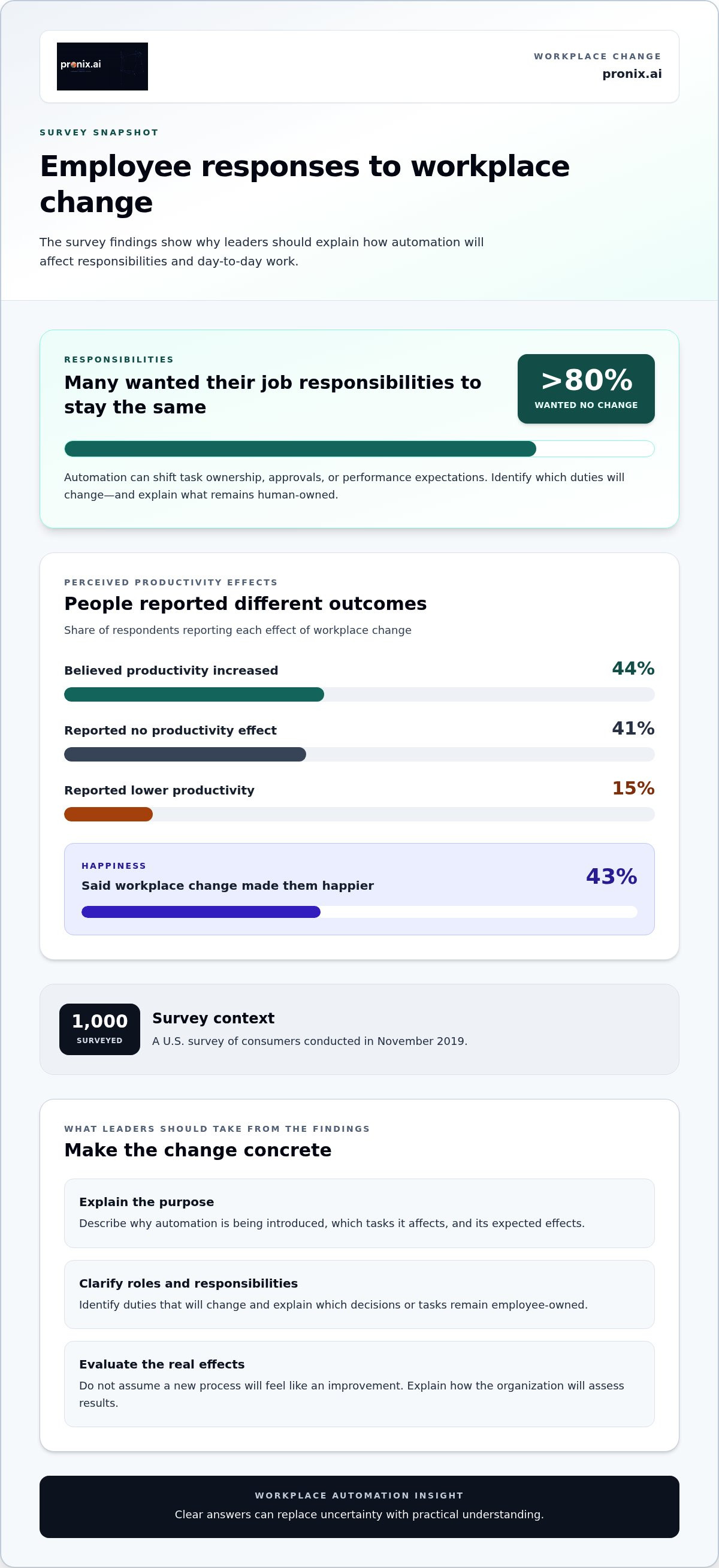
Resistance to change often reflects concern about job responsibilities, not opposition to technology itself. A U.S. survey questioned 1,000 consumers in November 2019. More than 80 percent wanted their job responsibilities to remain the same. Automation can shift task ownership, approvals, or performance expectations. Employees may interpret those changes as losing expertise or control. Identify which duties will change and explain what remains human-owned.
Perceived productivity effects also differ. In that survey, 43 percent said workplace change made them happier. Forty-four percent believed change increased productivity, while 41 percent reported no productivity effect. Another 15 percent reported lower productivity. These responses show why leaders shouldn’t assume a new process will feel like an improvement. Explain the change’s purpose, expected effects, and how the organization will evaluate results.
In the United States, review existing employment terms, workplace policies, and applicable labor agreements before changing duties, schedules, or roles. Explain the impact to affected employees and document decisions, including any revised job expectations.
A practical change-management framework connects visible leadership support with employee input, a focused pilot, and feedback-led adjustments. Leaders should explain the rationale consistently, involve affected teams in planning, and empower change champions to surface concerns and share practical guidance. For example, a team lead can gather workflow issues during a pilot and raise them with project owners.
Assess readiness through employee feedback, training participation, and questions tied to specific workflows. Ask whether employees understand the change, feel prepared to use the tools, and know where to raise concerns. Compare responses over time with operational measures such as output, downtime, and consistency. These indicators help distinguish training gaps from resistance rooted in unclear responsibilities.
Turn feedback into action through transparent communication. Use staff meetings and email to explain why automation is being introduced, which tasks it affects, and how employees can contribute. Leaders should align their messages and visibly support the change. Internal champions can connect project decisions to daily work, while regular feedback gives teams a way to flag disruption early.
2. Role-specific, scenario-based training
Training should reflect the work employees will do after automation, not just demonstrate software features. Map each affected role to its new tasks, decisions, and escalation points, then practise realistic scenarios. For example, a customer service representative can rehearse reviewing an automated response, correcting an error, and escalating an unusual request. This clarifies the handoff between people and technology before the workflow goes live.
Start with a skills assessment for each role. Identify which responsibilities are changing and what employees need to learn, such as interpreting system outputs or handling exceptions. Employees moving into new roles need additional training and access to expert guidance. Combine instruction with hands-on workshops or mentoring so they can practise unfamiliar tasks and build confidence with realistic work examples.
Use scenario-based simulations that follow the intended workflow from beginning to end. A finance employee might practise checking an automated invoice, resolving a flagged discrepancy, and recording the final decision. Include routine cases and exceptions. Ask learners to explain their choices, then give targeted feedback. This can reveal whether a knowledge gap, unclear process, or tool design is making the workflow difficult.
To compare automation costs with workforce transition and training costs, assess both against the same process and expected outcomes. Include implementation and operating expenses, along with training time, role changes, and the value of employee capacity redirected to other work.
Assurance matters alongside instruction. Explain how the tool supports each role, what employees remain responsible for, and where to get help during practice. Introduce knowledge in stages, moving from basic tasks to complex scenarios as employees demonstrate proficiency. For organizations designing new workflows and employee learning together, AI business automation can connect process implementation with the roles required to operate it.
3. Early employee involvement and transparent communication
Involve affected employees from the outset, before workflows are finalized. Managing employee resistance to automation depends on input from people who know the work firsthand. Invite frontline staff, supervisors, and process owners to workshops or pilot planning. Ask where repetitive work creates delays, where errors occur, and which decisions require human judgment. Explain how feedback will influence project decisions, then report what changed.
Use formal and informal channels together. Staff meetings and email can explain the project’s purpose, timeline, and expected effects. Team discussions, manager check-ins, and pilot debriefs give employees room to raise specific concerns. Keep leaders’ messages consistent and update them when the scope or workflow changes. For example, a project update can distinguish confirmed changes from open questions and identify who is responsible for following up.
Be specific about job effects. Explain which tasks automation will handle, which decisions employees will retain, and how exceptions will be managed. If warehouse robots take over palletizing, describe how workers’ duties may shift toward monitoring, resolving exceptions, or other operational tasks. Do not frame automation solely as a cost-cutting measure. Connect it to practical goals such as reducing repetitive work, improving safety, or supporting product quality.
Share evidence as the rollout progresses. Compare relevant before-and-after measures, such as output, errors, and consistency, then explain what the results mean for employees’ daily work. Invite pilot participants to describe what improved and what still causes friction. Employees outside the pilot can shadow participants, see the workflow in practice, and ask questions before wider adoption.
Stay engaged during the first few months after changes begin. Use surveys, focus groups, and manager conversations to gather feedback on usability, workflow impact, and unresolved problems. Assign owners to investigate concerns, communicate responses, and adjust processes where needed. This feedback loop makes managing employee resistance to automation an ongoing operational practice, not a one-time rollout task.
4. Fear of job loss and unfamiliar technology
Job security concerns can shape how employees respond to new technologies. Textile workers in the 19th century resisted knitting and textile machines partly because they feared losing jobs and the value of their craft skills. Employees today may similarly worry that automation will make their experience less useful. Treat those concerns as specific workforce risks, not as simple reluctance to adopt change.
Unfamiliar tools can add another layer of uncertainty. Employees may lack technical confidence, worry about losing control over decisions, or expect established routines to be disrupted. Negative experiences with earlier software rollouts can reinforce these fears. Relate the change to actual tasks: show which steps the technology handles, where people review its work, and how exceptions reach an employee.
Address job security concerns directly before automation begins. Explain which duties may change, what roles may be affected, and what workforce transition plans apply. Do not imply that every position is protected if that is not the decision. Clear answers and timely updates give employees a more reliable basis for understanding what the change means.
Introduce technology progressively where the workflow allows. A semi-automated process can let employees work alongside a system before it takes over more steps. For example, employees might review recommendations and resolve exceptions while learning how the system performs. This gives teams practical experience and helps identify issues before wider adoption.
Demonstrate benefits through the work itself. In a warehouse, automation can take on repetitive, heavy tasks such as palletizing or parcel handling, giving employees more scope for challenging work. In manufacturing, automated testing can free engineers to focus on product improvements rather than repetitive troubleshooting. Use relevant examples to make the proposed change tangible.
Build a clear transition plan that pairs role changes with training, employee feedback, and visible support from managers. For a structured approach to deploying automation around real business workflows, explore AI business automation.
Pronix.ai: Agentic AI Implementation
pronix.ai helps enterprises move from automation planning to implementation when workflows need to be designed for real operating conditions. Its Agentic AI Implementation and AI Business Automation services support organizations in translating business needs into deployable automation, with attention to the processes employees must use and manage.
Bring pronix.ai into the conversation when your organization has identified a suitable automation opportunity and needs to align workflows, data foundations, and implementation. Keep process ownership and employee readiness central to that work. For customer-facing operations, AI-Driven CX Modernization may also be relevant; Data & AI Foundations can address the underlying data environment.
Contact pronix.ai to discuss how its automation services can support your organization’s goals.
Turn employee trust into a foundation for change
Automation is not only a technology decision. It also shapes how people understand their work, contribute their expertise, and prepare for what comes next. Treat employee confidence as an operational consideration from the start, not a communication task added after implementation. This gives leaders a stronger basis for decisions and helps teams engage constructively with change.
Managing employee resistance to automation works best as an ongoing discipline. Keep listening as workflows evolve, clarify ownership, and use employee feedback to refine how technology supports daily operations. The next step is to connect workforce readiness with a practical implementation plan.
pronix.ai offers Agentic AI Implementation, AI Business Automation, and AI-Driven CX Modernization for enterprise transformation needs. Contact pronix.ai to discuss automation and explore an approach aligned with your organization’s goals. With a clear plan and employees included in the process, your organization can move forward with greater confidence.
Frequently Asked Questions
Why Do People Have A Resistance Against Technologies?
People resist technology when they expect disruption without a clear benefit or control. A new scheduling system, for example, may seem threatening if employees cannot see how shift decisions are made or corrected. Resistance can also reflect practical concerns about reliability and accountability. Clarify who reviews automated decisions, how employees report errors, and what they can do when the technology produces an unsuitable result.
Why do employees resist automation in the workplace?
Employees may resist workplace automation because they doubt its accuracy, worry about being judged by unfamiliar performance measures, or expect extra work during the transition. A service representative, for instance, may need to correct automated responses while still handling customer requests. Map these added tasks before rollout. Address workload, responsibility, and escalation paths so employees understand what will change in practice.
How can leaders communicate automation plans to employees?
Explain the business reason, scope, decision process, and unresolved questions in language employees can act on. A useful communication plan identifies the accountable project lead, gives staff a way to submit questions, and explains how responses will be shared. If plans change, state what changed and why. This helps prevent informal speculation from filling gaps in official updates.
What are effective ways to involve employees in automation decisions?
Invite employees who do the work to review process maps, test realistic cases, and identify exceptions before design decisions are final. Include different roles and shifts so the review reflects how work actually happens across the operation. Record each recommendation, its owner, and the decision made. This creates a traceable link between frontline input and the system’s final configuration.
How can companies retrain and reskill employees for automation?
Start with a role-based skills matrix comparing current capabilities with the tasks required by the changed workflow. Use a practice environment for common cases, then add unusual scenarios and exception handling. A supervisor or trained peer can observe practice and coach employees on specific gaps. Confirm readiness through demonstrated task performance, not course attendance alone.
What are the risks of implementing automation without employee buy-in?
Without employee buy-in, teams may avoid the new workflow, create manual workarounds, or enter information inconsistently. These behaviors can weaken process visibility and make performance results harder to interpret. A system may also miss the real bottleneck if frontline employees were not consulted. After launch, monitor workarounds, error reports, and unresolved support requests to identify adoption problems early.