

The safest cloud migration isn’t a platform swap. It’s a controlled change to how your contact center serves customers, routes work, protects data, and supports agents. For leaders migrating from on-premise contact center to cloud, the challenge is often uncovering legacy integrations, routing rules, and data dependencies that could put service continuity at risk.
That concern is justified. A rushed cutover can disrupt customer journeys, expose security gaps, or leave teams without the workflows they rely on. Reduce that risk with a phased plan, clear ownership, testable decision gates, and a rollback path established before production changes begin.
This guide explains how to build that plan, from mapping systems and defining business requirements to evaluating platforms such as Amazon Connect, Genesys, and NICE. You’ll learn how to shape a target architecture around integrations, security, compliance, and workforce needs, then set measurable acceptance criteria for each migration phase. The result is a practical path from discovery and design through cutover and ongoing operations, with technical decisions tied to customer experience and operational readiness.
Key Takeaways
- Anchor migrating from on-premise contact center to cloud to measurable business outcomes, not technology preference alone.
- Sequence discovery, design, preparation, migration, validation, and stabilization with named owners and decision gates.
- Compare platform fit, integration needs, control, scalability, and operating ownership as distinct parts of the target architecture.
- Protect service continuity with workload-based testing, rehearsed cutovers, and explicit rollback triggers.
- Connect strategy, implementation, integration, governance, and ongoing operations to prepare the cloud contact center for production.
Why migrate an on-premise contact center to the cloud, and what must improve?
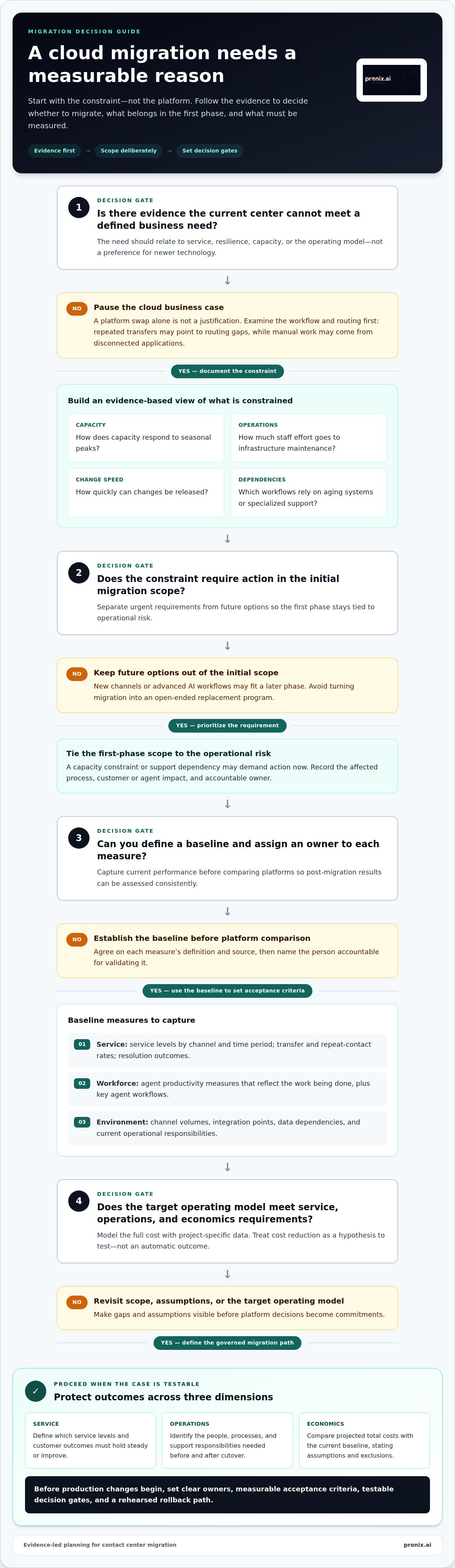
Start with the constraint, not the platform. A cloud transition is justified when evidence shows that the current contact center cannot reliably meet a defined service, resilience, capacity, or operating-model need. A preference for newer technology is not a business case. Leaders should be able to state what must improve, how they’ll measure it, and which customer or workforce outcome depends on the change.
This distinction matters because moving to the cloud can change where agents work and how systems connect, but it won’t automatically fix a confusing workflow or poorly designed routing rule. Virtual call center technology connects remote representatives with telephony and customer systems through cloud infrastructure. Whether remote operations are a priority or not, assess the operating model against actual business needs.
Which on-premise contact center constraints justify a cloud transition?
Build an evidence-based view of current constraints. Review how capacity responds to seasonal peaks, how much staff effort goes to infrastructure maintenance, how quickly changes can be released, and which workflows depend on aging systems or specialized support. Then trace customer and agent friction to specific processes. For example, repeated transfers may point to routing gaps, while manual work may stem from disconnected applications. Don’t assume the legacy platform is the root cause until you’ve examined the workflow.
Separate urgent requirements from future options. A capacity constraint or support dependency may demand action now, while new channels or advanced AI workflows may be better suited to a later phase. This keeps the initial scope tied to operational risk instead of turning migration into an open-ended replacement program.
What should the migration business case measure?
Establish a baseline before comparing platforms. Capture service levels by channel and time period, transfer and repeat-contact rates, resolution outcomes, and agent productivity measures that reflect the work being done. Document channel volumes, key agent workflows, integration points, data dependencies, and current operational responsibilities. Assign an owner to each measure so teams can validate its definition and source, then compare post-migration results consistently.
Model the full cost of the target operating model using project-specific data. Include licensing and usage, infrastructure, integrations, migration work, training, and ongoing operations. Account for transition needs such as testing and running environments in parallel where applicable. Cloud consumption, bundled capabilities, staffing, and support responsibilities can all affect the total. Treat cost reduction as a hypothesis to test, not an automatic outcome.
- Service: Define which service levels and customer outcomes must hold steady or improve.
- Operations: Identify the people, processes, and support responsibilities required before and after cutover.
- Economics: Compare projected total costs with the current baseline, stating assumptions and exclusions.
Migration succeeds when customer-service outcomes improve or hold steady while the new operating model meets defined cost, resilience, and control requirements. This standard turns migrating from on-premise contact center to cloud into a governed business decision, with evidence leaders can use to prioritize scope and set acceptance criteria.
How to plan an on-premise contact center cloud migration in phases
A phased plan turns migration from a single high-risk event into a sequence of controlled decisions. For teams migrating from on-premise contact center to cloud, sequence work according to dependencies, customer impact, risk, and readiness rather than an arbitrary calendar. Each phase needs an accountable owner, documented outputs, and a decision gate that confirms the next step is ready to begin.
Set governance before technical work starts. An executive sponsor resolves cross-functional priorities and approves major decisions. A business owner defines customer and agent requirements. Technical leads own architecture, integrations, data, and security controls. Change management prepares supervisors and agents through communications, training, and feedback. Responsibilities can be shared, but accountability for each decision must be explicit.
What belongs in discovery and target-state design?
Inventory the operating environment before selecting features or planning cutover. Record channels, queues, routing rules, phone numbers, recordings, reports, business-critical workflows, and the teams responsible for them. Map integrations and data flows to adjacent enterprise systems, including dependencies involving identity, customer records, workforce tools, and reporting. Then define target-state requirements in business terms: which workflows must be preserved, simplified, or redesigned? Platform evaluation should follow this agreed baseline, not replace it.
Use the inventory and target-state requirements to organize the work into six phases:
- 1. Discover: Validate the current-state inventory, service dependencies, owners, and risks. Resolve unknowns before they become cutover blockers.
- 2. Design: Document the target architecture, workflow changes, integration approach, security responsibilities, and acceptance measures.
- 3. Prepare: Configure environments, complete integration work, prepare data and test scenarios, and train affected teams. Confirm operational procedures and escalation paths.
- 4. Migrate: Move an approved workload or wave using a rehearsed runbook. Keep decision-makers available to respond to issues and invoke rollback criteria.
- 5. Validate: Compare results with agreed entry and exit criteria. Confirm customer journeys, agent processes, and dependent systems work as designed.
- 6. Stabilize: Monitor the new operating model, resolve defects, transfer knowledge to operational owners, and capture lessons before expanding or closing the program.
How should teams sequence migration waves?
Group workloads by complexity, customer impact, operating hours, and integration dependencies. A straightforward workflow with few dependencies may suit an early wave, while a high-volume or business-critical queue may need more preparation. Pilot representative workflows, not just the simplest case. A useful pilot tests the routing, integrations, and agent tasks that later waves will depend on, without exposing the most critical service to unproven changes.
For every wave, define entry criteria, exit criteria, and escalation triggers. Entry criteria might include completed configuration, trained users, and passed integration tests. Exit criteria should specify which service and workflow checks must pass. Escalation criteria should identify who can pause a wave, investigate a defect, or authorize rollback. Apply pilot findings to runbooks and training before expanding scope. This disciplined approach supports modernizing legacy contact centers with generative AI as part of a sequenced modernization plan, rather than adding new capabilities before operations are ready.
Compare cloud contact center approaches against enterprise requirements
Platform selection should follow target-state requirements, not lead them. Compare each option against the same operational scenarios: a routine inquiry, a complex transfer, a volume spike, and a change that affects an integrated system. This makes trade-offs visible and ties demonstrations to work the contact center actually performs.
Assess Amazon Connect, Genesys, and NICE against this framework, but don’t rank platforms without validating fit against enterprise requirements. Separate platform capabilities from the work needed to configure the platform, connect it to enterprise systems, govern it, and operate it. A strong product fit alone doesn’t establish migration readiness.
Which platform and deployment criteria should decision-makers compare?
Evaluate routing, channel coverage, workforce workflows, reporting, APIs, and required integrations against documented use cases. Involve security, identity, data, and compliance stakeholders to assess access controls, data handling, auditability, and governance. For each requirement, record whether the platform supports it natively, needs configuration, or requires integration or an operational process. Document evidence and unresolved dependencies rather than treating a roadmap promise as a current capability.
| Approach | Platform fit | Integration needs | Control model | Scalability | Operating ownership |
|---|---|---|---|---|---|
| Cloud platform with internal operations | Assess against required channels, routing, reporting, and workforce workflows. | Internal teams own design and connections to enterprise systems. | Internal teams define governance and operational controls. | Validate capacity behavior against workload and growth scenarios. | Internal teams manage releases, monitoring, incidents, and optimization. |
| Cloud platform with managed operational support | Use the same business requirements and acceptance criteria. | Define responsibility for integration changes and dependencies. | Document shared decision rights, access, and escalation paths. | Confirm how growth and service changes are planned and monitored. | Assign internal and external responsibilities in an operating model. |
| Phased hybrid transition | Check that requirements work across the target and remaining environments. | Map interim connections, data flows, and dependencies. | Set consistent controls across both environments. | Plan capacity across workloads during transition. | Coordinate ownership until workloads are fully transitioned. |
How should cloud operating models affect the decision?
Decide who owns release management, incident response, observability, integration maintenance, access reviews, and ongoing optimization. These responsibilities may sit with internal teams, a delivery partner, or a shared operating model. Name an accountable owner for each function and define how issues move from detection to resolution. This prevents gaps between implementation handoff and day-to-day operations.
Use a weighted decision matrix to compare options. Give more weight to the needs that matter most, such as integration complexity, governance, operational control, or the ability to support planned service changes. Score each option against documented evidence, then test leading candidates against representative workflows. This requirements-led approach supports AI-driven CX modernization for enterprises without assuming one architecture fits every organization.
Control migration risk with testing, cutover, and rollback criteria
Service continuity depends on rehearsed controls, accountable owners, and rollback triggers agreed before production changes begin. For enterprises migrating from on-premise contact center to cloud, a successful test is more than a green status in a project tracker. It’s evidence that real customer and agent workflows function, dependencies behave as expected, and teams know how to respond when something fails.
Build the test plan around actual workloads and approved requirements. Include functional, integration, load, security, accessibility, and user-acceptance testing. Define expected results in advance, record defects with owners, and make unresolved issues visible to the people authorized to approve or pause the transition.
How can teams validate service readiness before cutover?
Test representative interactions end to end, including queue entry, routing, transfers, recordings, and reporting. Exercise integrations with the systems agents rely on, then validate identity permissions and data handling against approved controls. Include failure scenarios, such as an unavailable integration or an unexpected routing outcome, so teams can verify escalation and recovery procedures. Accessibility checks and agent acceptance sessions can expose friction that technical tests alone may miss.
Rehearse the cutover with the people who will execute it. Confirm staffing, communications, escalation contacts, and decision authority under realistic conditions. Record test evidence and open risks in a readiness log. The accountable business owner should understand any remaining limitations before approving the next gate.
Migration acceptance requires verified workflows, functioning integrations, and operational readiness, not just a completed platform deployment.
What should a controlled cutover and rollback plan include?
Document the cutover window, sequence of changes, checkpoints, dependencies, and named decision owners. Set rollback triggers before the event. Examples include service levels crossing an agreed threshold, queue behavior diverging from expected patterns, critical integrations failing, or customer impact exceeding the organization’s tolerance. Specify who can call a pause or rollback, how the decision is communicated, and which steps restore the prior service path.
During stabilization, monitor service levels, queue behavior, errors, and agent feedback against the established baseline. Review these signals at defined checkpoints and route issues to owners with authority to act. Don’t expand a migration wave until exit criteria are met and unresolved risks have a documented disposition. Once service is stable, teams can prioritize optimization separately, including opportunities to apply agentic AI to appropriate workflows.
- Before cutover: Approve test evidence, readiness status, runbooks, communications, and rollback authority.
- During cutover: Track checkpoints, customer-impact thresholds, escalations, and go or no-go decisions.
- After cutover: Monitor service and agent signals until stabilization criteria are satisfied.
For an overview of enterprise contact center modernization and related services, visit pronix.ai.
Move from migration planning to a production-ready cloud contact center
A production-ready transition connects five decisions: define business outcomes, map dependencies, compare platform and operating approaches, control the transition, and establish ongoing operations. This sequence keeps technology choices tied to enterprise requirements. It also makes clear that migrating from on-premise contact center to cloud is not complete at cutover. The new environment needs accountable owners, operating procedures, and measures that show whether service performs as intended.
pronix.ai connects strategy, implementation, integration, governance, and managed services across the modernization lifecycle. Strategy translates business requirements into a target architecture and sequenced work. Implementation and integration connect the selected platform to enterprise workflows. Governance establishes decision rights and controls, while managed services support ongoing operations and optimization. Work involving Amazon Connect, Genesys, or NICE is shaped around the organization’s requirements rather than a one-size-fits-all template.
- Define outcomes: Confirm service, workforce, resilience, and operating objectives, with baseline measures for evaluation.
- Map dependencies: Document workflows, integrations, data flows, owners, and constraints that affect scope.
- Compare approaches: Assess platform fit and operating responsibilities against enterprise requirements.
- Control transition: Use evidence-based readiness decisions, rehearsed cutovers, and agreed escalation paths.
- Operate: Monitor service, govern changes, and assign responsibility for ongoing support and improvement.
This lifecycle also connects migration decisions to broader AI-driven CX modernization. AI capabilities should follow business priorities, data readiness, workflow design, and governance requirements. Treat them as part of the operating model, not features to add without a defined use case or accountable owner.
How does pronix.ai support enterprise CX modernization?
pronix.ai brings enterprise strategy and delivery workstreams together, linking target architecture with technical integration and operational readiness. Its contact center modernization work includes Amazon Connect, Genesys, and NICE, with platform decisions grounded in project-specific workflows and requirements. This connected approach carries governance and ownership from planning through implementation and ongoing operations.
What should the first migration planning session establish?
Bring business, operations, technology, security, and workforce stakeholders together to agree on desired outcomes, baseline measures, scope, known dependencies, and decision ownership. Select initial workflows for assessment based on business impact and readiness. Define the evidence needed to approve each migration wave, such as validated integrations, completed testing, and operational sign-off. These decisions give teams a practical starting point without committing to an unsupported schedule.
For enterprise teams ready to define their next steps, discuss a tailored contact center migration and modernization plan with pronix.ai.
Make the next move with a clear operating vision
The strongest migration plan creates more than a new technical environment. It gives leaders a practical way to evolve customer and agent experiences while keeping accountability, governance, and service performance visible. Before migrating from on-premise contact center to cloud, decide what the organization should be able to do differently after the transition, and how teams will sustain that progress in production.
That vision can guide decisions beyond the initial migration. It can help prioritize workflow improvements, identify where automation may add value, and keep future changes aligned with business needs rather than isolated technology choices. Bring the right stakeholders together around shared outcomes, dependencies, and decision rights to define a useful first step.
Plan your enterprise contact center migration with pronix.ai and turn your modernization priorities into a structured path forward. With clear direction and disciplined execution, your team can move toward a cloud contact center built to support what comes next.
Frequently Asked Questions
How long does it take to migrate an on-premise contact center to the cloud?
There’s no reliable universal timeline. Duration depends on scope, integration complexity, data readiness, governance approvals, and migration-wave design. A center with documented workflows and well-understood dependencies can plan more confidently than one with undocumented routing or tightly coupled systems. Estimate each phase separately, including discovery, configuration, testing, training, cutover, and stabilization. Treat the estimate as a planning model and revise it as teams resolve unknowns.
Can a contact center migrate to the cloud without downtime?
A migration plan can aim to avoid customer-facing downtime, but zero interruption shouldn’t be assumed or promised. Continuity depends on the transition design, tested routing and telephony changes, and available fallback paths. For example, teams may keep the existing environment available while validating a new workflow, then redirect traffic only after defined checks pass. Identify services that are especially sensitive to interruption and set acceptable impact thresholds before cutover.
What should be migrated first in a contact center cloud transition?
Start with a workload that is low enough in risk to control, yet representative enough to test real dependencies. A smaller queue with a clear business owner and known integrations may provide useful evidence before a complex, high-impact service moves. Consider customer impact, operating patterns, data requirements, and the effort to reverse a change. Avoid choosing a pilot solely because it appears technically simple; it should teach the team something useful about later waves.
How do you choose a cloud contact center platform?
Choose by testing documented enterprise workflows against platform fit, integration requirements, governance, and operating ownership. Compare Amazon Connect, Genesys, and NICE against the same scenarios, such as how a customer is routed, how an agent accesses relevant information, and how teams report on interactions. Identify which requirements need configuration or integration work. A structured evaluation keeps demonstrations focused on operational evidence rather than feature volume or platform preference.
What are the biggest risks when migrating a contact center to the cloud?
Common project risks include overlooked system dependencies, routing differences, integration failures, access-control gaps, and insufficient agent preparation. These issues can surface even when the core platform is available. Maintain a dependency register with an owner and test evidence for each critical connection. Also plan for operational risks, such as unclear escalation authority or teams relying on outdated procedures. Addressing these risks early makes cutover decisions more controlled and auditable.
How do enterprises measure whether a cloud contact center migration succeeded?
Compare post-migration results with a documented baseline, using consistent definitions and reporting periods. Track service performance alongside customer and workforce indicators, then segment results by channel, queue, or workflow to identify where changes helped or introduced friction. Review exceptions as well as averages. Stable overall service, for example, can hide a transfer problem in one queue. Assign owners to investigate deviations and decide whether corrective action or further optimization is needed.
Can an enterprise migrate in phases while keeping its existing contact center running?
Yes. Phased coexistence is possible when teams deliberately manage how work moves between the existing and cloud environments. Define how calls or interactions are routed, which system owns each workflow, and how agents access the information they need during the transition. Also account for synchronization, support responsibilities, and testing across both environments. Set an exit condition for each coexistence period so temporary arrangements don’t become an unmanaged long-term operating model.